Website Redesign: Signs, Steps and How to Keep Your SEO
Did you recognize that bad web design can hurt conversions and sales? An unattractive site deserves a redesign of the website. Find out in this article how can Inkyy help you with that.
 6 min read
A website redesign is worth doing when the site no longer helps the business: it is slow, hard to use on a phone, out of step with the brand or simply not bringing in enquiries. Done well, it fixes those problems. Done badly, it can wipe out years of search traffic.
This guide shows the signs that you need a redesign, a step-by-step process to follow and how to keep your SEO safe with redirects and careful URL planning. It is written for business owners and for agencies who manage redesigns for clients.
What is a website redesign?
A website redesign changes how a site looks, works or is organised so that it meets a clear goal, such as more sales, more leads or easier updates. It can be a visual refresh, a new structure and navigation, a move to a new platform or all three.
Every site has two parts. The back end is the code, hosting and content system that run it. The front end is what visitors see and use. A redesign changes one or both. Work out which part is failing before you spend money, because a content fix, a speed fix and a full rebuild are very different projects.
Signs you need a website redesign
- It does not work well on a phone. Tiny text, buttons that are hard to tap or pages that need sideways scrolling lose visitors fast.
- It is slow. Heavy images, old code and cheap hosting all show up in Google’s Core Web Vitals reports.
- The business has changed. New services, a new audience or a new brand make an old site misleading.
- Visitors leave and enquiries fall. Your analytics show that people land, then go, or never reach the contact page.
- Nobody can edit it. If every text change needs a developer, the site will go out of date.
- Navigation is confusing. People cannot find key pages in a couple of clicks. See our guide to website navigation.
- The platform is outdated. Unsupported software and plugins are a security risk.
- It looks dated. A site that looks neglected makes people doubt the business behind it.
Be honest about your reason. “It has been a while” or “a competitor just redesigned” are not goals. If a few pages are weak, improving those may be enough. Our post on reasons for redesigning your website covers more cases.
Redesign, refresh or rebuild?
- Refresh. Update colours, fonts, images and copy on the current structure. It is quick and low risk.
- Redesign. Change the layout, navigation and page structure, usually on the same platform.
- Rebuild. Move to a new platform or code base, often together with a redesign. It takes the most effort and carries the most SEO risk, so it needs the full redirect plan below.
Pick the smallest option that solves the problem. Involve the people who talk to customers, such as sales and support, as well as marketing and the owner. They know what visitors ask for, and what stops them from buying.
Website redesign process: step by step
Follow these steps in order. Each one reduces the risk of the next, and the last ones protect the search traffic you already have.
1. Set goals you can measure
Write down why you are redesigning and how you will know it worked. Examples: more contact form submissions, a lower bounce rate on key pages, faster load times, more sign-ups. Tie every decision back to those numbers.
2. Audit the current site
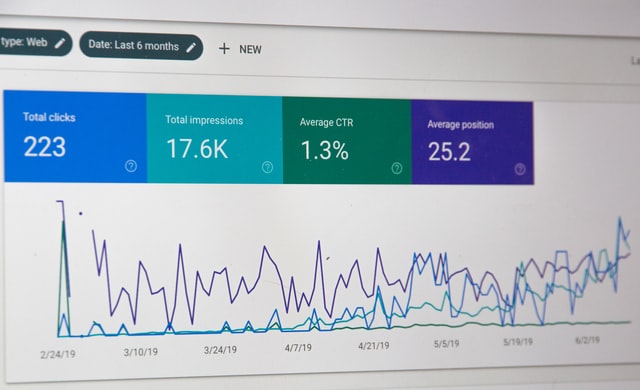
Find out what works before you change it. Use your analytics and Google Search Console to list your most visited pages, the pages that bring in leads and the queries that send traffic. Crawl the site to export every URL, title and heading, and note which pages have backlinks.
3. Understand your visitors
Map the journey from first visit to customer. Which pages do people read, what questions do they have and what makes them act? Talk to customers and sales staff. A redesign that follows this journey helps nurture visitors towards an enquiry.
4. Check your competitors
Look at the leading sites in your market, as if you were a customer. What do they explain better? Where are they slower or harder to use? Note the gaps you can fill, but do not copy them. Our web design process guide shows where this research fits.
5. Plan the structure and content
Decide which pages to keep, merge, rewrite or remove. Draw a sitemap and make wireframes before any visual design. Keep pages that earn traffic and links, and improve them rather than deleting them.
6. Design for the goal
Now design the look and feel. Use visual hierarchy to guide the eye and place calls to action where people expect them: in the header, after key sections and at the bottom of long pages. Make it easy to act, so nobody has to hunt for the next step.

Design for mobile from the start. A responsive layout adapts to every screen size, and the desktop and mobile versions should feel like the same site.
7. Build and move the content
Build on a staging site that search engines cannot see. Move and rewrite content, set up forms and tracking, and check that titles, headings and image alt text carry over. Choose a platform your team can edit without a developer.
8. Test everything
Test in the main browsers and on real phones and tablets. Submit every form, click every button and check the speed. Test keyboard use and colour contrast for accessibility. Check that every redirect works.
9. Launch and monitor
Launch at a quiet time and have someone ready to fix problems. Then watch Search Console, analytics and your forms for several weeks. Compare the numbers with the goals you set in step one and fix what is not working.
How to keep your SEO during a redesign
Redesigns lose search traffic when old URLs stop working or good content disappears. These habits prevent that:
- Keep your URLs where you can. If a page keeps its address, there is nothing to redirect. Change a URL only when there is a good reason.
- Redirect every changed or removed URL. Send each old address to the most relevant new page with a permanent 301 redirect, never to the home page by default. Google explains how in its guides to 301 redirects and site moves with URL changes.
- Keep what ranks. Carry over the titles, headings and main text of pages that bring traffic, and improve them, rather than rewriting from scratch.
- Map redirects before launch. Use your crawl from step two as a spreadsheet: old URL, new URL, status. Test the redirects on staging.
- Keep staging out of search. Block the staging site while you build, then remove the block when you launch. Forgetting this is a common cause of traffic loss.
- Update internal links and the sitemap. Link straight to final URLs, avoid redirect chains and submit the new XML sitemap in Search Console.
- Watch after launch. Check Search Console for crawl errors and drops in clicks. A small dip can happen, but a long one means something is wrong. Our web design tips for SEO explain what else to check.
Avoid the usual traps too. Our list of web design mistakes is a good checklist before you sign off.
Frequently asked questions
How long does a website redesign take?
A small site can take a few weeks. A larger site with new content, custom features or a platform change can take several months. Content and approvals cause most delays, so agree dates early.
Will a redesign hurt my SEO?
It can if URLs change without redirects, content is deleted or the new site is slow or blocked from search engines. With a redirect plan and testing, rankings should hold and often improve.
How often should I redesign my website?
There is no fixed schedule. Redesign when your goals, brand or technology change, and make small improvements in between based on data.
What is the difference between a redesign and a refresh?
A refresh updates visuals, such as colours, fonts and images, on the existing structure. A redesign can change the structure, content, navigation and platform as well.
Planning a website redesign for a client?
Inkyy is a white label design and development team for agencies. We handle the design, the build and the migration, including redirects, and you deliver the result under your own brand. See our design services and development services, or book a 15-minute call.