Plumbing Website Design: A Checklist to Win More Calls
Find out in this brand new article from Inkyy Blog team how can we help your plumbing business web design, and what is important to focus on when designing a business website.
 6 min read

Plumbing website design has one job: turn a worried person with a leak into a phone call. People who search for a plumber are usually in a hurry, often on a phone, and they pick the first business that looks local, trustworthy and easy to reach.
This guide gives you a practical checklist for a plumbing website, from the first screen and the click-to-call button to service pages, reviews, local search and speed. It also covers the pages you need and the mistakes that cost plumbers jobs.
What a plumbing website has to do
A plumbing site is not a brochure. It answers three questions in a few seconds: do you cover my area, can you help with my problem, and how do I reach you now? If a visitor cannot answer those from the first screen, they go back to the search results and call the next name.
That is why the design is simple on purpose. Clear headlines, a phone number that never disappears, proof that you are real and a short path to a quote. Nice photography and a good logo help, but they come second. The same logic applies to other trades, so our guide to electrical business web design and our advice on web design for tradesmen will look familiar.
Plumbing website design checklist
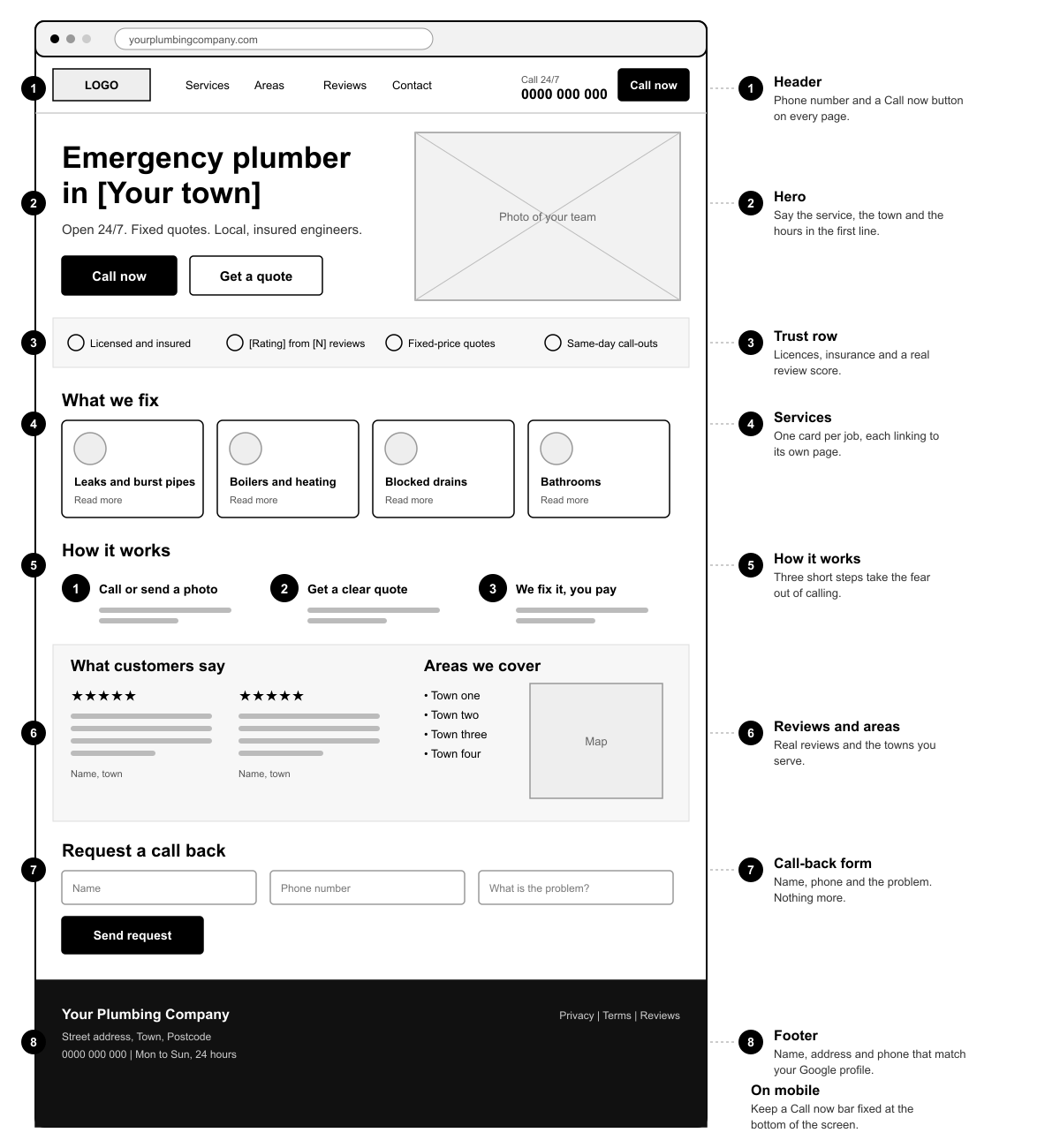
Use this list when you plan a new site or review an old one. The wireframe shows where each part sits on a homepage.
The first screen
- Say what you do and where. “Emergency plumber in [town]” beats “Welcome to our website”. Add your hours if you offer out-of-hours work.
- Put the phone number in the header. Make it a tap-to-call link so one tap on a phone starts the call, and keep a Call now button visible as people scroll.
- Offer a second route. Some visitors will not call. A short “Get a quote” or “Request a call back” form catches them.
Trust
- Show who you are. A real photo of you or your team, your name and your area do more than stock images of smiling workers.
- List licences, insurance and memberships. Only claim what you hold, and link to the register where one exists.
- Show real reviews. Quote customers with their first name and town, and link to your Google reviews so people can check them.
Services and areas
- One page per main service. Boiler repair, leaks, blocked drains and bathroom fitting each deserve their own page with plain language, photos of real jobs and a clear next step.
- One page per area you serve. A short, honest page for each town works better than a long list of place names in the footer.
- Explain how pricing works. You do not need a price list, but “fixed quote before we start” or “free estimates” calms nerves.
Contact and booking
- Keep forms short. Name, phone number and a line about the problem is enough. Every extra field loses someone.
- Show your address, phone and hours in the footer. They should match your Google Business Profile exactly.
Speed and mobile
- Design for the phone first. Check that buttons are easy to hit with a thumb, text is readable and nothing covers the call button. Our notes on website navigation help here.
- Keep pages light. Resize and compress photos, avoid auto-playing video and test with Google’s Core Web Vitals measures.
Write for people in a hurry
Use short sentences and plain words. Lead with the visitor’s problem, such as “Burst pipe? Call now”, and skip phrases like “comprehensive plumbing solutions”. Describe each service as a simple sequence: you call, we arrive, we give a quote, we fix it.
Add a few questions to each service page, for example how fast you can come out, whether you charge a call-out fee and which brands of boiler you work on. Answer with your own policy, and update opening hours and emergency details the day they change. Wrong information on a plumbing site costs you the call and the review.
Pages a plumbing website needs
- Home. The summary of everything above.
- Service pages. One per main job.
- Area pages. One per town or district you cover.
- About. Who you are, how long you have worked locally and what you hold.
- Reviews or case studies. Short write-ups of real jobs, with before and after photos.
- Contact. Phone, form, address, hours and a map.
- FAQ or blog. Answers to questions customers ask, such as “what to do if a pipe bursts”.

Photos matter. Use pictures of your own vans, your team and your finished work wherever you can. Stock photos like the tap above are fine for background, but they are no proof that you exist.
Local SEO for plumbers
Most plumbing jobs come from local searches, so the site and your Google Business Profile have to work together. Claim and complete your Business Profile, and keep your name, address and phone number the same everywhere. Write your service and area pages for real searches such as “blocked drain in [town]”, and add LocalBusiness structured data (schema.org also has a Plumber type) so search engines understand what you do.
Search optimisation takes steady work, and many plumbers hand it to a specialist such as VM Digital. For a step-by-step view of marketing, including reviews, ads and local listings, read our guide to internet marketing for plumbers. Our web design tips for SEO cover the technical side.
Common plumbing website mistakes
- A phone number that is hidden in a menu or only in the footer.
- Only stock photos, with no real people, vans or jobs.
- Vague headlines and no mention of the town or area.
- A slow site loaded with huge images and sliders.
- Old reviews, old prices or a “latest news” page that stopped years ago.
- Pop-ups that cover the content or the call button on a phone.
For more on this, see 9 mistakes you should avoid in web design.
How we approach a plumbing website
At Inkyy we work in three steps. First we set the goals: more calls, more quote requests, or more jobs in a certain area. Then we agree the functions, such as click-to-call, a quote form, service and area pages, reviews and booking. Finally we design and build the site around those goals, with all the pages you need.
Inkyy is an in-house studio of web and graphic designers and developers. We work with agencies that look after tradespeople and local businesses, and we build the site under your brand.
Frequently asked questions
What pages does a plumbing website need?
A home page, a page for each main service, a page for each area you cover, an About page, reviews or case studies, and a contact page. A short FAQ or blog helps with search.
Do plumbers still need a website if they have a Google Business Profile?
Yes. The profile helps people find you, but your site is where you explain services, show proof and control the message. The two should match and link to each other.
How can a plumbing website get more calls?
Put a tap-to-call number in the header, say the service and town in the headline, show real reviews and keep the site fast on a phone. Then keep your Google profile and local pages up to date.
Should a plumber show prices on the website?
You do not have to list every price, but give customers an idea of how pricing works. Phrases such as “fixed quote before we start” or “free estimates” help people feel safe to call.
Need a plumbing website for a client?
Inkyy is a white label design and development team for agencies. We design and build websites for plumbers and other trades, with click-to-call, quote forms and local pages, and you deliver them under your own brand. See our design services and development services, or book a 15-minute call.