



Web Design Laws: Legal Rules and UX Laws Explained
In this new article from Inkyy Blog team you can find out which great web design laws you should follow in 2021.
 7 min read
Web design laws mean two different things, and a good designer needs to know both. The first are legal rules that decide what your website must do, such as being accessible, respecting privacy and using only content you have the right to use. The second are UX laws, tested ideas from psychology that explain why some designs are easier to use than others.
This guide covers both. You will get the main legal requirements for websites in the US, EU and UK, with official sources, then five UX laws you can apply to any layout. The legal part is general information, not legal advice.
Web design laws: the legal side
Not legal advice. Laws differ by country, state and type of business, and they change. Use this section as a checklist of topics to raise with a qualified lawyer, not as a final answer.
Accessibility laws
Most accessibility rules point to the same technical benchmark, the Web Content Accessibility Guidelines (WCAG), usually version 2.1 or 2.2 at level AA. In practice that means enough colour contrast, text alternatives for images, keyboard access, clear form labels and a logical page structure. Read more about WCAG to see what each level covers.
- United States, ADA. The US Department of Justice says the Americans with Disabilities Act applies to the websites of businesses open to the public, but it does not set one technical standard for them. See the DOJ web guidance. For state and local governments, a 2024 rule requires WCAG 2.1 AA. A 2026 interim final rule moved the deadlines to 26 April 2027 for entities serving 50,000 people or more, and 26 April 2028 for smaller ones.
- United States, Section 508. Federal agencies and their suppliers must make digital content accessible. The official Section508.gov site has the details.
- European Union, European Accessibility Act. Directive (EU) 2019/882 applies from 28 June 2025 and lists e-commerce among the covered services, as the European Commission page explains. Some exemptions exist, for example for certain micro-enterprises that provide services, and each country has its own national law, so check the rules where you sell.
- United Kingdom. The Equality Act 2010 requires service providers to make reasonable adjustments for disabled people. Public sector sites must also meet WCAG 2.2 AA and publish an accessibility statement, see the GOV.UK guidance.
Privacy and cookie laws
If your site collects personal data, even through a contact form or analytics, privacy law applies. The main rules to know are these.
- GDPR (EU and UK). The General Data Protection Regulation (Regulation 2016/679) requires a lawful reason to collect personal data, a clear privacy policy and ways for people to access or delete their data. The full text is on gdpr-info.eu, and the European Commission has a plain-language page on data protection. The UK has its own version, UK GDPR, with similar rules.
- Cookie consent. In the EU and UK, non-essential cookies such as advertising and some analytics cookies need consent before they are set. A banner with a clear reject option and honest wording is the usual approach. GDPR.eu explains cookie rules in simple terms.
- CCPA and CPRA (California). These laws give California residents the right to know what data a business collects and to opt out of its sale or sharing. They apply to larger businesses and those that handle a lot of personal data. The California Attorney General keeps an official CCPA page with the thresholds.
Copyright and licensing
Copyright in an image, text, font or piece of code exists from the moment it is created, and using it without permission can lead to takedown notices or claims. The US Copyright Office and GOV.UK both explain the basics, and the US DMCA page covers takedown requests.
- Use images and icons you have bought, made or that carry a licence that allows your use. Keep a record of the licence.
- Check that web fonts and plugins are licensed for the site and for client work.
- Follow the terms of open licences such as Creative Commons, including credit where they ask for it.
- Do not copy text or layouts from other sites.
What this means for a project
Build these checks into every project instead of adding them at the end: run an accessibility audit, set up consent for cookies, publish a privacy policy that matches what the site really does, and keep licences on file. A site that does this is also easier to use, which is the point of the next section. Our guide to web design mistakes lists related problems to avoid.
Web design laws: the UX laws
These are not legal duties. They are well-known principles from psychology, economics and philosophy that explain how people use interfaces. Many of them are collected on Laws of UX.
1. Hick’s law
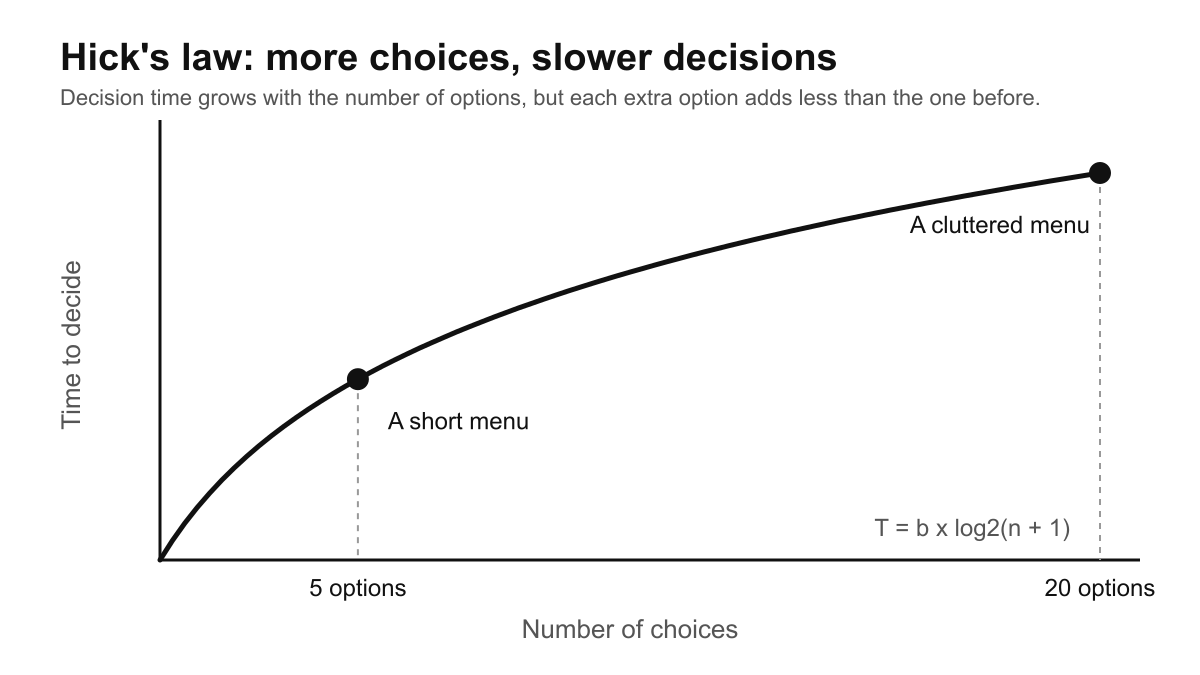
Hick’s law says that the time it takes to decide grows with the number and complexity of the choices. More options mean slower decisions. The effect is real but the increase flattens out, which is why a clear short menu works better than a long one. Read the short summary on Laws of UX.
Use it: limit main navigation items, group long lists and highlight one recommended option in pricing tables.
2. Fitts’s law
Fitts’s law says the time to reach a target depends on its distance and its size. Large, close targets are quick to hit and small, distant ones are slow. See the Fitts’s law summary. It matters most on touch screens.
Use it: make buttons large enough to tap, leave space between them and put the main action near where the user is already looking.
3. Gestalt laws
Gestalt psychology, developed in the early 20th century, describes how people see patterns before details. The main laws are proximity, similarity, closure, continuity, common region and symmetry. Visitors see groups first and read the parts after. Our post on Gestalt theory in design goes through each one.
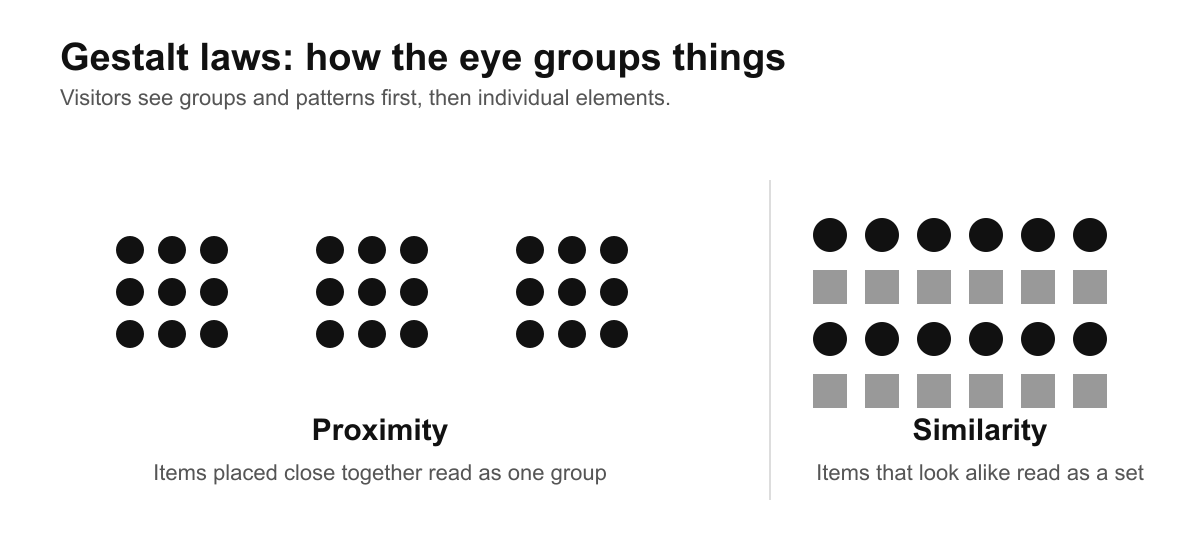
Use it: put related items close together, style related items alike and use more space between unrelated groups. See the law of proximity and the law of similarity.
4. Rule of thirds
The rule of thirds is a guideline from photography, not a law. You divide an image into nine equal parts with two vertical and two horizontal lines and place key elements on the lines or their crossings. It gives hero images and banners a more natural balance than a centred subject. The idea is closely related to grid-based layouts.

Use it: crop hero photos so the subject sits on a third, and leave empty space for headline text.
5. Occam’s razor
Occam’s razor is a principle attributed to the 14th-century philosopher William of Ockham: when two solutions explain the same thing, prefer the simpler one. In design it means not adding features, effects or steps that the user does not need. You can read more about the principle.
Use it: before you add a new element, ask what the user loses if it is not there. If the answer is nothing, leave it out.
How to apply web design laws in a project
- Start with the rules you must follow. List the accessibility, privacy and licensing requirements for the countries your client sells in.
- Design with the UX laws. Simplify choices, size targets for touch and group related content.
- Test. Run an accessibility check, try the site with a keyboard and watch a real person use it.
- Document. Keep licences, consent settings and the privacy policy in the project file, and review them when the site changes.
Related reading: web design principles, 5 rules of web design, visual hierarchy, IT security in the design process and our design services.
Frequently asked questions
What are web design laws?
The term covers legal requirements for websites, such as accessibility, privacy, cookie consent and copyright, and also UX laws such as Hick’s law and Fitts’s law that guide usable design.
Does my website have to be accessible?
In many places, yes. Public sector sites face specific rules, and the European Accessibility Act covers e-commerce and other services in the EU. In the US, the Department of Justice treats websites of businesses open to the public as covered by the ADA. WCAG 2.1 or 2.2 AA is the usual target. Check your own situation with a lawyer.
Do I need a cookie banner?
If you use non-essential cookies, such as advertising or some analytics cookies, and you have visitors in the EU or UK, you generally need consent before setting them. A site that uses only essential cookies may not need one.
Can I use any image I find online?
No. Most images are protected by copyright. Use images you own, have licensed, or that carry a licence allowing your use, and keep a record of it.
Are UX laws real laws?
No. They are named principles, not rules enforced by anyone. They are useful because they are based on research into how people see, decide and move.
Need an accessible, compliant website for a client?
Inkyy is a white label design and development team for agencies. Our in-house designers and developers build websites with accessibility and privacy in mind, delivered under your brand. See our design services or book a 15-minute call.


