



SaaS Website Design Agency: What Your SaaS Site Needs
How can Inkyy Design Studio help with your SaaS website, what does SaaS mean and represent, and how will we make your website better, are few things you will find out in the new article of our blog team.
 1 min read

A SaaS website design agency does more than make a product page look neat. A software-as-a-service site has to explain an invisible product in seconds, build trust with strangers and move them towards a trial, demo or sign-up. If it does not, even a great product struggles to grow.
This article explains what SaaS is, what a SaaS website needs, the mistakes that cost sign-ups and what to look for when you hire a SaaS website design agency. It is written for founders and for agencies who build SaaS sites for clients.
What is SaaS?
Software as a Service (SaaS) means you use software through a browser on a subscription instead of buying and installing it. The vendor hosts the servers, databases and code, handles updates and fixes problems. Customers only need a device and an internet connection.
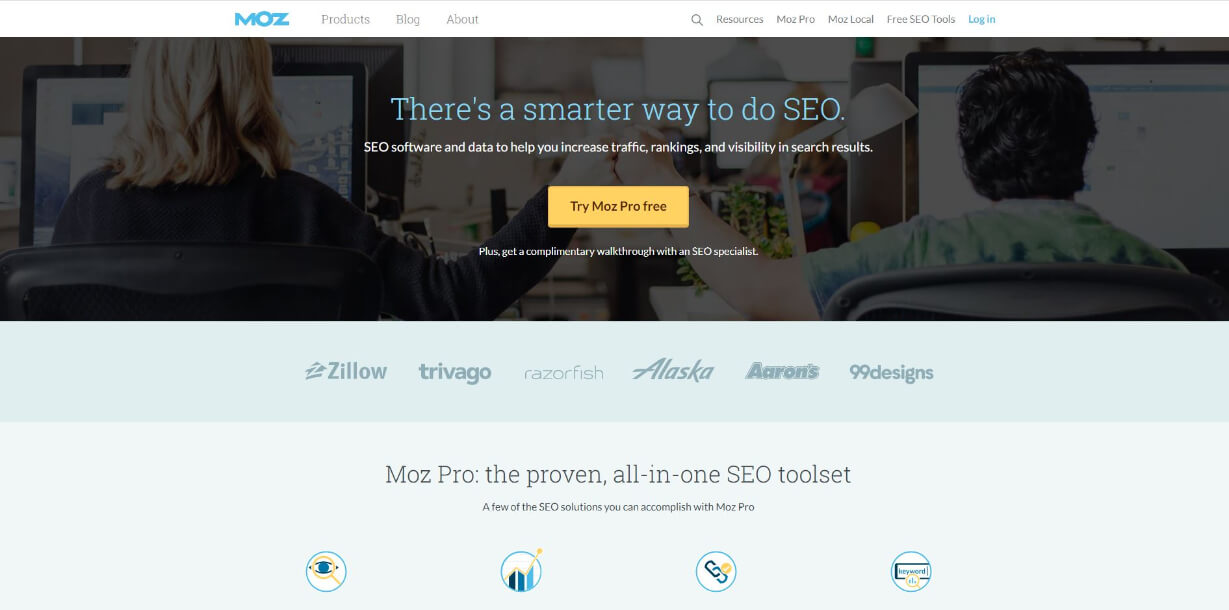
Moz is a well-known SaaS product: you log in, use the tools in your browser and pay a subscription. The screenshot above was taken when this article was first written, so the live homepage may look different today.
Why companies choose SaaS
The model has clear advantages, and your website should speak to the ones that matter to your buyers.
- Faster to start. The software is already installed and configured, so a team can be using it within hours rather than weeks.
- No hardware or maintenance. Customers do not buy servers or manage upgrades.
- Lower upfront cost. A monthly fee is easier for small and mid-sized companies than a large licence payment.
- Access anywhere. A browser and a connection are enough on most devices.
- Automatic updates. Everyone gets new features at the same time.
- Easy to scale. Customers can add or remove seats as their needs change.
There are trade-offs too. Customers hand their data to a vendor, they depend on that vendor staying in business, and subscriptions add up over time. A good SaaS website answers these worries openly instead of ignoring them.
Why a good SaaS website matters
Almost every SaaS category is crowded. Buyers compare three or four tools in separate tabs and often decide from the website alone. That makes your site the product’s first demo.

A strong SaaS site makes the value clear in one sentence, shows the product working and gives the visitor one obvious next step. Beauty helps, but conversion is the real measure: how many visitors become trials, demos or customers.
What a SaaS website needs
- A one-line value proposition. Say who the product is for and what it does for them. “Project management for small design teams” beats “The future of work”.
- Product visuals. Real screenshots or a short demo video show the product better than abstract illustration.
- One primary call to action. “Start free trial” or “Book a demo”, repeated in the header, hero and after key sections.
- Social proof. Customer logos, short quotes and case studies, used only with permission.
- A pricing page. Visitors look for it first. Show plans, what each includes and a plain answer to “what happens after the trial”.
- Features explained by outcome. Lead with what the customer can do, then how the feature works.
- Trust information. Security, privacy and uptime details, plus a link to your terms and data policy.
- Integrations. A page listing the tools you connect with helps buyers who need to fit you into an existing stack.
- Speed and mobile performance. Slow pages lose people before they see anything. Google’s guide to Core Web Vitals explains what to measure.
For layout ideas, see our collection of the best SaaS website designs and our notes on landing pages and product pages. You can also start from the free SaaS Figma template kit we published.
How to structure a SaaS home page
A reliable order for the home page is: headline and call to action, product visual, customer logos, three or four key benefits, a short walkthrough of how it works, testimonials, pricing summary and a final call to action. Each block answers the next question a visitor is likely to have.
Keep each section short and give it one job. If a section does not help the visitor decide, move it to a deeper page. Long pages are fine when they stay scannable, with clear headings and generous spacing.
Measure and improve after launch
A SaaS site is never finished. Track the share of visitors who start a trial or book a demo, where they drop off and which pages they read before signing up. Then change one thing at a time, such as the headline, the button text or the pricing layout, and compare results. Even a few small tests will teach you more than a redesign driven by opinion.
Common SaaS website mistakes
- Jargon in the headline. If a stranger cannot repeat what you do, rewrite it.
- Too many calls to action. Trial, demo, newsletter and contact sales on one screen split attention. Pick one.
- No pricing or a vague “contact us”. Even a range builds trust.
- Stock photos instead of the product. Visitors want to see the interface.
- Heavy animation. It can slow the page and hide the message. Our 5 rules of web design cover keeping things simple.
- Confusing navigation. Keep the main menu short and see our tips on website navigation.
What to look for in a SaaS website design agency
Not every web design agency understands subscriptions and product-led growth. Ask these questions before you hire one:
- Have they designed for software products before, and can they show conversion goals, not just screenshots?
- Do they plan the page structure and messaging first, then design?
- Can they build the site or work with your developers, so the design survives the handover?
- Do they use a design system or reusable components, so new pages are quick to add?
- Do they set up analytics and tests so you can improve the site after launch?
Our guide on how to choose a web design agency goes deeper, and the basic principles of web design help you judge the work you are shown.
Frequently asked questions
What is a SaaS website?
It is the marketing site for a software-as-a-service product. It explains the product, shows pricing and sends visitors to a trial, demo or sign-up. It is separate from the app itself.
Which pages does a SaaS website need?
At least a home page, product or features pages, pricing, customer stories, about, a contact or demo page and legal pages. Many also add integrations, a blog, documentation and a security page.
Why hire a SaaS website design agency instead of using a template?
A template is fine for a first version. An agency helps when you need a clear message, a custom layout, a design system for many pages and a site built to convert.
How long does it take to design a SaaS website?
A focused marketing site often takes several weeks, depending on the number of pages, how clear your messaging is and how fast feedback arrives. Rushing the messaging stage usually costs more time later.
Need a SaaS website for a client?
Inkyy is a white label design and development team for agencies. We design and build SaaS marketing sites and landing pages that you deliver under your own brand. See our design services, explore our development services or book a 15-minute call.


