



Bouncer: Free Ecommerce App UI Kit for Adobe XD
 3 min read

Bouncer is a free ecommerce app UI kit for Adobe XD, designed by Almaz Bisenbaev. It is a desktop online store design for gadgets, with 9 templates and more than 30 elements, built on a clean white layout with a pink and purple banner.
The Gumroad page still works and still lists the kit at $0. Below is what the design shows, where to get it and how to open it now that Adobe XD is no longer being developed.
What the Bouncer kit looks like
The store is white and airy, with a red BOUNCER logo and a thin top bar for language, currency, profile and basket. The menu lists Home, Store, iPhone, iPad, MacBook and Accessories. A purple to pink slider shows an iPhone X, and three promo tiles sit under it for an iPhone 6, an Oculus Rift and a GoPro Hero 6, each with a price. Below that is a Best Seller section with tabs and a grid of product cards at $499, one of them showing a hover state with two round icon buttons.
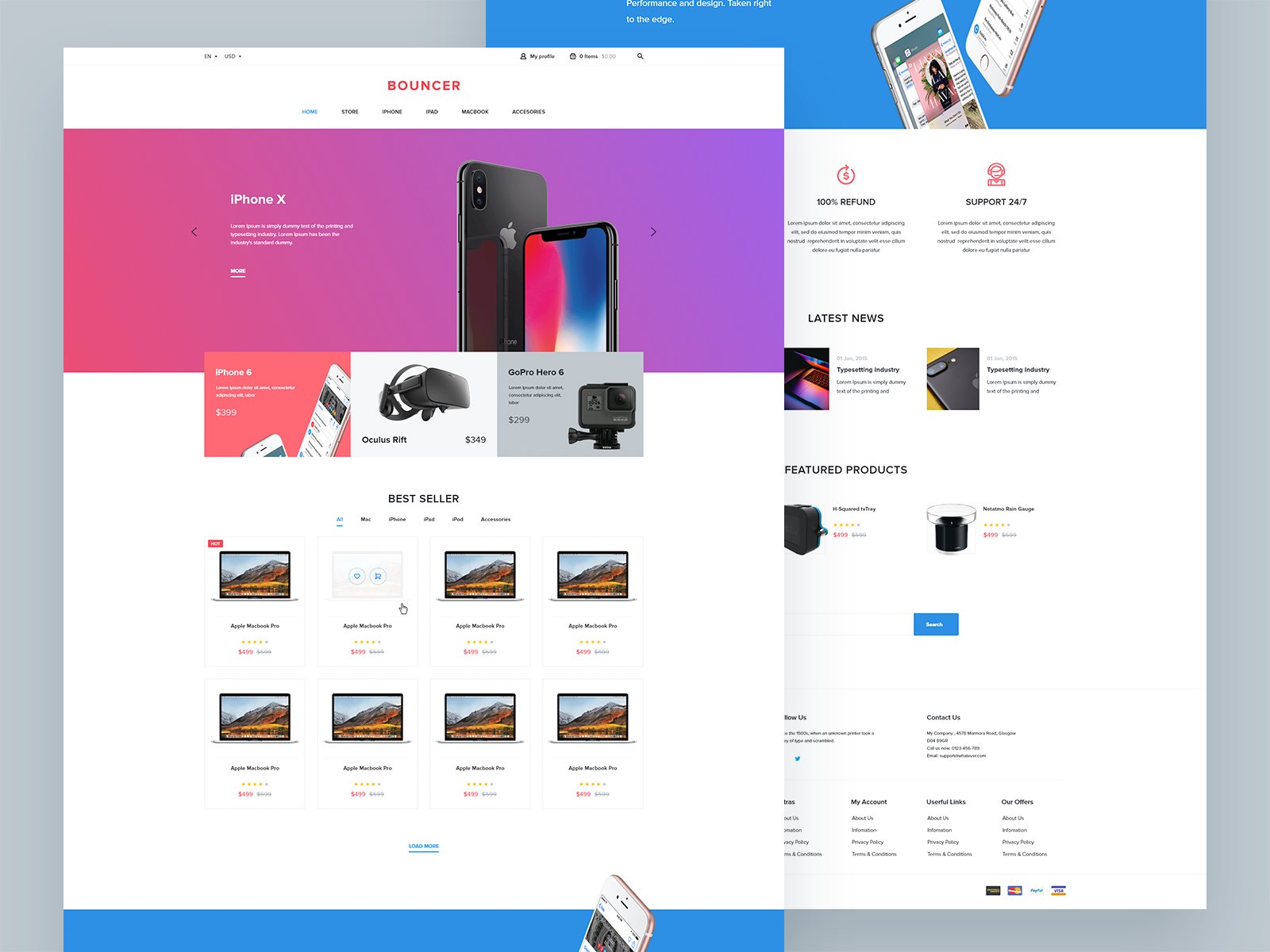
A second page sits behind the homepage in this preview. It has a blue banner with phones, a refund and support block, a Latest News row, Featured Products with star ratings, a footer with four link columns and payment icons. The original description adds that the kit includes buttons in 5 different colours, several banner layouts, and a templates page with post widgets, a single product layout, listings and a single post.
What is in the download
- Source: a Gumroad page by the designer, Bouncer Ecommerce UI Kit | Adobe XD, with a listed size of 8.32 MB.
- Price: $0. The original post said you enter your email address at checkout. No licence terms are stated on the page, so check with the designer before using it in paid client work.
- Format: Adobe XD, desktop layouts. There is no mobile version in the preview, so plan responsive screens yourself.
- Content: the product names, prices, news and body copy are placeholders. The product photos show real Apple and GoPro products, so replace them with your client’s own images before presenting.
Opening it in Adobe XD or Figma
Adobe XD is in maintenance mode. Adobe still fixes bugs and security issues, but it is not adding new features. If XD is installed on your machine, the file opens as normal.
To bring the screens into Figma, the Convertify plugin can import an .xd file into a new Figma page, with its layers, text and images. Check the plugin page for current pricing. Alternatively, export the pages you need from XD as SVG, drag them into Figma and rebuild the text styles.
Who it suits
The kit fits a small shop selling electronics or accessories, or any catalogue store that needs a home page, product cards and a news section. The product card with its hover state is the most reusable piece. Before you ship a design from it, add the pages every store needs, such as a basket, checkout, account and order confirmation, and check the small grey price and body text for contrast. Our design tips for ecommerce success and the list of common ecommerce design mistakes help with that.
More free ecommerce kits
Browse all our free Adobe XD kits, or try these related files:
- E-commerce free UI kit for Adobe XD, another store kit
- Bike shop free ecommerce XD UI kit, for a single-category shop
- Sello minimal e-commerce website XD template, a cleaner, minimal store
- Fashion store free Adobe XD template, for clothing brands
Need an online store designed for a client?
Inkyy is a white label design and development team for agencies. Our in-house designers create online stores and websites that you present under your own brand. See our design services or book a 15-minute call.


