



Sello: Free Minimal Ecommerce Template for Adobe XD
 3 min read
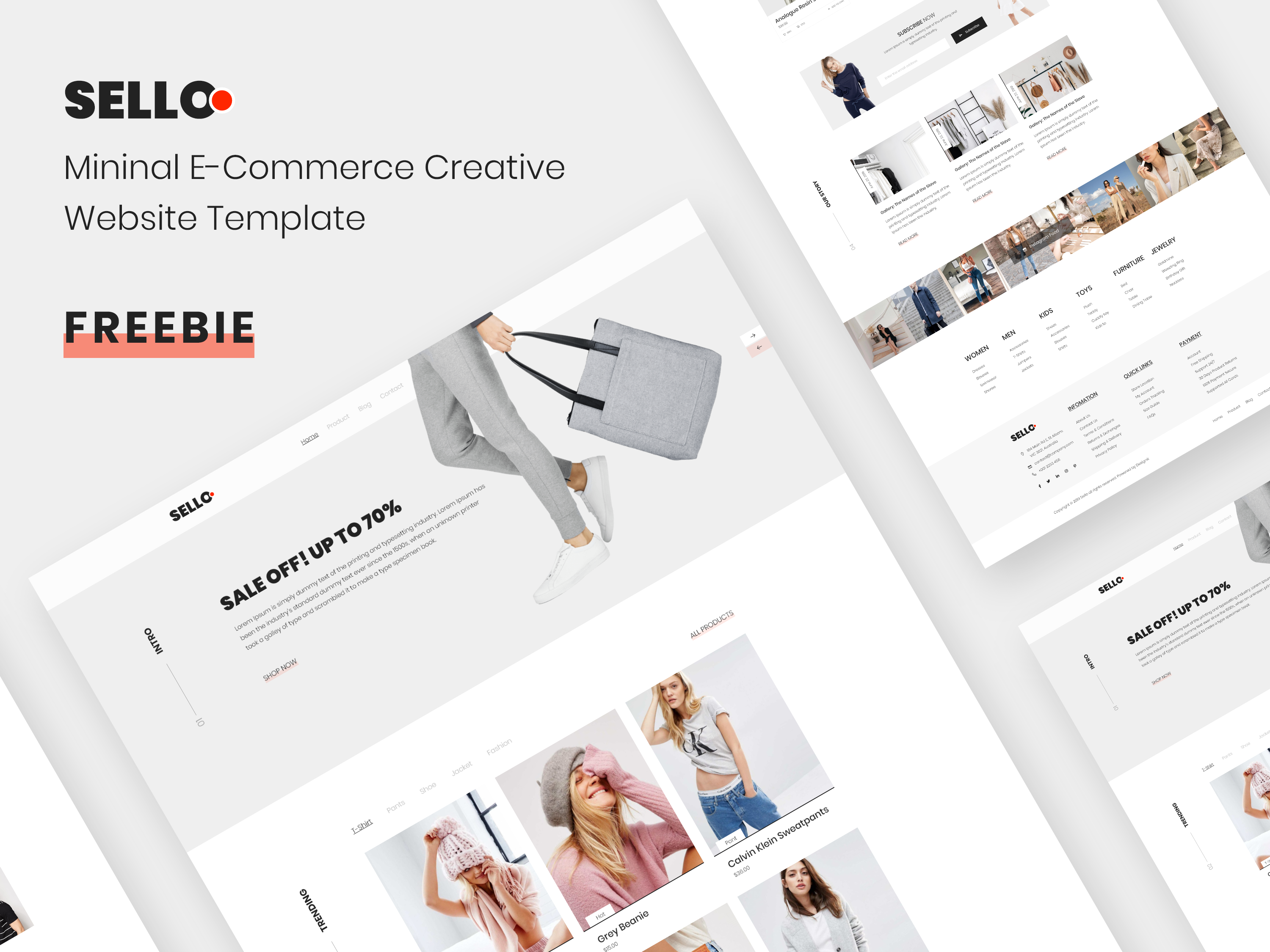
Sello is a free minimal ecommerce template for Adobe XD, shared by Mahmudul Hasan Manik. It is a fashion store home page with a big sale banner, a trending products row, a story gallery and a long footer, set in black, white and light grey with a small red dot in the logo.
The original post sent readers through UI Store Design, which in turn points to the project page on Behance. Below is what the design shows, where to get the file now, and what to check once you have it.
What the Sello template looks like
The cover shows the pages at an angle on a light grey background. The sections we can see are:
- Intro: a slanted “SALE OFF! UP TO 70%” headline beside a model holding a grey tote bag, with a Shop now link, side arrows and a vertical “Intro” label.
- Trending: filter tabs (T-Shirt, Pants, Shoe, Jacket, Fashion) above tall product cards with a name and price, such as Grey Beanie and Calvin Klein Sweatpants.
- Our story: a gallery strip with short captions and Read more links, followed by a photo mosaic.
- Footer: a Subscribe now box and link columns for Women, Men, Kids, Toys, Furniture and Jewelry, plus Information, Quick links and Payment.
Where to get it
UI Store Design still lists Sello as a free XD file and sends you on to the Behance project page, which is where the download is. Behance blocks automated checks, so we could not open the project from here. If the file has been taken down, the Behance page will say so, and our related kits below are a good fallback.
- Designer: Mahmudul Hasan Manik, as named in our original post.
- Format: Adobe XD, desktop website.
- Price: free. The original post said it was 100% free to download. We have no other licence terms, so read the notes on the Behance page before using it in paid client work.
What to check after you download it
We could only check the cover image, not the XD file itself, so open it and look at the artboard sizes, the fonts and which pages are included. The cover calls it a “Mininal” template, so fix that typo if you reuse the title. The product and model photos are sample content with real brand names on them, so replace them before you show the design to a client.
Adobe XD is in maintenance mode. Adobe still fixes bugs and security issues, but it is not adding new features. If XD is installed on your machine, the file opens as normal.
If your team works in Figma, the Convertify plugin can import an .xd file into a new Figma page, including layers, text and images. Check the plugin page for its current pricing. Another route is to export the artboards from XD as SVG and drag them into Figma, then rebuild the text styles and spacing by hand.
Who it suits
Sello fits a small fashion, lifestyle or homeware shop that wants a quiet, photo-led look. The home page has the main selling blocks, but a store needs more. Add a product page, a cart, checkout and an account area, and test the filter tabs on a phone. Our guide to the features every successful e-commerce website has is a good checklist, and 5 design tips for ecommerce success covers the page details.
More free ecommerce kits
Browse all our free Adobe XD kits, or try these related files:
- Bouncer free ecommerce Adobe XD UI kit, for a product-led store
- Fashion store free Adobe XD template, another clothing layout
- Bike shop free ecommerce XD UI kit, for a single-category shop
- E-commerce free UI kit for Adobe XD, with more store screens
Need an online store designed for a client?
Inkyy is a white label design and development team for agencies. Our in-house designers create online stores and product pages that you present under your own brand. See our design services or book a 15-minute call.


