



Playband: Free Music Player App UI Kit for Adobe XD
 3 min read
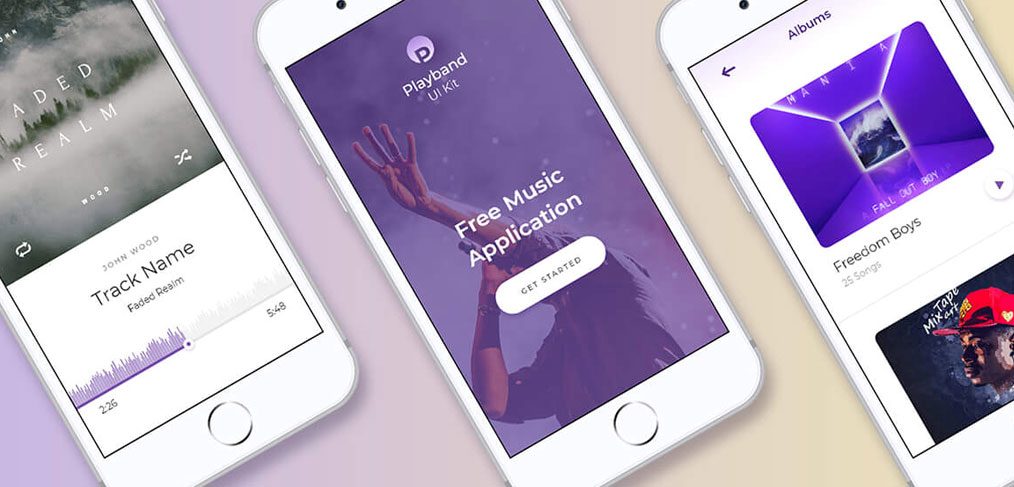
Playband is a free music player app UI kit for Adobe XD, made by Evatheme. It is a purple, photo-led iPhone design for a music app, with sign in, album and track lists, a track player, a profile and a news page.
The original download is hosted here on Inkyy and still works. Below is what the screens show, what is inside the archive, and how to open it now that Adobe XD is no longer being developed.
What the Playband kit looks like
The cover shows three white iPhones on a soft lilac and sand background. The start screen is a purple-tinted photo of a fan with a raised hand, with the Playband logo, the line “Free Music Application”, a white Get Started button and Sign In and Sign Up at the bottom. The albums screen uses large rounded album covers with a title and a song count. The player has a track name, an artist, a waveform scrubber and a timeline. The 14 artboards in the file are:
- Start: the start screen, registration, a “check your mail” confirmation screen and log in.
- Music: albums list, a single album with its track list, album info about the artist, the tracks list, and the music player.
- Browse and account: collections by genre, such as Drum and Bass, Ambient, Rock and Jazz, a profile with albums, tracks and playlists, and a menu.
- Extras: a news page and a help screen.
What is in the download
- File: one 7z archive of about 4.8 MB with one Adobe XD file inside, “Playband UI kit.xd”. You need an archive tool such as 7-Zip to open it.
- Screens: 14 artboards, all iPhone screens at 375 x 812 px. The original post said 40 screens, but the file holds 14.
- Fonts: Montserrat only, which is free on Google Fonts.
- Content: the photos, the album and track names and the artist biography are sample content. Replace them before you show the design to a client.
- Price: free. The designer’s original page for the kit on evatheme.com now redirects to the studio’s home page, and no licence terms were stated with the file, so check with Evatheme before using it in paid client work.
Opening it in Adobe XD or Figma
Adobe XD is in maintenance mode. Adobe still fixes bugs and security issues, but it is not adding new features. Extract the archive, and if XD is installed on your machine the file opens as normal.
To bring the screens into Figma, the Convertify plugin can import an .xd file into a new Figma page, with its layers, text and images. Check the plugin page for current pricing. Install Montserrat first so the text comes across correctly. Alternatively, export the screens you need from XD as SVG, drag them into Figma and rebuild the text styles.
Who it suits
The kit fits a music streaming app, a podcast or radio app, an artist or label app, or a fan club. The large cover art and the clean player give it a focused feel. The file is several years old, so check it against current iPhone layouts, including the safe areas at the top and bottom. If you build on it, add the states a real player needs, such as a mini player, a queue, offline downloads and search. Our mobile app design tips cover what to plan first.
More free music and mobile kits
Browse all our free Adobe XD kits, or try these related files:
- XD music app free UI kit, another music app design
- Subscription app free UI kit, for plans and payments
- Adobe XD mobile UI kit, with more general app screens
- Free mobile UI PSD mockup, to present your screens
Need a mobile app designed for a client?
Inkyy is a white label design and development team for agencies. Our in-house designers create mobile apps and websites that you present under your own brand. See our design services or book a 15-minute call.


