Free Login Screen UI Kit for Adobe XD by Byron Yego
 3 min read

This login screen UI kit for Adobe XD was made by Byron Yego, who is based in Nairobi, Kenya. It contains four login screens that use flat illustrations next to a simple email and password form.
Below you will find what the screens look like, what the Gumroad download includes, and how to open the file now that Adobe XD is no longer being developed.
What the login screens look like
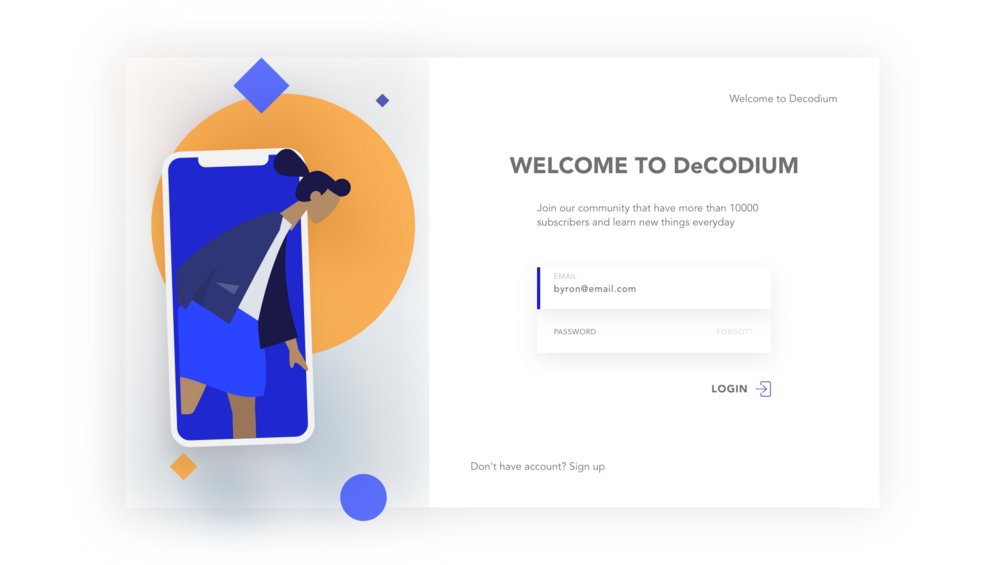
Each screen splits the page in two. One side holds an illustration and a short welcome message. The other holds the form. The sample brand in the previews is called Decodium, and the copy invites people to join a community of subscribers. Two of the four designs are visible in the previews:
- Blue version: a soft blue panel with a seated figure, lamps, a clock and plants, a white “Sign in” outline button, and a narrow white panel with a “Be one of us!” heading, rounded email and password fields with icons, a blue Login button and a sign up link.
- Orange version: a white card with a phone-shaped illustration on an orange circle, blue and orange diamonds, a “Welcome to DeCODIUM” heading, flat email and password fields with a Login link, and a “Don’t have account? Sign up” line at the bottom.
What is in the download
- File: one Adobe XD file of about 2.23 MB, shared on Gumroad under the name “Login Screen UX Designs”.
- Contents: four login screen designs. The seller says all the elements are attached, so you can edit the fields, buttons and illustrations.
- Account: Gumroad asks for an email address at checkout. The Gumroad page belongs to a seller called Alfaxit, the same name that appears in the social links on the designer’s Behance profile.
- Price: free. The seller writes “Free but if you can, consider buying me a $1 cup of coffee”, so a tip is optional. No other licence terms are stated, so check with the designer before using it in paid client work.
Opening the file in Adobe XD or Figma
Adobe XD is in maintenance mode. Adobe still fixes bugs and security issues, but it is not adding new features. If XD is installed on your machine, the file opens as normal.
To move it into Figma, the Convertify plugin can import an .xd file into a new Figma page, with its layers, text and images. Check the plugin page for current pricing. Alternatively, export the artboards from XD as SVG, drag them into Figma and rebuild the text styles.
Using a login screen UI kit well
The illustrated split layout suits a community, learning or lifestyle product where the sign in page is part of the brand. Before you ship a design like this, change the sample name and copy, add a forgot password link on every version, and show an error state for a wrong email or password. Check the white-on-blue text and the grey placeholder text for contrast, and make sure the form still works on a phone, where the illustration should shrink or move above the fields.
More login screens and UI kits for XD
Browse all our free Adobe XD kits, or try these related files:
- 10 login screen templates for Adobe XD, a larger set of layouts
- Vault, a free security UI kit, for sign in and security flows
- Modern and trendy buttons XD UI kit, for form buttons
- Free cards UI kit for Adobe XD, for content blocks
Need a login flow designed for a client?
Inkyy is a white label design and development team for agencies. Our in-house designers create apps and web products, including sign up and sign in flows, that you present under your own brand. See our design services or book a 15-minute call.