



OldGold: Free Ecommerce UI Kit for a Bike Shop in Adobe XD
 3 min read

OldGold is a free ecommerce UI kit for Adobe XD, designed by Imam Fajar around an online bike shop. It is a set of website sections for a store: a header with a cart, a hero slider, product cards, a flash sale countdown, login and sign-up forms and a cart summary, in deep navy and orange.
Below is what each section looks like, the file details, where to download it, and how to use it now that Adobe XD is no longer being developed.
What the OldGold sections look like
The kit uses a dark navy photo background for the hero and banners, white cards for products and forms, and a strong orange for prices, buttons and the small diamond markers next to each section title. The preview shows these parts:
- Header: the OldGold logo, a category menu (Home, Kids, Mountains, BMX, Flips, Racing), an orange Login button and a cart icon.
- Hero slider: a large headline, a short product line, Buy Now and Take A Look buttons, diamond-shaped arrows and slide dots.
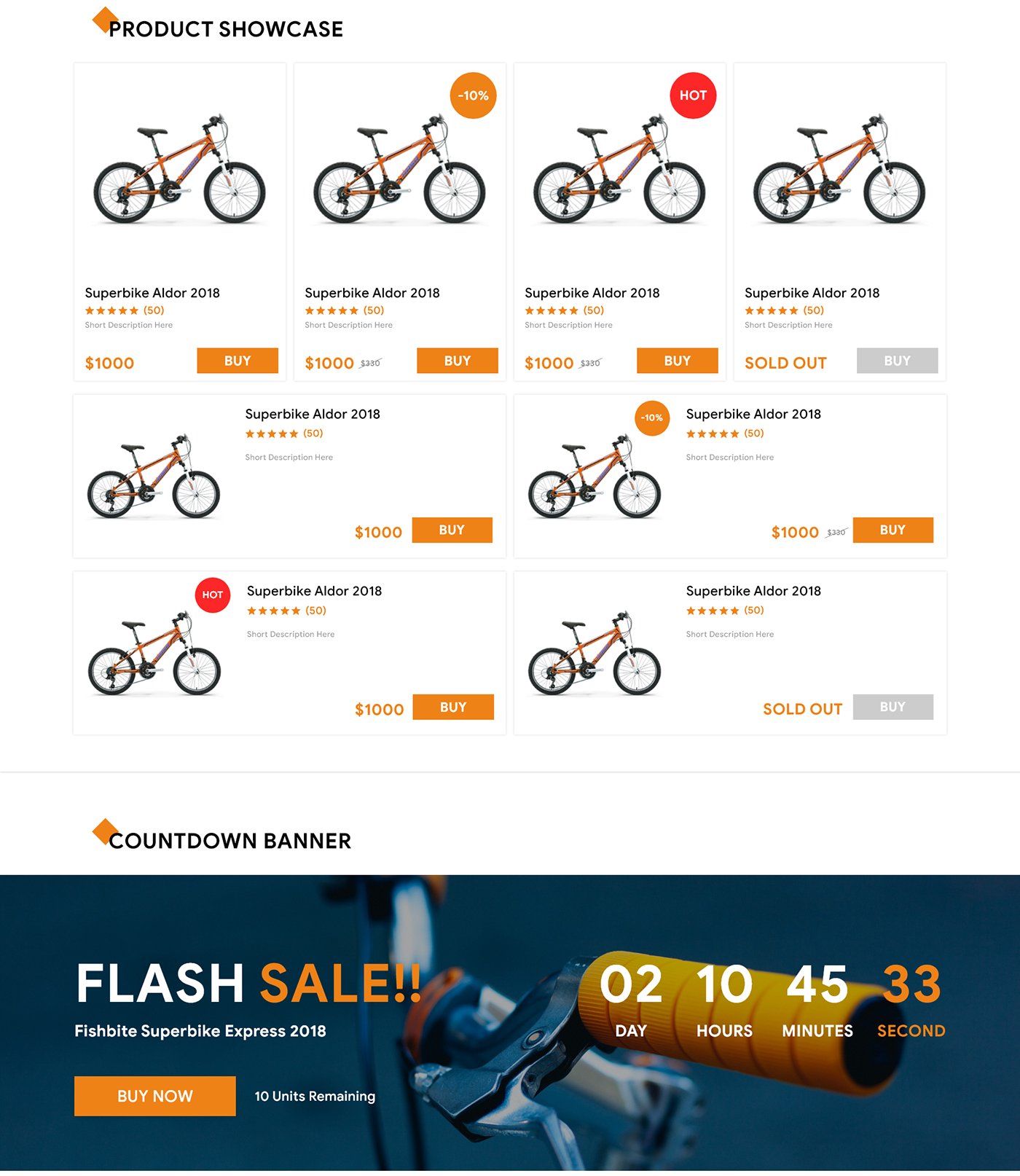
- Product showcase: grid cards and wide list cards with a bike photo, star rating, price, Buy button and badges for a discount, a hot item or a sold-out product.
- Countdown banner: a “Flash Sale” block with days, hours, minutes and seconds, a Buy Now button and the number of units left.
- Login and sign up: two forms with orange title bars, remember-me and terms checkboxes, and social login icons.
- Cart: a product row with quantity and delete, plus a summary with subtotal, gift wrapping, shipping, coupon, grand total and Checkout.
File details and licence
- Format: one Adobe XD file, “3b – Bike Shop UI Kit.xd”, about 5.6 MB, shared on Google Drive.
- Layout: desktop sections, not a mobile app.
- Designer: Imam Fajar, who shows the full kit in his Behance project.
- Licence: shared as a free download. No licence terms are stated, so contact the designer if you need written terms for client work.
- Content: product names, prices and ratings are placeholders. Some old prices are lower than the new ones, so fix those before you show the design to a client.
Opening it in Adobe XD or Figma
Adobe XD is in maintenance mode. Adobe still fixes bugs and security issues, but it is not adding new features. If XD is installed on your machine, the file opens as normal.
To bring the kit into Figma, the Convertify plugin can import an .xd file into a new Figma page, with its layers, text and images. Check the plugin page for current pricing. Alternatively, export the artboards from XD as SVG, drag them into Figma and rebuild the text styles. For a shop, rebuild the product card first as a component with variants for the normal, discount, hot and sold-out states.
Who it suits
OldGold fits a bike shop or any small store with one strong product category, such as outdoor gear, scooters or sports equipment. Change the hero photo and the orange accent, and the same sections work for other products. It is a component set, not a full shop. You will still need category and product pages, filters, checkout steps and mobile layouts. Check the small grey text on the cards for contrast as well.
More free ecommerce kits
Browse all our free Adobe XD kits, or try these related files:
- E-commerce free UI kit for Adobe XD, for a general online shop
- Sello minimal e-commerce website XD template, in a lighter style
- Bouncer free ecommerce Adobe XD UI kit, another store kit
- E-commerce web design mistakes, and how to avoid them
Need an online shop designed for a client?
Inkyy is a white label design and development team for agencies. Our in-house designers create ecommerce websites that you present under your own brand. See our design services or book a 15-minute call.


