These web design examples are 29 website concepts from Dribbble, grouped by the kind of site they suit: SaaS, agencies, online shops, service businesses, restaurants and travel, and personal portfolios. Each one has a clear idea about layout, typography, colour or the hero section that you can use in a real project.
For every design we note what works, what has aged and what type of business it fits. After the list you will find what today’s best websites do differently, practical tips and answers to common questions.
What makes a website design work
- A hero that answers three questions: what is this, who is it for and what do I do next. One headline, one supporting line, one main button.
- Clear hierarchy: size, weight and spacing tell the eye where to look first. See our guide to visual hierarchy.
- Restrained type and colour: one or two typefaces, a base palette and one accent kept for buttons and links. More on colour schemes in web design.
- Proof early: client logos, reviews or the product itself, close to the top.
To be honest about the examples: most are concept shots, not live sites, and they are a few years old. They show desktop layouts, many use placeholder text and some have pale text that would fail an accessibility check. They are still great for ideas, as long as you read the section on modern websites before copying anything.
29 web design examples, grouped by site type
Each example links to the designer’s original shot on Dribbble.
SaaS and tech website examples
Software sites have one job above the fold: explain the product in a sentence and get a sign-up. These seven do it in different ways.
1. Elevio landing page by Martin Strba
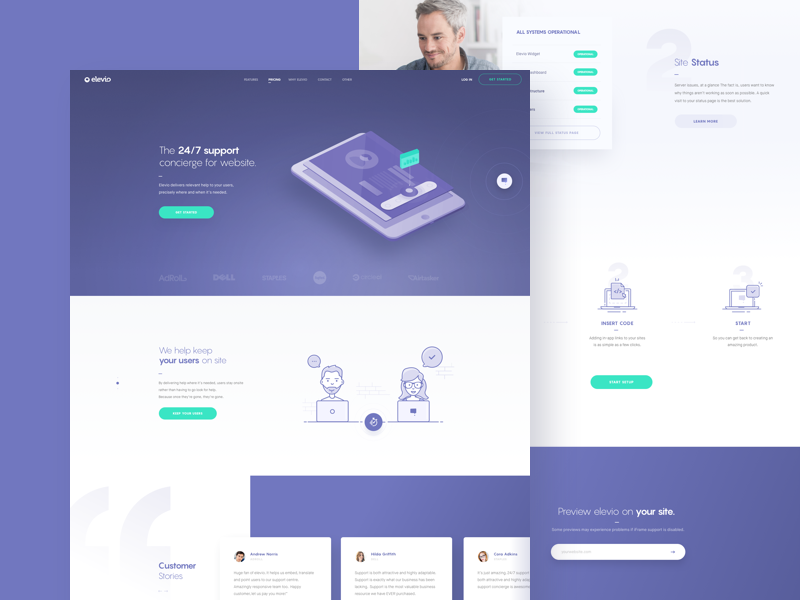
An indigo hero with a light headline where only “24/7 support” is bold, an isometric tablet and a strip of client logos straight under the fold, so proof arrives before the first scroll. A solid model for a B2B SaaS homepage, once the small pale grey body text is darkened. See the shot on Dribbble.
2. Teachable features page by Balkan Brothers
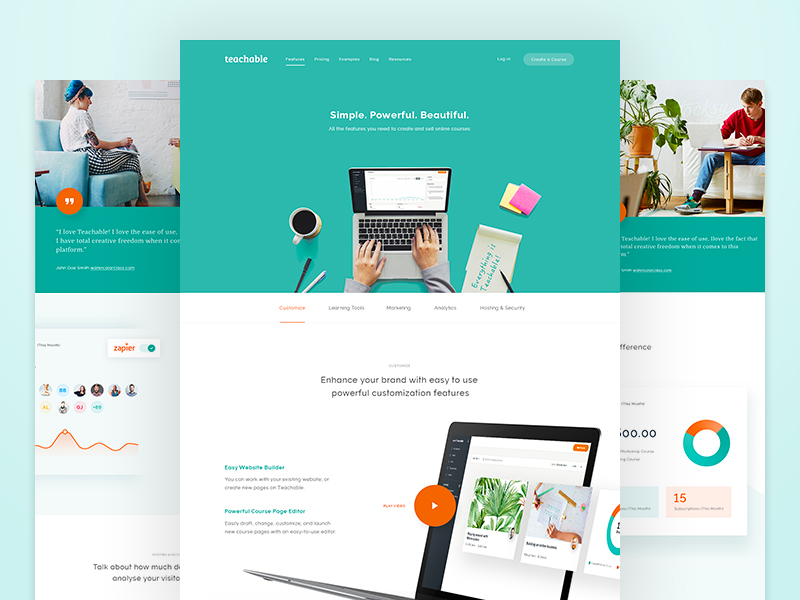
A teal hero, a three-word promise and a top-down photo of real hands on a laptop, which feels more human than an illustration. A row of tabs splits a long features page into customise, marketing, analytics and more. Borrow it for any SaaS product with many modules. See the shot on Dribbble.
3. Bugsnag by Robbin Cenijn
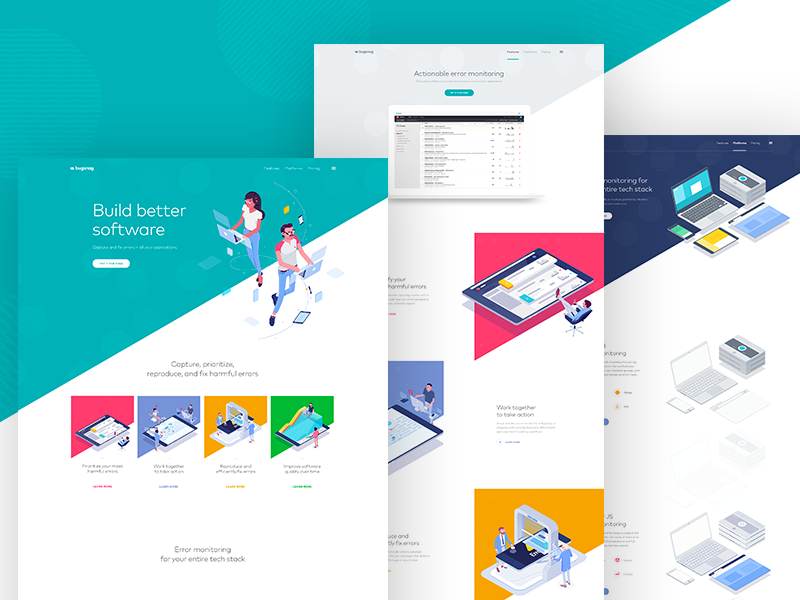
A diagonal teal and white split and a short, thin headline, “Build better software”. Four tiles in pink, purple, yellow and green each hold a small isometric scene, which makes error monitoring feel friendly. It suits developer tools; export the illustrations as SVG to keep the page light. See the shot on Dribbble.
4. Gibbon website by Wouter de Bres
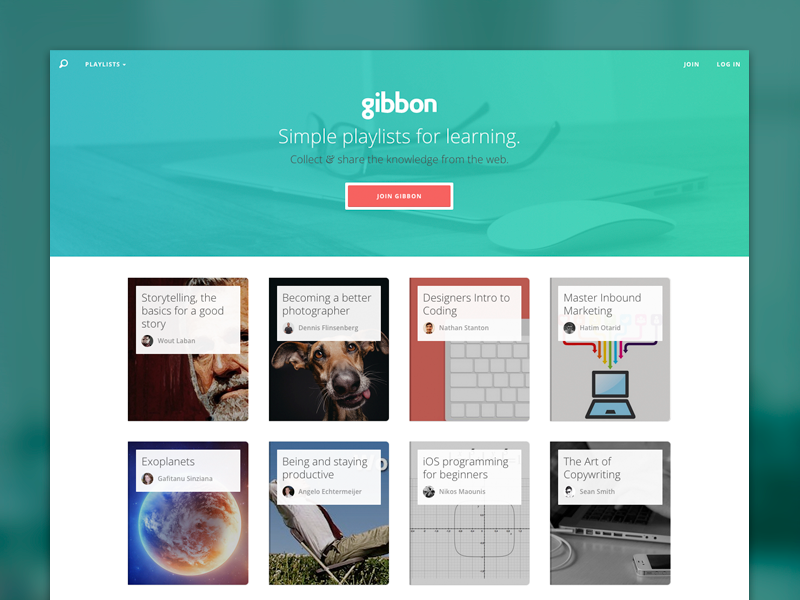
A teal gradient over a soft photo, one line of copy and one coral button. Straight below, a grid of playlist cards shows the product itself instead of describing it. That is the move to copy for edtech, content platforms and marketplaces. See the shot on Dribbble.
5. Ethereum company landing page by Saepul Rohman
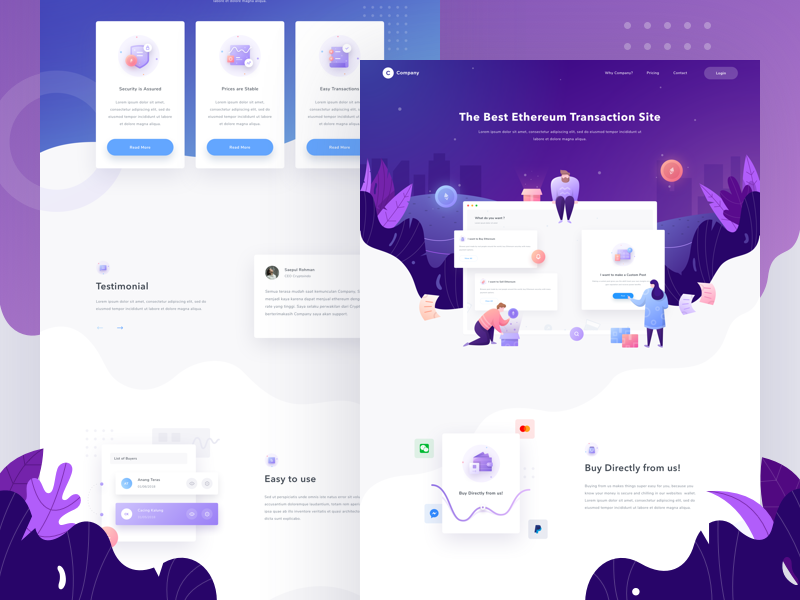
A purple gradient, a centred headline and a flat illustration of people, leaves and floating interface cards. Three feature cards and payment icons follow. The friendly style softens a technical product, which suits crypto, fintech and payment apps. The copy is placeholder text, so judge the layout only. See the shot on Dribbble.
6. Payments marketing website by Neopix
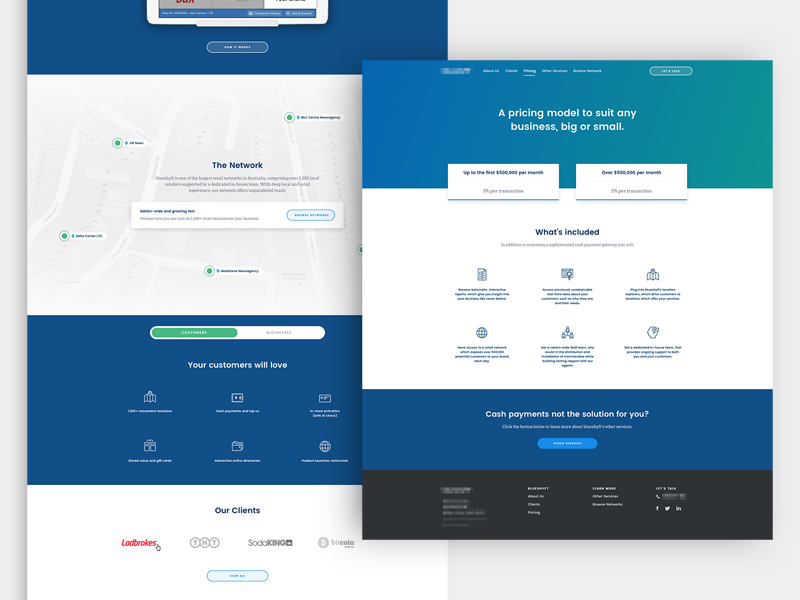
Calm blues, two simple pricing cards and a grid of line icons. The best detail is a toggle that switches the page between customers and businesses, giving two audiences their own message on one site. Useful for fintech and any B2B service that sells to two groups. See the shot on Dribbble.
7. Home loan landing page by Masudur Rahman
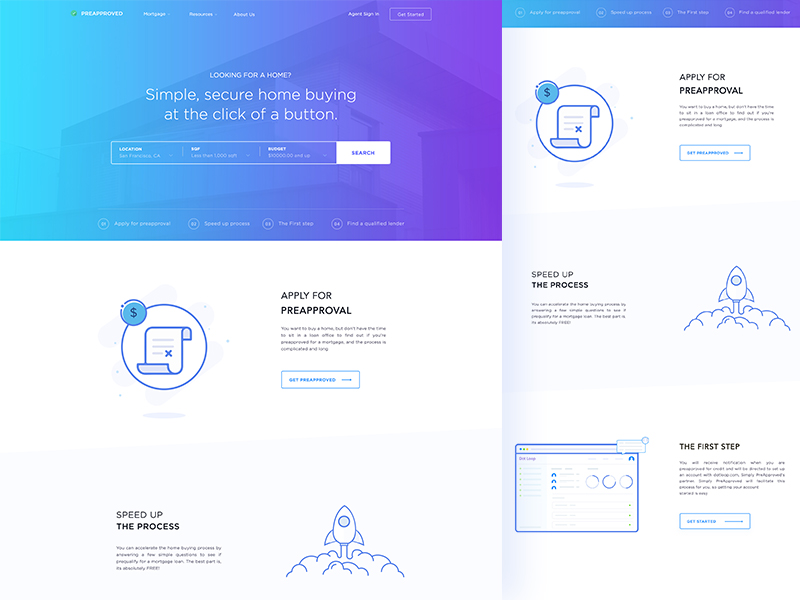
A search bar for location, size and budget sits right under the headline, so visitors act before they read. Numbered steps then get a section each, with blue line illustrations. The cyan to purple gradient keeps a serious subject light. A clear template for mortgage, insurance and proptech sites. See the shot on Dribbble.
Agency and studio website examples
Agency sites sell taste and trust. The best ones lead with a point of view and get to real work quickly.
8. Digital agency website by Mythics Design
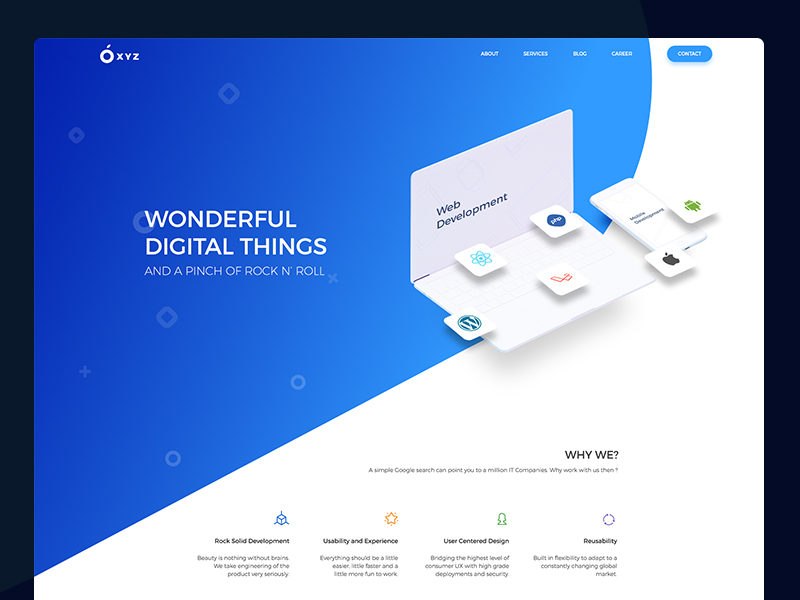
A bright blue diagonal hero, a big uppercase headline, “Wonderful digital things”, and an isometric laptop ringed with WordPress, React and mobile platform icons. Visitors know what the team builds before they read a word. It suits development agencies that want to look approachable rather than corporate. See the shot on Dribbble.
9. Dspot web by Javier Oliver
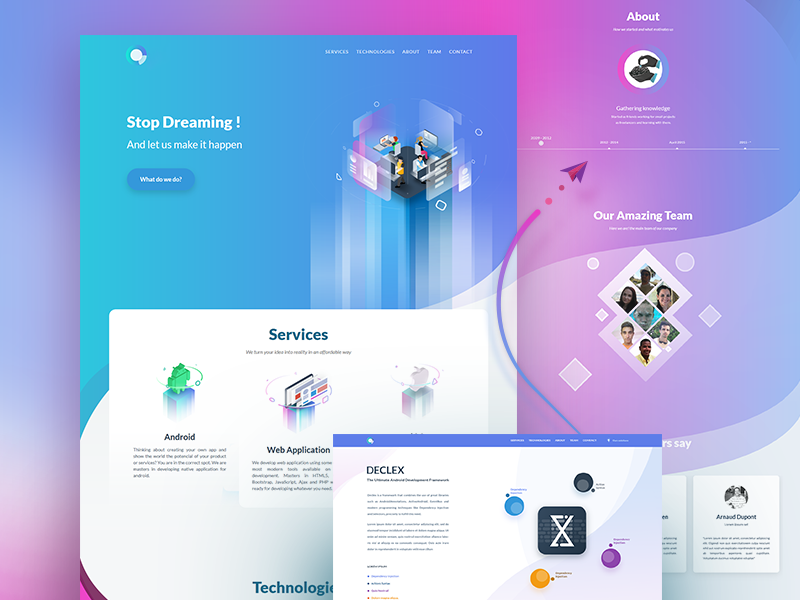
A cyan to magenta gradient runs through every section, with a glowing isometric tower in the hero, service cards for Android and web apps, and team photos cropped into diamonds. Plenty of personality for an app studio. Check white text on the lighter parts of the gradient, where contrast drops. See the shot on Dribbble.
10. Agency web design by Jenn Pereira
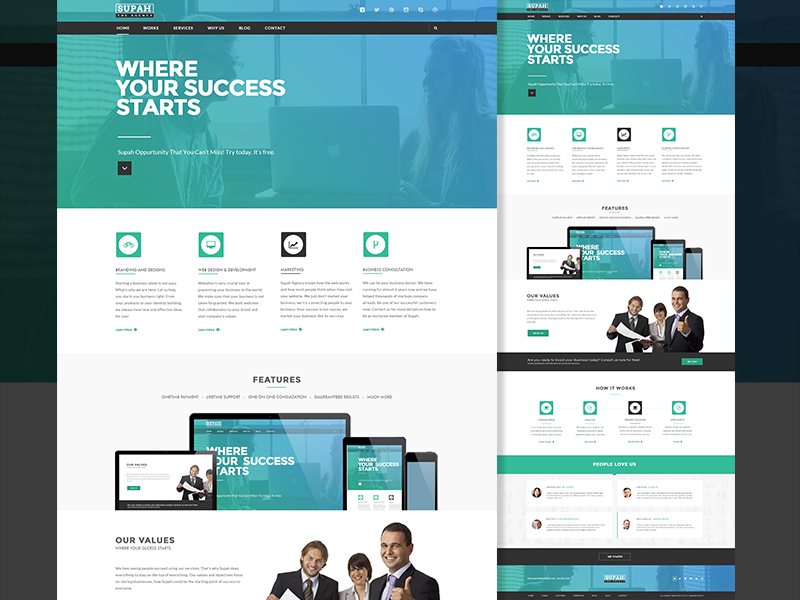
A teal overlay on a photo, a heavy uppercase headline and four service columns with square icons. It is the classic small agency layout and it still works because visitors know where to look. Replace the stock photos of people in suits with your real team and projects. See the shot on Dribbble.
11. Agency landing page by Metro
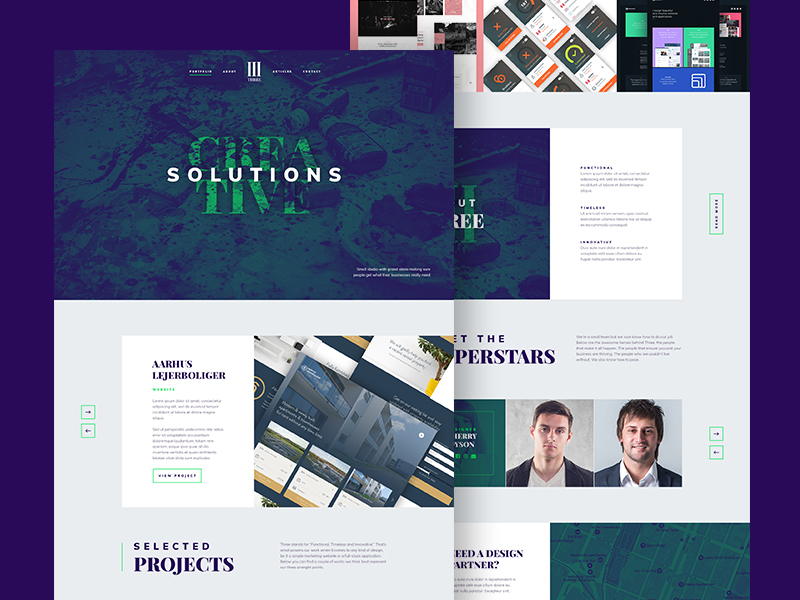
Deep purple and dark green, a widely spaced uppercase “Solutions” over a large green serif word, and bold serif headings for selected projects shown in a carousel. The serif and spaced sans pairing feels editorial and premium. A good reference for branding studios and creative agencies. See the shot on Dribbble.
12. Clever Music by Blaz Robar
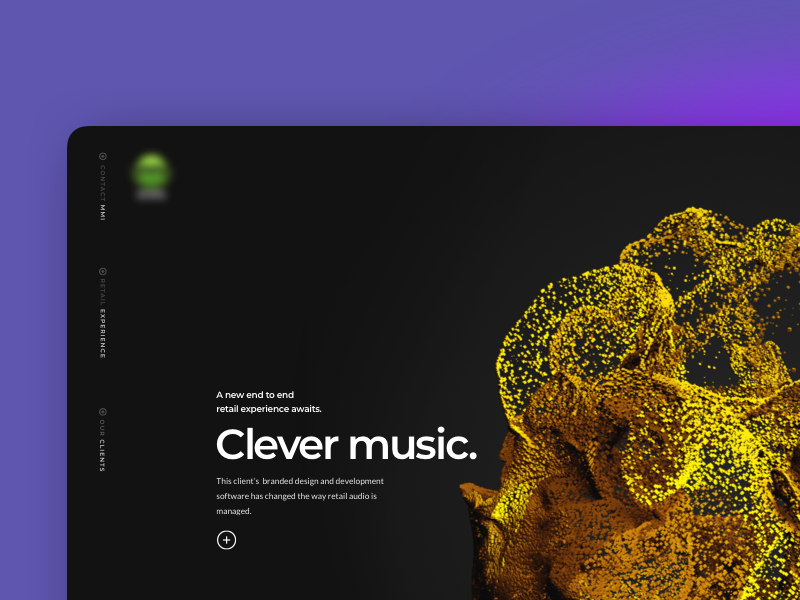
A near-black page, one large white heading and a yellow 3D particle shape filling the right side, with navigation reduced to vertical labels on the left edge. One strong visual carries the page. It fits agency case studies and audio tech brands, with a lighter fallback for slow phones. See the shot on Dribbble.
13. Poliigon case study by Pixelmatters
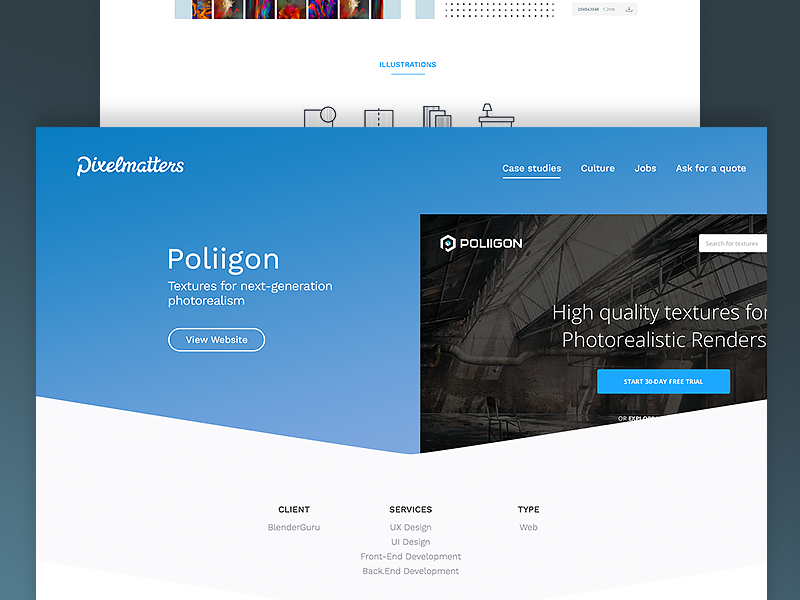
A blue hero with the project name, then an angled edge revealing a screenshot of the finished site and a small table listing client, services and project type. That table is the detail to copy, because buyers scan case studies for exactly that. Ideal for agency and freelancer case studies. See the shot on Dribbble.
Ecommerce website examples
Online shops need the product, the price and the button in one glance. These four show different ways to get there.
14. PlayStation VR website by Kazi Mohammed Erfan
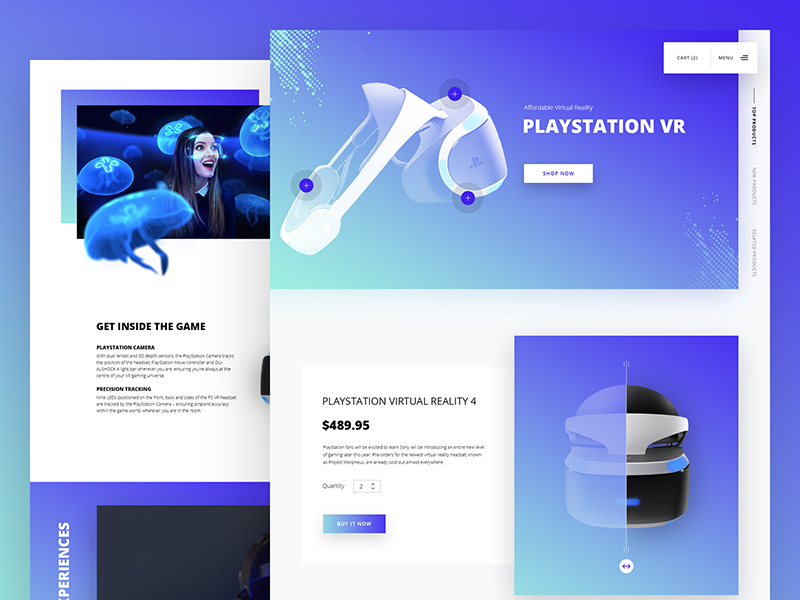
A blue to teal gradient, a clean white headset render, a bold uppercase product name and a “Shop now” button. Lower down, a product card shows price, quantity and “Buy it now” beside the product image. A good layout for a single-product store or an electronics launch. See the shot on Dribbble.
15. REPQQ ecommerce landing page by Robert Berki
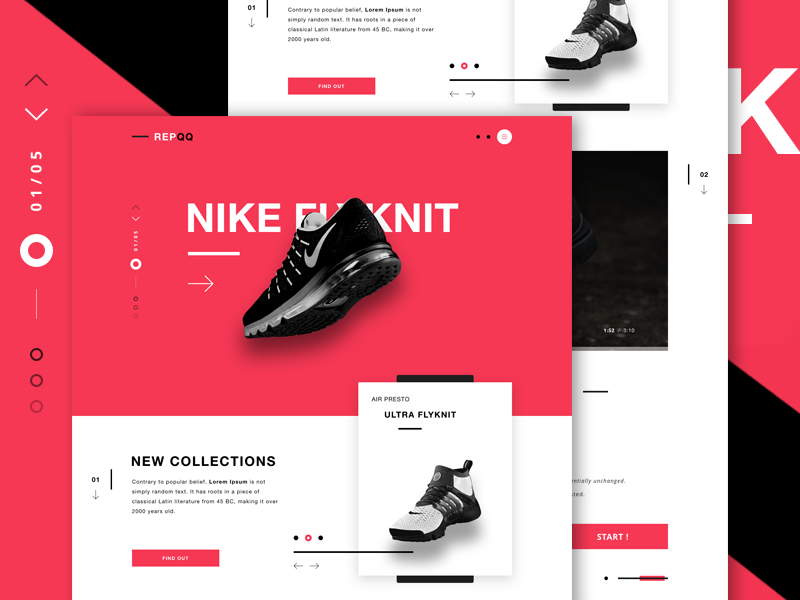
Coral red and black blocks, a huge white uppercase product name and a black running shoe overlapping it, plus a slide counter and a “New collections” card. The overlap adds drama but hides part of the name, so keep key words clear. It suits sneaker, fashion and streetwear launches. See the shot on Dribbble.
16. Kingdom Supply Co website by Aaron Lynch
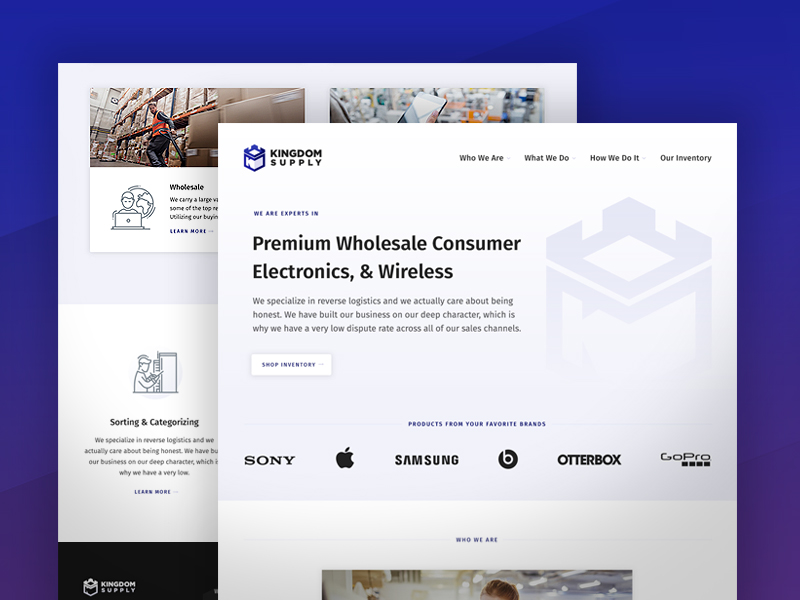
A light page, a bold headline that says exactly what the company sells, a faint logo mark behind it and a row of well-known electronics brand logos doing the trust work. Nothing here is flashy, and that is the point. A strong model for B2B wholesale and distribution. See the shot on Dribbble.
17. Thriva by Joe Furr
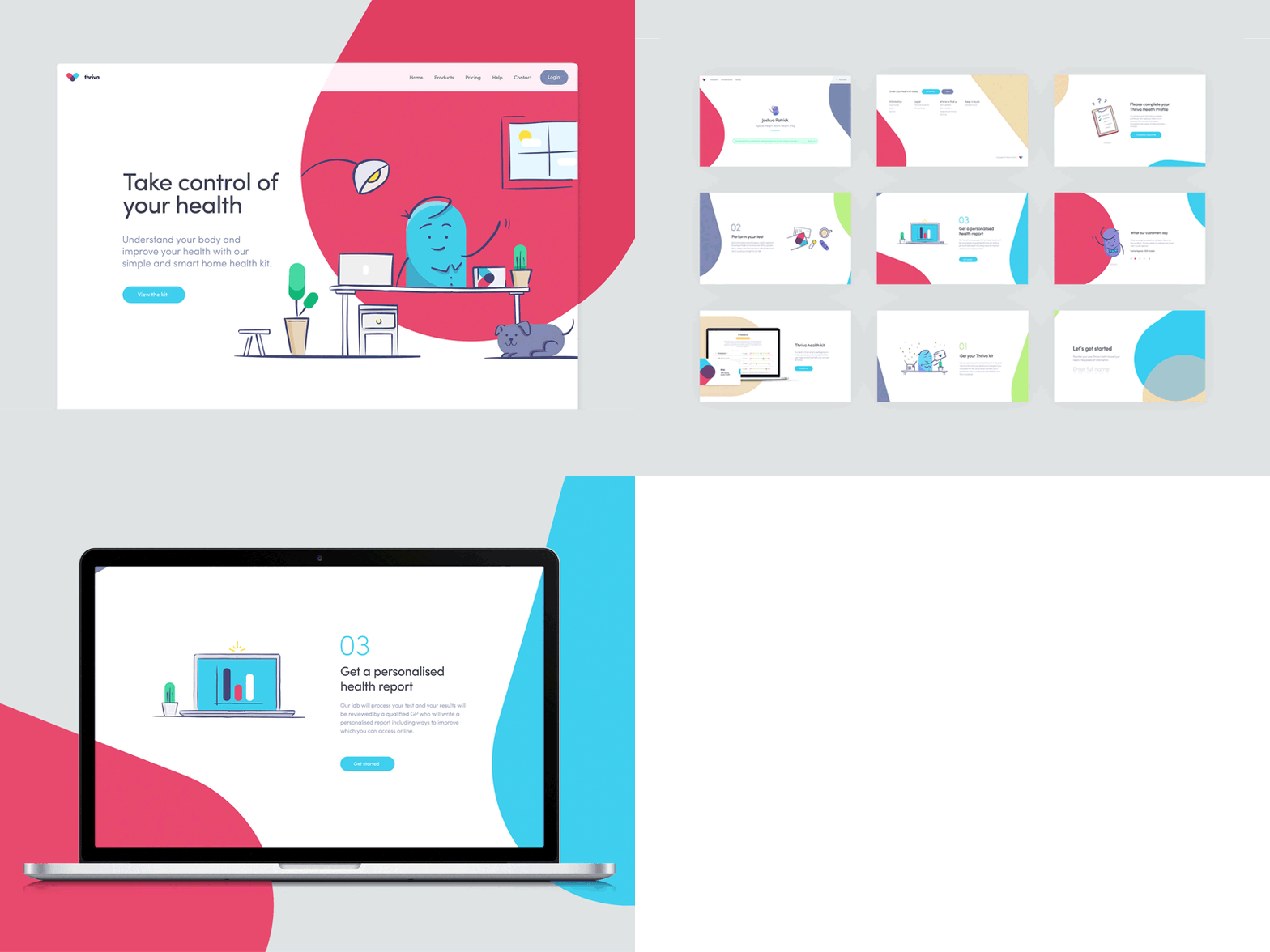
Large pink and cyan shapes, a hand-drawn character at a desk with a dog at its feet, and a short headline, “Take control of your health”. Numbered steps explain the kit, the test and the report. The friendly drawings take the stress out of a medical topic. Great for health and wellness subscriptions. See the shot on Dribbble.
Service business and utility website examples
For services, the visitor wants to know what it costs and how to start. These four put that up front.
18. Optical fibre provider homepage by Web Efficient
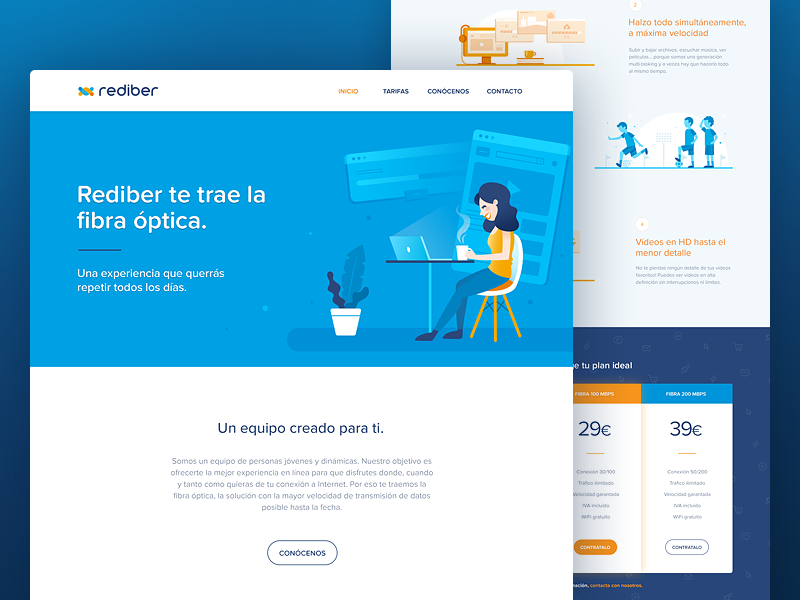
A bright blue hero with a flat illustration of a woman at a laptop and a short Spanish headline promising fibre broadband. Two pricing cards show the 100 and 200 Mbps plans in large numbers. Plain, friendly and clear about cost, which is what broadband and telecom buyers want. See the shot on Dribbble.
19. Elgastrom energy provider landing page by Robert Berki
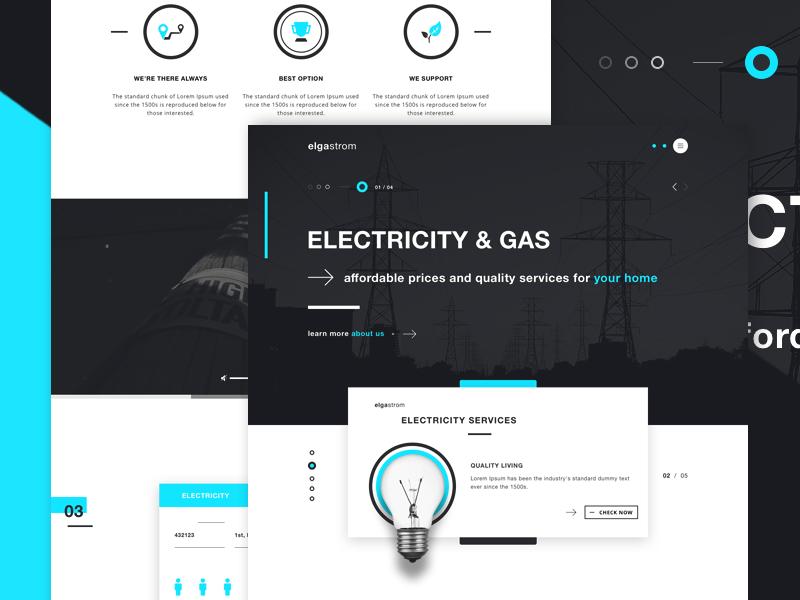
A dark charcoal hero over a photo of power lines, a bold uppercase “Electricity & gas” headline and cyan accents on key words. A white card with a light bulb introduces the services. The dark palette feels solid and grown-up. It suits energy companies, utilities and infrastructure firms. See the shot on Dribbble.
20. 2ULaundry landing page by Aryana Shakibaei
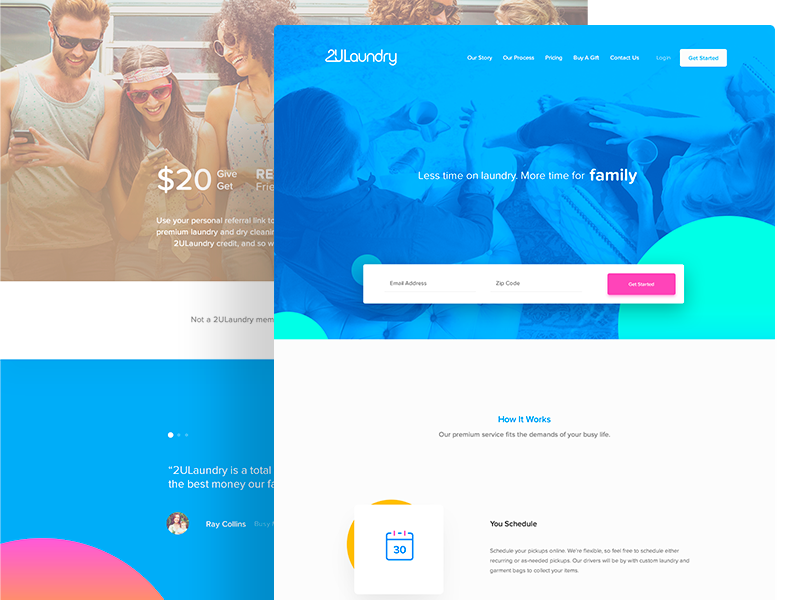
A blue duotone photo hero, the line “Less time on laundry. More time for family” and a form asking for email and zip code right in the hero. Asking for the postcode first checks coverage and starts the sign-up in one step. Ideal for on-demand and local service businesses. See the shot on Dribbble.
21. Just Chefs one page design by Kris Bradbury
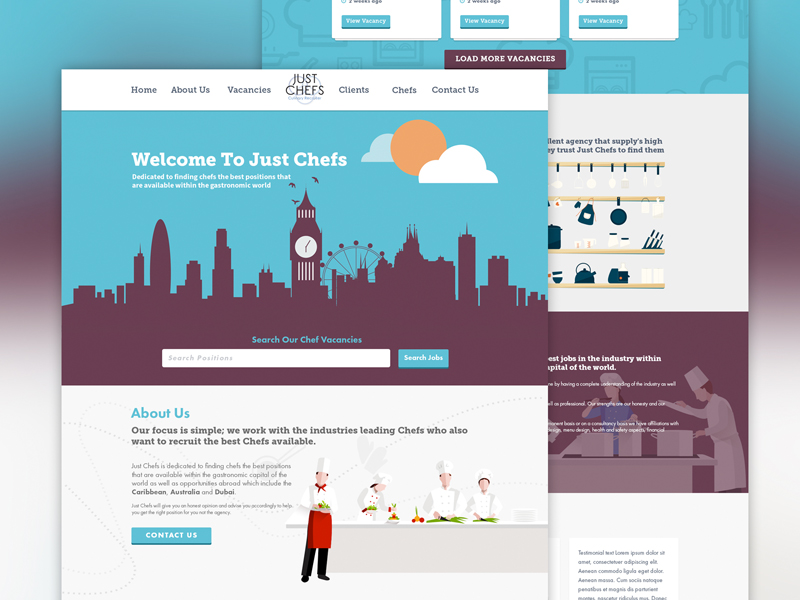
A flat illustration of the London skyline in plum against sky blue, with a vacancy search bar on top and illustrated chefs further down. The illustration gives a recruitment agency a personality stock photos never would. It suits recruitment agencies, job boards and niche staffing firms. See the shot on Dribbble.
Restaurant, travel and lifestyle website examples
These sites sell a feeling first, so photography and mood carry more weight than copy.
22. Food and restaurant website by Rostislav
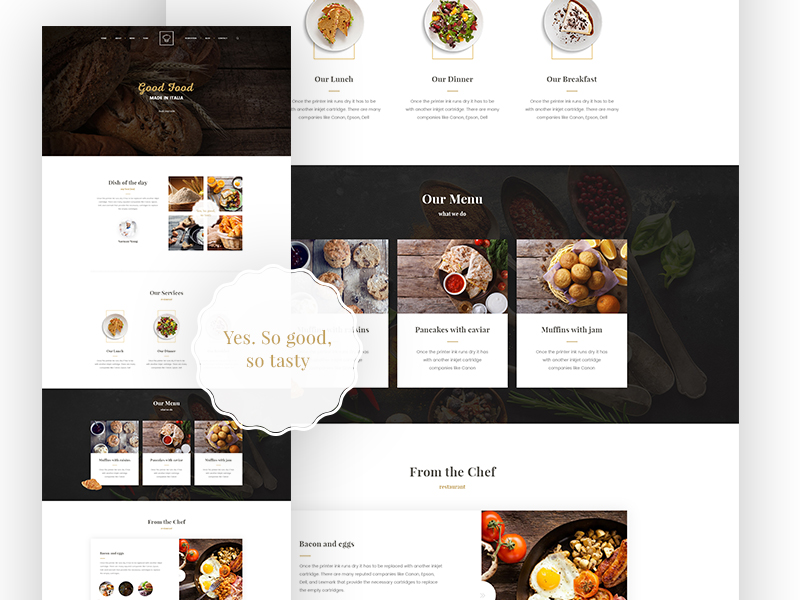
A dark wooden hero with a script “Good food” heading, serif section titles and a dark menu band with photo cards for each dish. Real food photography does most of the work. A ready reference for restaurants, cafés and bakeries; add opening hours, location and booking near the top. See the shot on Dribbble.
23. Onshore surf website by Dann Petty
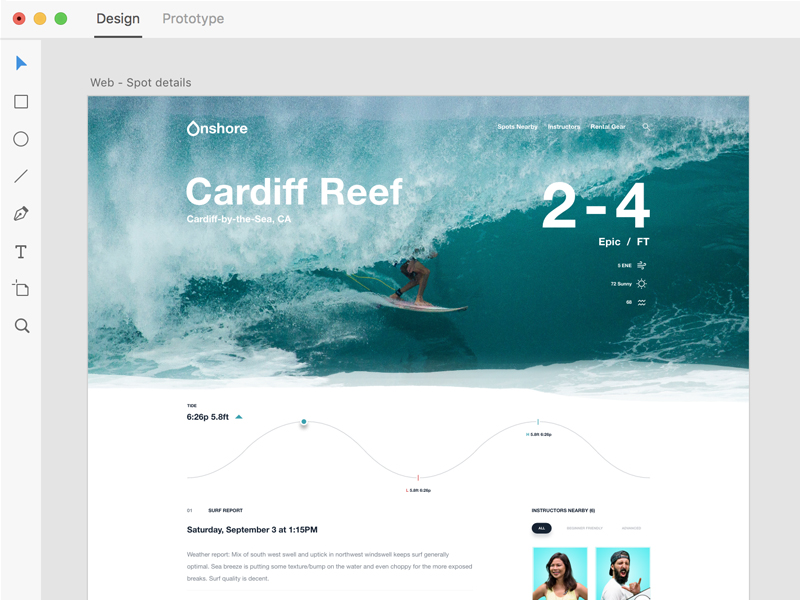
A full-width photo of a surfer inside a wave, the spot name in large white type and the wave height, “2-4 ft”, even bigger. A tide chart and surf report turn data into something readable at a glance. Making the key number the hero suits travel, outdoor sport and weather sites. See the shot on Dribbble.
24. Steamer Lane template by Jurre Houtkamp
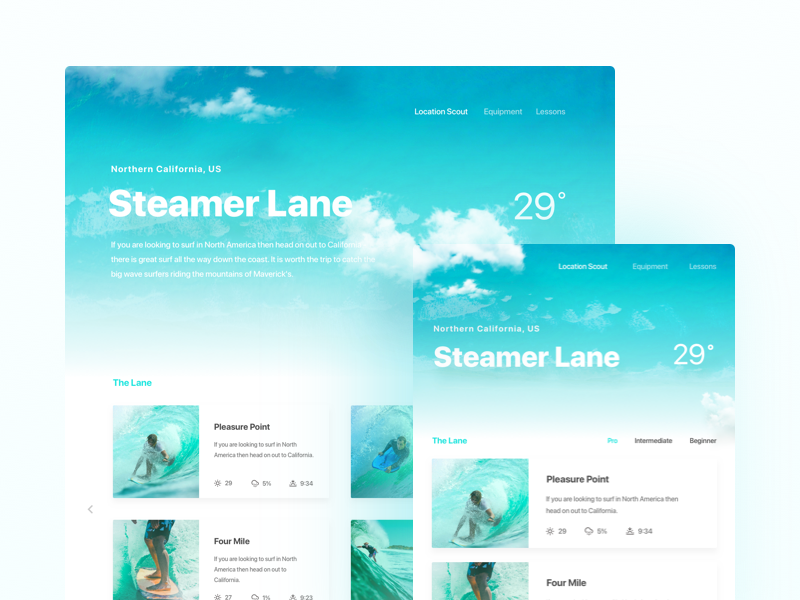
A cloudy sky blue hero, a bold location name with the temperature beside it, and cards for nearby spots filtered by skill level. The shot also shows a narrower version of the layout, which is rare on Dribbble. Use it for travel guides, location directories and activity booking. See the shot on Dribbble.
25. Modern slider by Sebastian Stapelfeldt
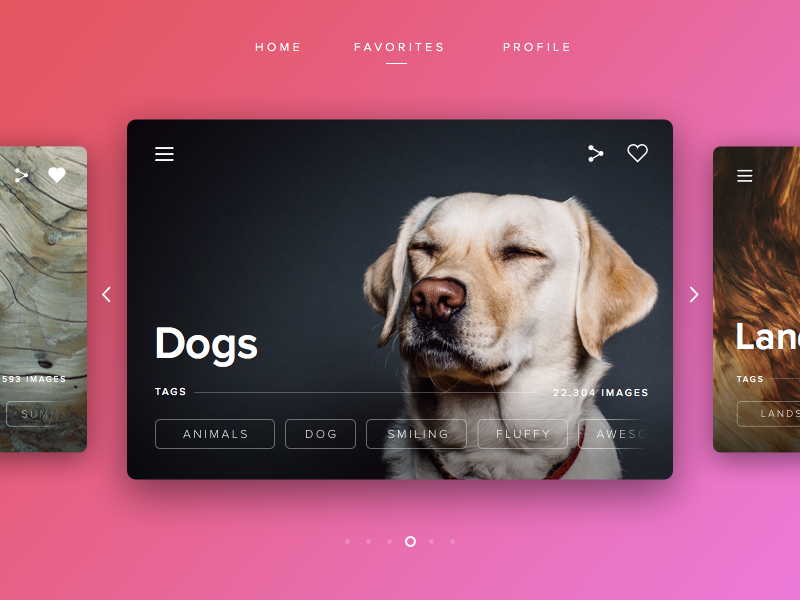
A pink to magenta background and a large card with a full-bleed photo of a smiling Labrador, a big “Dogs” title and outlined tag buttons, with the next cards peeking in from the sides. It suits photo libraries and media sites. On a homepage, do not hide key content in a carousel. See the shot on Dribbble.
Blog, portfolio and template examples
Personal sites and starter kits. Useful as a base, as long as you make them your own.
26. Sinensis personal blog by Azhari Subroto
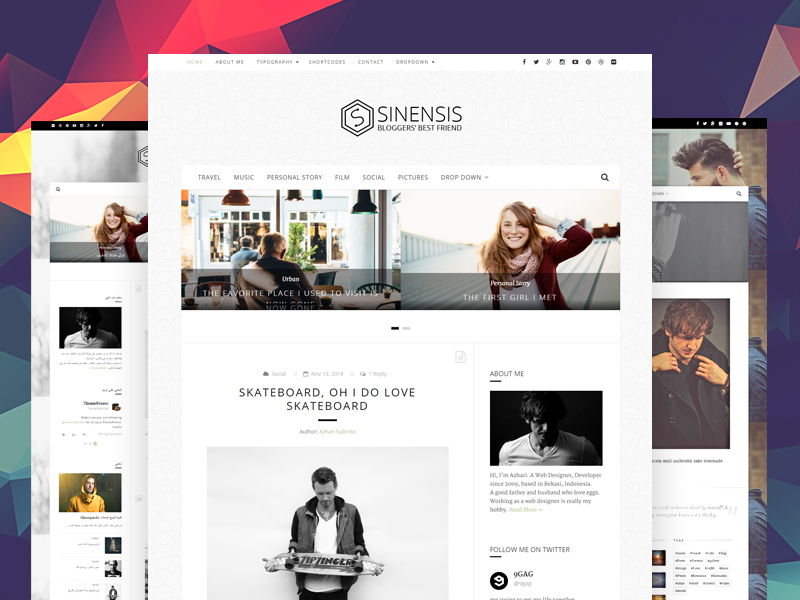
A white layout with a centred hexagon logo, a category menu, a featured post slider and letter-spaced uppercase titles. A sidebar with a black and white portrait makes it personal. A clean base for personal blogs and small magazines; on mobile, drop the sidebar and enlarge the article text. See the shot on Dribbble.
27. DribbbleFolio v2 by Vineeth G S
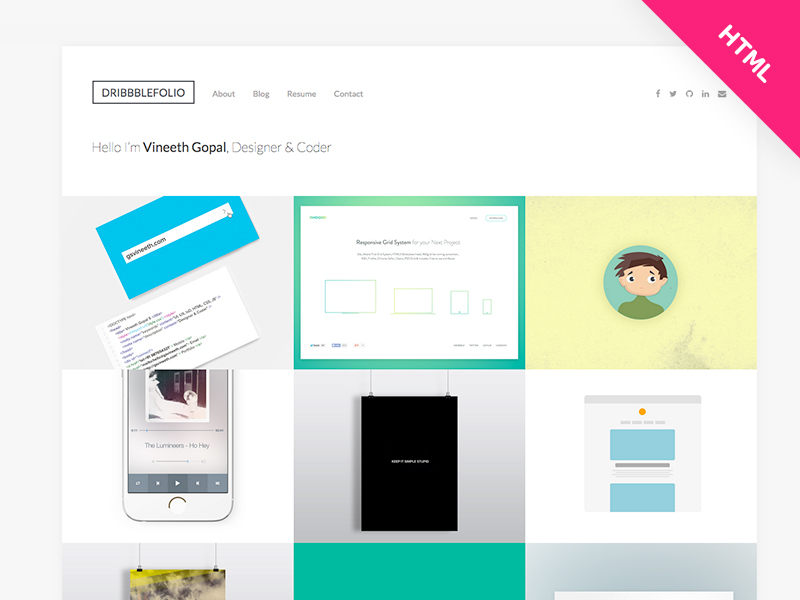
A free HTML portfolio template: boxed logo, a one-line introduction and an edge-to-edge grid of project tiles. The work does the talking, as it should. It suits freelancers who need something live quickly. Add short project descriptions so clients know what you did and search engines have text to read. See the shot on Dribbble.
28. Hexagon portfolio PSD by Mahmud Saeef
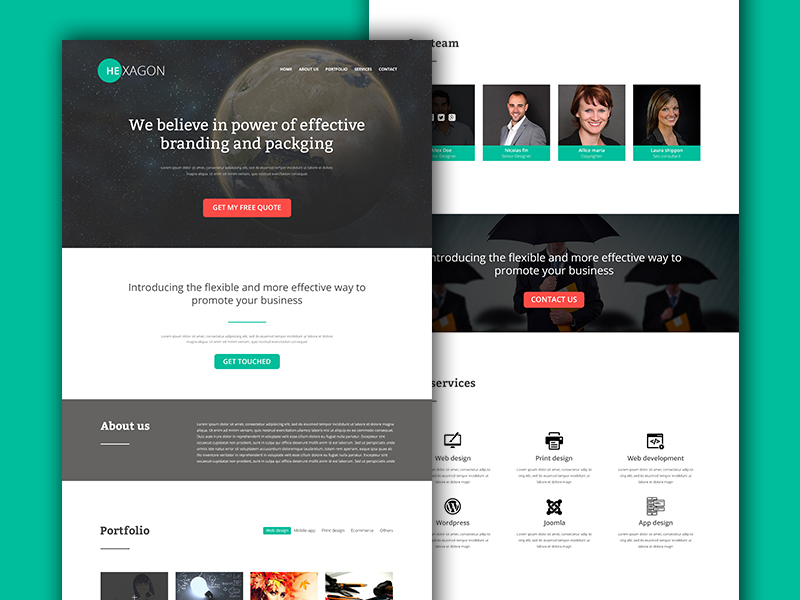
A dark space hero with a serif headline, an orange quote button and a teal accent elsewhere, then team photos, service icons and a filtered portfolio. It covers everything a small studio needs on one page, but the headline has a typo and two accents compete. Tidy the details before you borrow it.
29. Material Kit by Creative Tim
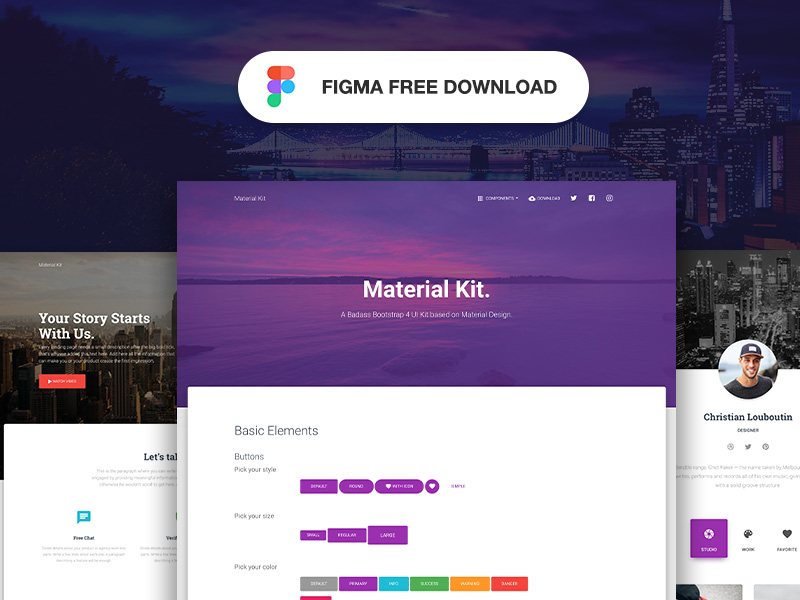
Not a finished website but a free UI kit based on Material Design, shown with a purple photo hero, a profile page and buttons in every size and colour. Kits like this speed up startup sites and admin areas. Change the type, colours and imagery, or your site will look like everyone else’s. See the shot on Dribbble.
What today’s best websites do differently
Dribbble rewards a beautiful desktop screenshot. Real websites are used on phones, on slow connections and by people with keyboards and screen readers. That is where the gap is biggest.
- Mobile first: on most consumer sites, phones bring the majority of visits. Good teams design the small screen first, so menus, forms and buttons work with a thumb. Almost every shot above shows desktop only.
- Performance: Google measures loading speed, responsiveness and layout shift as Core Web Vitals. That means WebP or AVIF images, SVG illustrations, fewer web fonts and no autoplay video in the hero. Heavy 3D scenes and huge PNG gradients look great in a shot and slow a real page down.
- Accessibility: WCAG asks for a contrast ratio of at least 4.5:1 for body text. Thin pale grey text and white text on light gradients, common above, usually fail. Add visible focus states, real alt text and form labels. The European Accessibility Act now covers many online shops and services sold in the EU.
- Real content first: layouts built around lorem ipsum break when real copy arrives. Write the headline and key sections before the design. Placeholder text hides problems until launch.
- Fewer sliders, clearer choices: carousels and hidden menus bury content. Show the key message and one main action without making people click to find them.
Tips for using website design examples
- Pick examples from your site type. A SaaS page needs sign-ups, a restaurant needs bookings and a shop needs sales. Not sure which you are? Read about the different types of websites.
- Borrow patterns, not pixels. Take the idea, such as a postcode field in the hero or a client and services table on a case study, and design it in your own brand.
- Design mobile alongside desktop. If a hero only works at 1440px wide, it does not work.
- Check type and contrast early. Body text of at least 16px with strong contrast is cheaper to plan than to fix. Our font pairing tips help with the rest.
- Set a page weight budget for images, fonts and scripts before anyone opens a design tool, and avoid the common web design mistakes.
Working on a software product? See the best SaaS website designs. Building a shop? Read the features every successful ecommerce website has, or compare a landing page vs a product page.
Frequently asked questions
What makes a good website design?
A clear message in the hero, an obvious next step, readable type, a focused palette, fast loading and a layout that works on phones. A site that is slow or hard to read on mobile loses visitors however good it looks on a big screen.
Are Dribbble website designs real websites?
Many are not. Shots are often concepts or early drafts made to show an idea. Use them for layout and style ideas, not as proof that a design performs well.
Can I copy a website design I like?
Use it as a reference, not a template. Common patterns such as a hero with a search bar are fine to reuse, but the artwork, photos and copy belong to their creators. Build your own version around your brand and content.
Where can I find more web design examples?
Dribbble and Behance are good for visual ideas. For working sites, look at galleries that link to live websites and at companies in your own industry. Always check a site on your phone before you use it as a reference.
Need a website designed for a client?
Inkyy is a white label design and development team for agencies. Our in-house designers and developers build fast, accessible, mobile-first websites that you deliver under your own brand. See our design services or book a 15-minute call.
 Book a Meeting