



Speed: Free Sport App UI Kit for Adobe XD
 3 min read
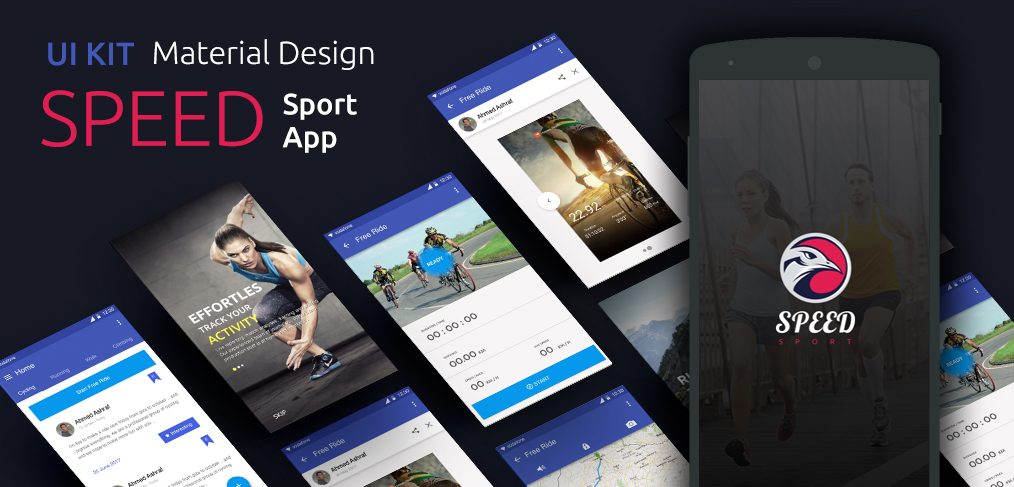
Speed is a free sport app UI kit for Adobe XD, designed by Mahmoud Ash. It is a Material Design kit for an Android app where people track rides, follow a feed and join sport events.
The original Google Drive folder we linked to is gone, so the download has moved to the designer’s own pages. Below is what the screens show, where to get the file and how to open it now that Adobe XD is no longer being developed.
What the Speed kit looks like
The cover is titled “UI Kit Material Design: Speed Sport App” and fans out tilted Android screens on a dark navy background. The app itself uses an indigo app bar, white cards and a bright blue action button, with full-bleed sport photos on the welcome and ride screens. The original description lists these screens:
- Welcome: three slides with a photo and short text over it. The cover shows one with an athlete and a Skip link.
- Login and sign up: pages with all the inputs you need.
- Home: a feed with tabs such as Cycling and Running, plus events, and a pop-up for when someone is interested in an event.
- Free Ride: a start page and a finished page that show duration, distance, speed and average speed, with a round Ready button, a large timer, a blue Start button and a map.
The original post counted 12 screens. We have not been able to open the current file to confirm that number.
Where to get the file
Mahmoud Ash shared the kit as a free download. It sits on his Dribbble shot and on his Behance project, where the download button of the kit’s listing at Freebie Supply also points. Both pages are the designer’s own, so they are the safest place to get the latest copy. The kit was described as having clean layers. We did not find any licence terms beyond “free”, so check with the designer before using it in paid client work.
Opening it in Adobe XD or Figma
Adobe XD is in maintenance mode. Adobe still fixes bugs and security issues, but it is not adding new features. If XD is installed on your machine, the file opens as normal.
To bring the screens into Figma, the Convertify plugin can import an .xd file into a new Figma page, with its layers, text and images. Check the plugin page for current pricing. Alternatively, export the screens you need from XD as SVG, drag them into Figma and rebuild the text styles.
Who it suits
The kit fits a cycling or running tracker, a club or event app, or a fitness community with a social feed. It follows the Material Design look of 2017, with an app bar and flat blue buttons, so refresh the type, icons and spacing if you want a current Android feel. Test the white text over photos for contrast, and add the screens a real tracker needs, such as history, settings and permissions for location. Our fundamental rules of mobile app design are a good checklist.
More free fitness and mobile kits
Browse all our free Adobe XD kits, or try these related files:
- Power free fitness XD template, for a gym or fitness website
- Smartwatch free UI kit for Adobe XD, for activity and watch screens
- Taxi app free UI XD kit, another app with maps and live trips
- Adobe XD mobile UI kit, with more general app screens
Need a mobile app designed for a client?
Inkyy is a white label design and development team for agencies. Our in-house designers create mobile apps and websites that you present under your own brand. See our design services or book a 15-minute call.


