



Find You: Free Social App Landing Page for Adobe XD
 3 min read
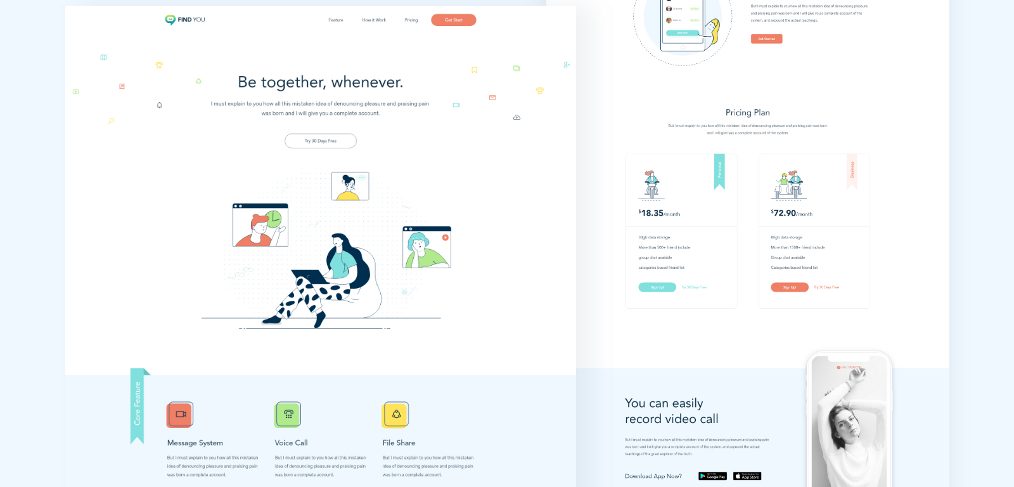
Find You is a free social app landing page for Adobe XD, designed by Ruhul Amin. It is a single long page for a chat and video-call app, drawn with light line illustrations on white and pale blue, with coral and teal buttons.
The original Dropbox download still works. Below is what the page contains, what is inside the file and how to open it now that Adobe XD is no longer being developed.
What the Find You landing page looks like
The page starts with a slim top bar: the Find You logo, links for Feature, How it Work and Pricing, and a coral Get Start button. The hero headline says “Be together, whenever.” above a Try 30 Days Free button and an illustration of a woman on a laptop, surrounded by three video-call windows. Small coloured icons float across the white background. The rest of the page runs in this order:
- Core features: a pale blue band with three icon tiles, Message System, Voice Call and File Share.
- Create account: a phone illustration of a sign-up form, with an email field and a Get Started button.
- Invite friends: a phone showing a friends list with accept buttons.
- Pricing plan: two cards with sample prices of $18.35 and $72.90 a month, storage and friend limits, and Sign Up buttons.
- App download: a phone with a black and white video call, and Google Play and App Store badges.
- Newsletter and footer: a subscribe box, quick links and social icons.
What is in the download
- File: one Adobe XD file, Find you.xd, of about 4 MB, shared on Dropbox.
- Artboard: one artboard called Main, 1920 x 6306 px.
- Fonts: Avenir LT Std and Rubik for text, and the Line Awesome icon font. Rubik is free from Google Fonts. Avenir LT Std is a commercial typeface, so you need a licence or a replacement.
- Content: the body text is placeholder copy, and the prices and plan details are samples.
- Price: free. No licence terms were stated with the file, so check with the designer before using it in paid client work.
Opening it in Adobe XD or Figma
Adobe XD is in maintenance mode. Adobe still fixes bugs and security issues, but it is not adding new features. If XD is installed on your machine, the file opens as normal, and the single Main artboard scrolls from top to bottom.
To bring the file into Figma, the Convertify plugin can import an .xd file into a new Figma page, with its layers, text and images. Check the plugin page for current pricing. Alternatively, export the artboards you need from XD as SVG, drag them into Figma and rebuild the text styles.
Who it suits
The layout fits a messaging, video or community app that wants a friendly, light brand. The strongest idea is the order: one promise, three features, a two-step explanation of how to start, then price. If you build on it, put real app screens in the phone frames and write your own copy in place of the placeholder text. Make the coral buttons large enough to tap on a phone, and plan a mobile version, as the file only has the 1920 px desktop layout. Our landing page vs product page article helps you decide what the page should do.
More free landing page kits
Browse all our free Adobe XD kits, or try these related files:
- Awesome App Landing page Template, a dark app landing page by Inkyy
- Task management web-app landing page free XD, for a productivity tool
- Freebie Adobe XD Landing page Kit, for a general starting point
- Free Chatbot UI kit for Adobe XD, for chat screens
Need an app landing page designed for a client?
Inkyy is a white label design and development team for agencies. Our in-house designers create landing pages and app websites that you present under your own brand. See our design services or book a 15-minute call.


