



Smoofy: Free Smoothie App UI Kit for Adobe XD
 3 min read

Smoofy is a free smoothie app UI kit for Adobe XD, designed by Ernesto Alonso. It is a mobile concept for a smoothie shop where customers browse drinks, open a product, add it to a cart and pay, all in soft greens with rounded shapes.
Below is what the screens show, where to download the file, and how to open it now that Adobe XD is no longer being developed.
What the Smoofy kit looks like
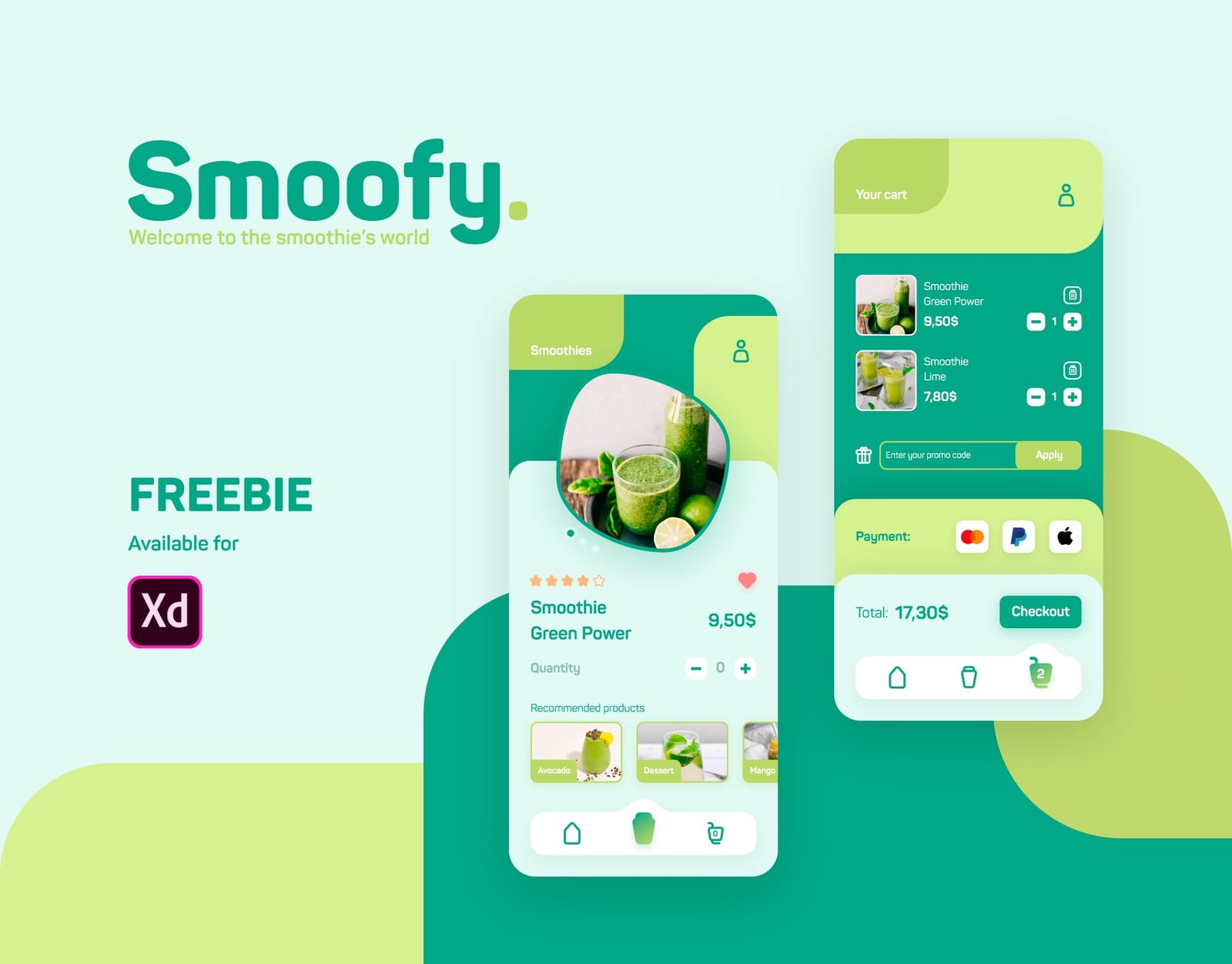
The palette mixes a deep teal green, a lime green and a pale mint background. Cards and screen headers use large rounded corners and leaf-like blob shapes, and the type is a rounded sans serif. Drink photos sit in soft frames with a small label on each. The two previews show these screens:
- Side menu: a round avatar with the user name, then Profile, Messages, Promotions, Favorites and Categories, each with a line icon.
- Smoothies list: a Specialties row of large drink cards (Green power, Avocado, Lime), then an All products list with photo, name and price, plus heart and star icons for favourites and ratings.
- Product page: a big drink photo in a blob frame with slider dots, a star rating, the name and price, a quantity stepper and a Recommended products row.
- Cart: two items with quantity buttons and a delete icon, a promo code field with an Apply button, payment icons for card, PayPal and Apple Pay, a total and a Checkout button.
- Navigation: a bottom bar with home, drinks and cart icons, where the cart shows a badge with the item count.
File details
- Format: Adobe XD, about 13.4 MB according to the Gumroad listing.
- Platform: mobile app screens.
- Designer: Ernesto Alonso, who also shows the project on Behance as “UI Design – Smoothie Shop App”.
- Price: free on Gumroad, which works on a pay what you want basis, so you can enter 0. Gumroad asks for an email address to send the file.
- Licence: no licence terms are stated with the download, so check with the designer before you use it in paid client work.
- Content: product names, prices and photos are sample content to replace with your own.
Opening it in Adobe XD or Figma
Adobe XD is in maintenance mode. Adobe still fixes bugs and security issues, but it is not adding new features. If XD is installed on your machine, the file opens as normal.
To bring the screens into Figma, the Convertify plugin can import an .xd file into a new Figma page, with its layers, text and images. Check the plugin page for current pricing. Alternatively, export the artboards from XD as SVG, drag them into Figma and rebuild the text styles. Turn the product card, the quantity stepper and the bottom bar into components first, as almost every screen repeats them.
Who it suits
Smoofy fits a juice bar, a smoothie chain or a healthy food delivery start-up that wants a light, fresh ordering app. The flow from list to product to cart is already there, which makes it a good base for a click-through prototype. You will still need screens for sign-in, order tracking and an empty cart, and a real product photo set. Our mobile app design tips cover what to plan before you add them. Also check the white text on lime green and the small labels for contrast.
More free food and mobile UI kits
Browse all our free Adobe XD kits, or try these related files:
- Fresh food free mobile XD UI kit, for a grocery or produce app
- Restaurant finder app free XD mobile UI kit, for food discovery screens
- Organic natural health Adobe XD UI kit, another green, nature-led style
- E-commerce free UI kit for Adobe XD, for more cart and checkout layouts
Need a mobile app designed for a client?
Inkyy is a white label design and development team for agencies. Our in-house designers create mobile apps and ordering flows that you present under your own brand. See our design services or book a 15-minute call.


