



Project Management Dashboard: Free UI Kit for Adobe XD
 3 min read
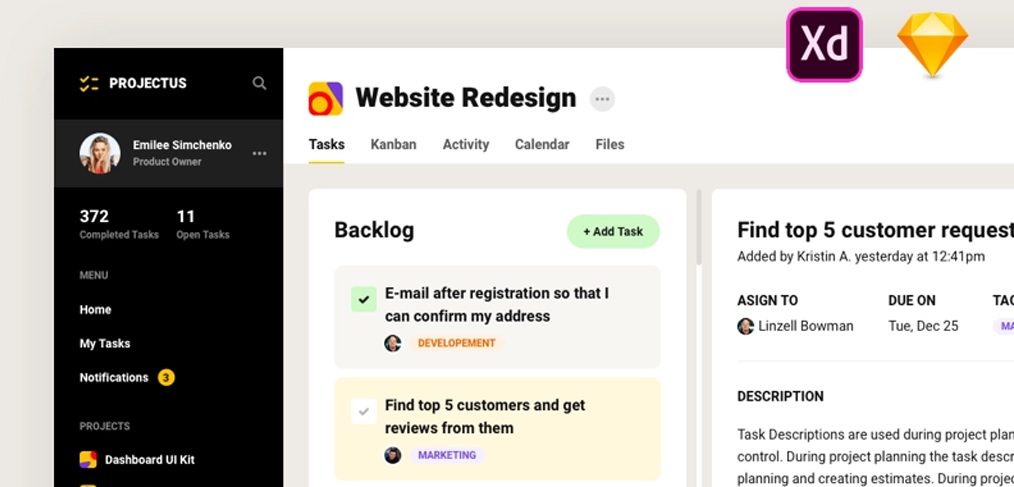
This project management dashboard is a free UI kit for Adobe XD, designed by Yuri G. It has 12 screens for a desktop task and team tool, with a dark sidebar, a backlog, a calendar, files and a home page of charts.
The Dropbox folder we first linked to no longer opens. The designer still shares the kit on his own pages, which are linked below, along with what the screens show and how to open an XD file today.
What the dashboard looks like
The cover crops into one screen. A black sidebar carries a “Projectus” logo, the user profile with counters for 372 completed and 11 open tasks, and a menu with Home, My Tasks and Notifications. The main area is white and grey with soft cards and small coloured tags. For a project called Website Redesign, a row of tabs offers Tasks, Kanban, Activity, Calendar and Files. Beneath them, a Backlog column lists tasks with green, yellow and purple tags, and a detail panel shows who a task is assigned to, its due date and a description. The Adobe XD and Sketch logos in the corner show that the kit comes in both formats.
The original listing describes the rest of the kit:
- Left menu: your projects, teams and notifications, and the counts for incoming, open and completed tasks.
- Project views: todos, backlog, threads, calendar, files, activity and the members of a single project.
- Other screens: add a new team, a profile page and a home page with charts and today’s tasks.
Where to get the file
Yuri G shared the kit as a free download on Dribbble, where it is called Project Management Tool UI Kit, and he has a related project on Behance. Use the download on those pages, as they are the designer’s own and the most likely to stay current. We could not open the current file, so the 12 screens come from the original listing and we cannot give a file size. We did not find any licence terms beyond “free”, so check with the designer before using it in paid client work.
Opening it in Adobe XD or Figma
Adobe XD is in maintenance mode. Adobe still fixes bugs and security issues, but it is not adding new features. If XD is installed on your machine, the file opens as normal.
To bring the screens into Figma, the Convertify plugin can import an .xd file into a new Figma page, with its layers, text and images. Check the plugin page for current pricing. The Sketch version is another route, as Figma can open .sketch files directly.
Who it suits
The kit fits a task manager, a team workspace, an agency client portal or an internal tool. The sidebar and project tabs give a clear structure, and the backlog and detail panel are the parts most tools need. If you build on it, design the states the kit may not show, such as empty projects, long task names, overdue tasks and a mobile layout. Keep tag colours paired with text, so the meaning does not rely on colour alone.
More free dashboard kits
Browse all our free Adobe XD kits, or try these related files:
- Free dashboard UI kit for XD, with charts and tables
- Free Adobe XD dashboard template, another desktop dashboard
- Profile analytics free Adobe XD UI kit, for user and stats screens
- CRM website XD template, for a client management product
Need a dashboard or web app designed for a client?
Inkyy is a white label design and development team for agencies. Our in-house designers create dashboards, web apps and websites that you present under your own brand. See our design services or book a 15-minute call.


