



Waplant: Free Plant App UI Kit for Adobe XD
 3 min read
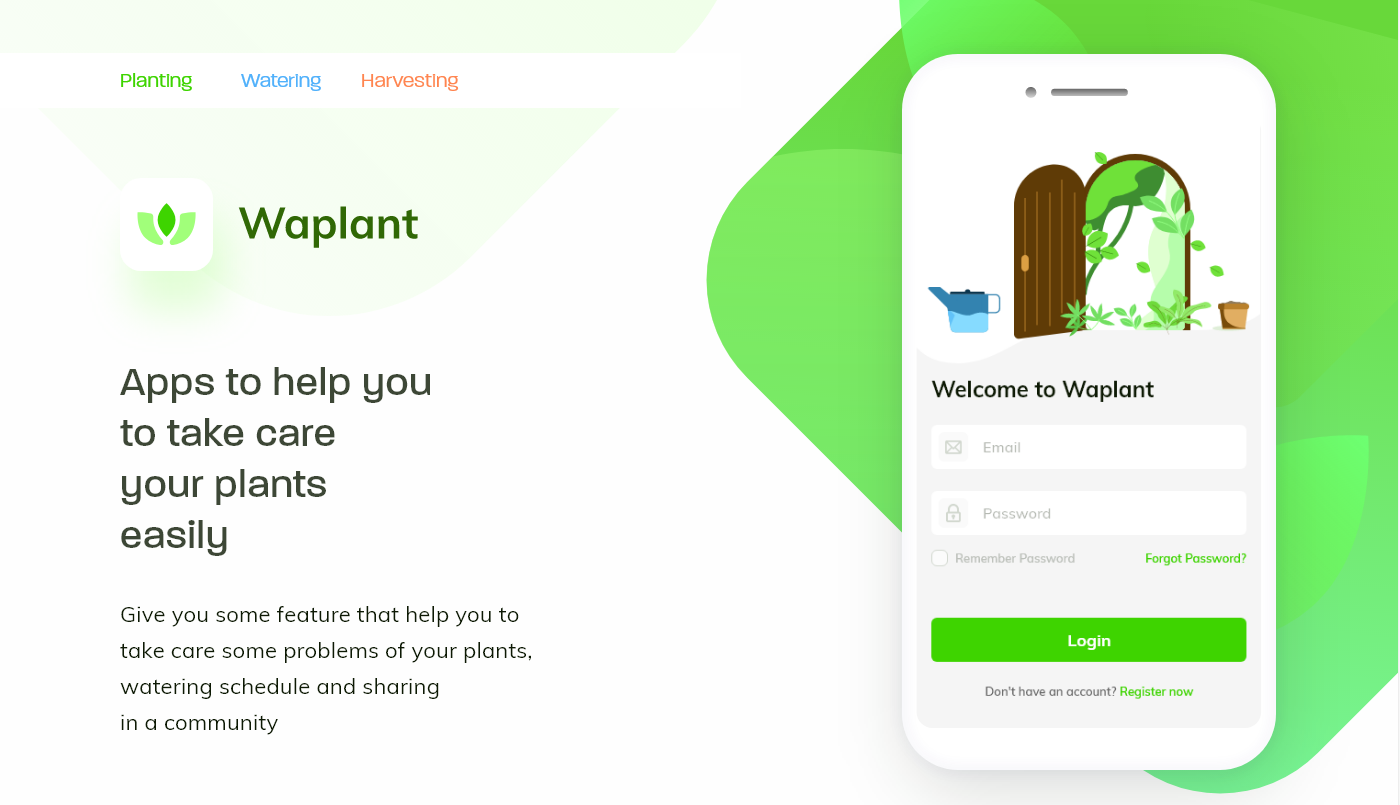
Waplant is a free plant app UI kit for Adobe XD, designed by Seto Febriant. It is a mobile app concept for people who keep house plants: it reminds you when to water, helps you plan care, and lets you get advice from articles and a community.
Below is what the preview shows, where to download the file, and how to open it now that Adobe XD is no longer being developed.
What the Waplant kit looks like
The style is fresh and friendly: white screens, soft green blobs in the background, a bright green for buttons and links, and a rounded sans serif. The app icon is a simple three-leaf sprout on a white tile. The preview shows these parts:
- Presentation header: three topic labels (Planting, Watering, Harvesting) in green, blue and orange, the Waplant icon and wordmark, and the tagline “Apps to help you to take care your plants easily”.
- Login screen: a flat illustration of an arched door overgrown with plants, a watering can and a pot, then “Welcome to Waplant”, email and password fields with icons, a Remember Password checkbox, a Forgot Password link, a green Login button and a Register now link.
- App idea: according to the designer, the app covers a watering schedule, help from articles and sharing with a plant community.
File details
- Format: one Adobe XD file, Waplant Free UI kit.xd, about 4.4 MB.
- Platform: mobile app screens.
- Designer: Seto Febriant, who also posted the kit on Dribbble as “Waplant Mobile Apps Free UI kit”.
- Price: free to download from Dropbox. No licence is stated with the download, so check with the designer before using it in paid client work.
- Content: text and labels are sample content to replace with your own.
Opening it in Adobe XD or Figma
Adobe XD is in maintenance mode. Adobe still fixes bugs and security issues, but it is not adding new features. If XD is installed on your machine, the file opens as normal.
To bring the screens into Figma, the Convertify plugin can import an .xd file into a new Figma page, with its layers, text and images. Check the plugin page for current pricing. Alternatively, export the artboards from XD as SVG, drag them into Figma and rebuild the text styles. Turn the input fields and the green button into components early, as every new screen will reuse them.
Who it suits
Waplant fits a garden centre, a plant delivery shop or a start-up building a plant care or reminder app. The illustration and green palette make it feel calm and approachable, which suits a hobby audience. Treat it as a concept: you will still need screens for a plant library, care reminders, notifications and the community feed. Our mobile app design tips cover what to plan before you add them. Also check the light grey placeholder text and green links for contrast on white.
More free mobile UI kits
Browse all our free Adobe XD kits, or try these related files:
- Organic natural health Adobe XD UI kit, another green, nature-led style
- Fresh food free mobile XD UI kit, for a grocery or produce app
- 10 login screen templates for Adobe XD, for more sign-in layouts
- 7 fundamental rules of mobile app design
Need a mobile app designed for a client?
Inkyy is a white label design and development team for agencies. Our in-house designers create mobile apps and product screens that you present under your own brand. See our design services or book a 15-minute call.


