


Login Page Template: 10 Free Login Screens for Adobe XD
 3 min read

This free login page template for Adobe XD gives you 10 mobile sign in screens, each with its own layout and visual style. It is now shared by the designer studio ash.Studio on Gumroad under the name “Login app pages – Material Design”.
The Google Drive link we used to share has stopped working, so this page now points to the designer’s own download. Below is what the screens look like, how to get the file and how to turn one of them into a solid login screen for a real app.
What the 10 login screens look like
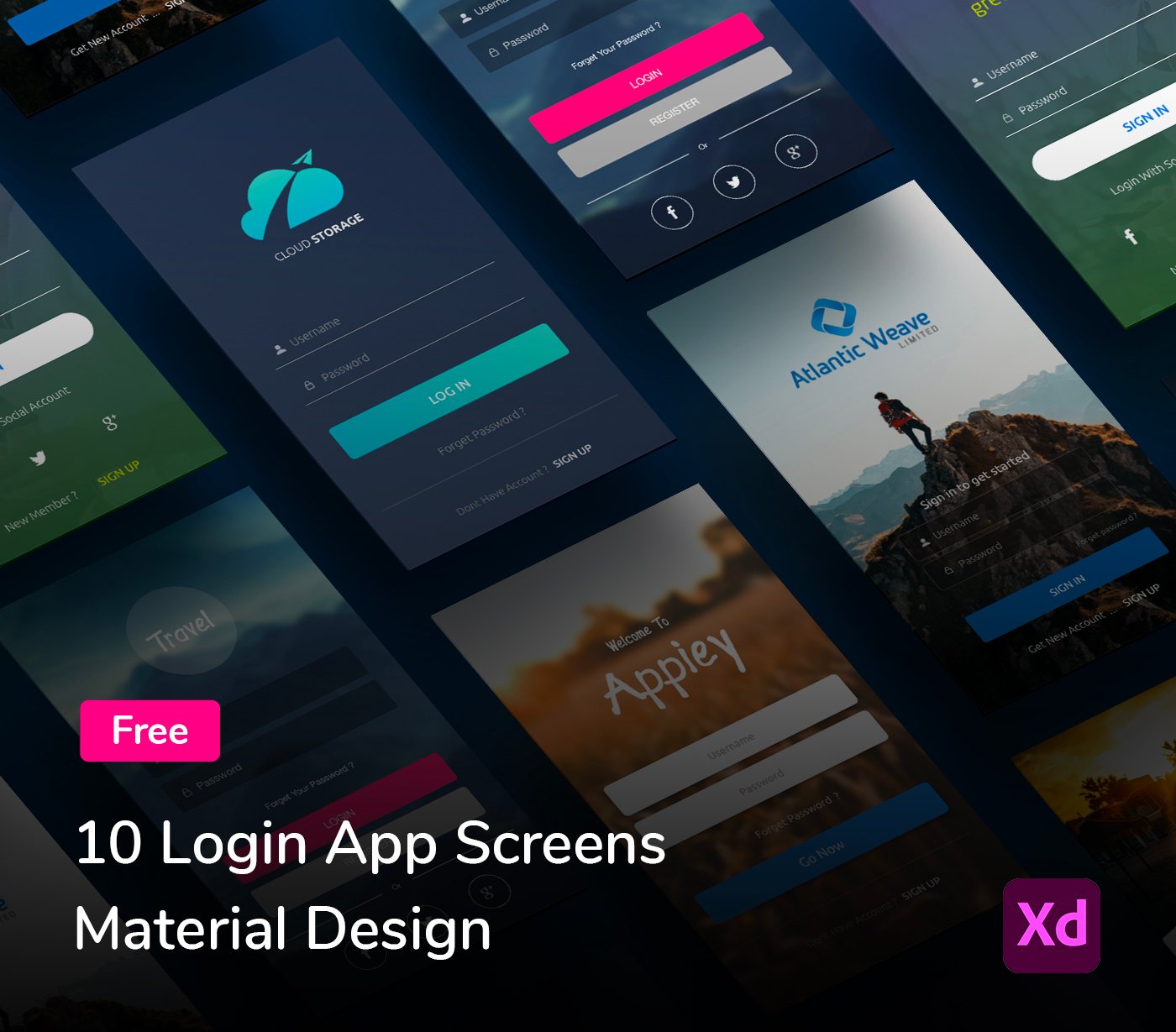
Every screen is a full-height mobile sign in page with a username field, a password field, a main button and a link to sign up. What changes from one to the next is the mood. Most of them sit on a photo or a dark background, which is a good way to show a brand before the user has even logged in. The ones you can see in the previews include:
- Travel: a blurred mountain photo, a round logo, a pink Login button, a grey Register button and round Facebook, Twitter and Google+ icons.
- Appiey: a warm, blurred field photo with a hand-drawn “Welcome To Appiey” title, white rounded fields and a blue Go Now button.
- Cloud Storage: a flat dark navy screen with a teal cloud logo, underlined fields and a teal Log In button.
- Atlantic Weave: a hiker standing on a rock above the clouds, with a blue Sign In button at the bottom.
- greenpower: a leaf logo with a white pill-shaped Sign In button, social login and a yellow Sign Up link.
How to download the template
- Where: the designer’s Gumroad page, which describes it as a freebie of 10 login screens, each with a unique style and layout.
- Price: free. Gumroad shows it as “$0+”, so type 0 in the price box to get it without paying. Gumroad asks for an email address to send the file.
- Format: an Adobe XD file, as the preview’s XD badge shows.
- Images: the background photos and brand names, such as Appiey and Atlantic Weave, are sample content. Swap them for your own before you show a client.
Opening it in Adobe XD or Figma
Adobe XD is in maintenance mode. Adobe still fixes bugs and security issues, but it is not adding new features. If XD is installed on your machine, the file opens as normal.
To bring the screens into Figma, the Convertify plugin can import an .xd file into a new Figma page, with its layers, text and images. Check the plugin page for current pricing. Alternatively, export the screens you need from XD as SVG, drag them into Figma and rebuild the text styles.
Turning a template into a good login screen
Good login screen design is mostly about removing friction. Pick the layout that matches the brand, then check it against how people really sign in today:
- Contrast: grey text and thin underlines on a photo are hard to read. Darken the photo or add a solid panel behind the form.
- Fields: use an email field rather than a username if that is what the app expects, and add a show password toggle.
- Social and passkey sign in: Google+ no longer exists, so replace those icons with Sign in with Apple, Google or a passkey option.
- Errors and states: design the wrong password, loading and forgot password screens too. The template only covers the default state.
- Tap targets: keep buttons and links large enough to hit with a thumb, especially “Forgot password”.
Our fundamental rules of mobile app design and UX and UI mobile app design tips are a useful checklist before you build on it.
More free login and UI kits
Browse all our free Adobe XD kits, or try these related files:
- Creative login screen bundle made in Adobe XD, for more sign in layouts
- UI elements collection for Adobe XD, for fields, toggles and controls
- Modern buttons free XD UI kit, to restyle the main button
- Vault free security UI kit, for screens around account security
Need a mobile app designed for a client?
Inkyy is a white label design and development team for agencies. Our in-house designers create mobile apps, from the first login screen to the full product, that you present under your own brand. See our design services or book a 15-minute call.


