



Book App UI Kit for XD: Dark Book Review App Concept
 3 min read
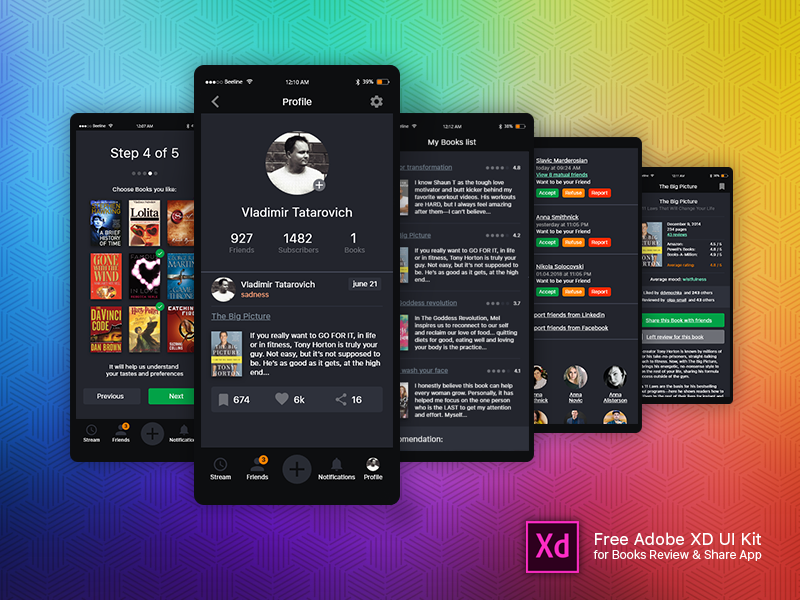
This book app UI kit for Adobe XD was designed by Vladimir Tatarovich for a book review and sharing app. It is a dark mobile concept of 19 screens where readers pick the books they like, post short reviews, follow friends and share titles.
The free download is no longer available, so we keep this page as a design reference. Below is what the screens show, what changed with the file, and where to find similar free kits that you can still download.
What the book review app looks like
The screens use a charcoal background with white text, grey cards and green for the main actions, with small orange and red buttons in the friends list. Five of the 19 screens appear in the preview:
- Onboarding: “Step 4 of 5” asks you to choose books you like from a grid of covers, with green ticks on the chosen ones and Previous and Next buttons.
- Profile: a round photo, counts for friends, subscribers and books, and a review card with a mood label, cover, excerpt and like, comment and share counts.
- My books list: review excerpts with small covers and star ratings.
- Friends: people who want to be your friend, with Accept, Refuse and Report buttons, plus options to import friends from LinkedIn and Facebook.
- Book detail: book facts, ratings from several stores, an average mood and buttons to share the book or leave a review.
A bottom bar with Stream, Friends, a central plus button, Notifications and Profile ties the app together.
Is the book app UI kit still available?
No. The designer shared the file as a ZIP on Dropbox, and Dropbox now reports that file as deleted. We could not find a current copy from Vladimir Tatarovich anywhere else. His original shot is still online, so you can view the screens and credit the designer there.
If you already have the file, it was shared as a free resource and the designer asked people who use it to thank him. No other licence terms were stated. The book covers in the preview belong to their publishers, so replace them with your own content.
Working with an old XD file
Adobe XD is in maintenance mode. Adobe still fixes bugs and security issues, but it is not adding new features. If XD is installed on your machine, an existing copy of the file opens as normal.
To move it into Figma, the Convertify plugin can import an .xd file into a new Figma page, with its layers, text and images. Check the plugin page for current pricing. Alternatively, export the screens from XD as SVG, drag them into Figma and rebuild the text styles.
What to borrow from this design
Even without the file, the layout is a useful reference for a reading community, a book club app or a review feature in a bookshop app. The step-by-step taste picker is a good way to start a recommendation feed. The review card puts the cover, mood and reactions in one compact block. If you build something similar, check the contrast of the grey text on the dark background, and make the small Accept, Refuse and Report buttons large enough to tap.
Free book and reading kits you can download
Browse all our free Adobe XD kits, or try these related files:
- Bookstore app free UI kit for XD, for browsing and buying books
- 20 blog and reader mobile screens for Adobe XD, for reading layouts
- Best free book mockups, to present covers in your app concept
- Fundamental rules of mobile app design, before you build your own
Need a mobile app designed for a client?
Inkyy is a white label design and development team for agencies. Our in-house designers create mobile apps and community features that you present under your own brand. See our design services or book a 15-minute call.


