



Blog/Reader: Free Blog App UI Kit for Adobe XD
 3 min read
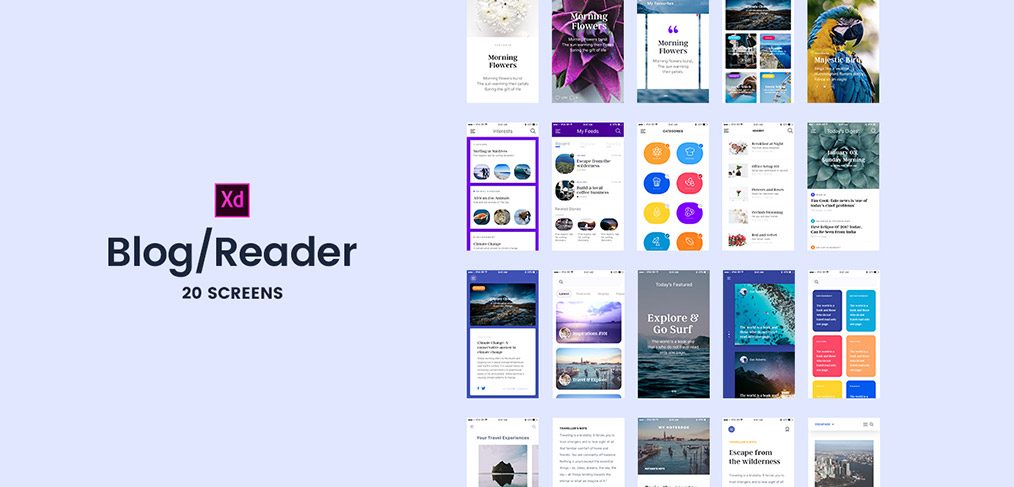
Blog/Reader is a free blog app UI kit for Adobe XD, shared by Hannah Milan on Dribbble. It has 20 mobile screens for a reading or news app, with post pages, category lists, listings, featured stories, bookmarks and a favourites page.
The original Dropbox download still works. Below is what the screens show, what is inside the file and how to open it now that Adobe XD is no longer being developed.
What the blog app UI kit looks like
The cover is lavender with the XD logo and “Blog/Reader, 20 screens” in black, beside a grid of small screens. Most are white with photo headers, set in a serif for headlines and a clean sans for the interface. A few use full-bleed photos or bright cards in purple, orange, blue and green. Reading the text layers in the file, the screens include:
- Home and feeds: Today’s Featured, Today’s Digest, Headlines, My Feeds, Latest, Popular and Recent tabs.
- Categories: a grid of coloured tiles for topics such as business, sport, science, travel and cooking.
- Story pages: a large photo, author and time, view and comment counts, a read full story link and related stories.
- Personal: Bookmarks, My Favourites, Interests and a notebook section.
What is in the download
- File: Blog_Reader.zip on Dropbox, about 126 MB, holding one Adobe XD file.
- Screens: 20 artboards at 375 x 667 px, the iPhone 6 and 7 size. Scale them up if you design for newer phones.
- Why it is heavy: the file embeds about 40 full-size photos.
- Fonts: text is set in SF UI Text and Argent CF. Argent CF is not bundled with the file and, as far as we know, is a paid typeface, so install it first or pick a replacement.
- Content: headlines, bylines and photos are sample content. Replace them before you show the design to a client.
- Price: free. No licence terms were stated, so check with the designer before using it in paid client work.
Opening it in Adobe XD or Figma
Adobe XD is in maintenance mode. Adobe still fixes bugs and security issues, but it is not adding new features. If XD is installed on your machine, the file opens as normal, although the embedded photos make it slow to load.
To bring the screens into Figma, the Convertify plugin can import an .xd file into a new Figma page, with its layers, text and images. Check the plugin page for current pricing. Alternatively, export the screens from XD as SVG, drag them into Figma and rebuild the text styles.
Who it suits
The kit fits a news reader, a magazine or a personal blog app. The strongest parts are the story page and the category grid, as both show how to mix big photos with readable text. If you build on it, add what a real reading app needs, such as search, settings, offline reading and text size controls, and check the small captions for contrast. Our mobile app design tips cover what to plan before you extend it.
More free reading and blog kits
Browse all our free Adobe XD kits, or try these related files:
- Creative blog free XD template, for the web version of a blog
- Winter travel blog landing page UI kit, for a travel blog
- Free UI kit for a book review mobile app, for reviews and reading lists
- Adobe XD mobile UI kit, for general app screens
Need a content app designed for a client?
Inkyy is a white label design and development team for agencies. Our in-house designers create mobile apps and blogs for media and publishing brands that you present under your own brand. See our design services or book a 15-minute call.


