



Sky: Free Travel Website UI Kit for Adobe XD
 3 min read
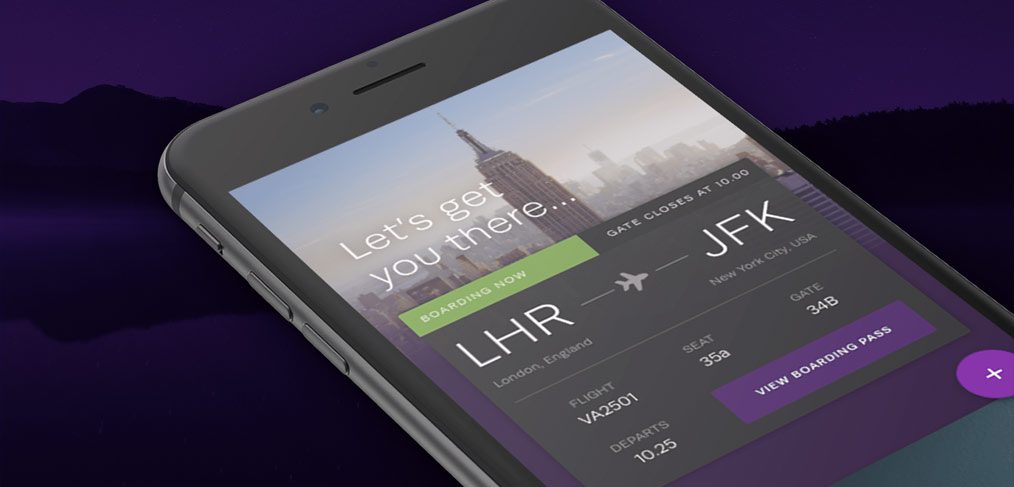
Sky is a free travel website UI kit for Adobe XD, designed by Sarah Parmenter. It gives you the pages a travel app or booking site needs, from hotel, flight and activity listings to buttons and icons for sharing and social links.
The download sits on the Behance project page. Below you will find what the preview shows, what to expect from the file, and how to open an .xd file now that Adobe XD is no longer being developed.
What the Sky preview shows
The cover image shows a phone at an angle against a dark purple night landscape. The screen is a boarding pass. A photo of the New York skyline sits under the line “Let’s get you there…”, with a green “Boarding now” label and a route from LHR (London, England) to JFK (New York City, USA) joined by a plane icon. Below it are the flight number VA2501, seat 35a, gate 34B and the departure time. A purple “View boarding pass” button and a round purple plus button finish the screen. The type is thin and light, and the colours are mostly purple, white and dark grey, with one green label.
What is in the kit
- Scope: Adobe featured Sky in its roundup of free XD kits and describes it as a kit for travel apps and websites, with hotel, flight and activity listings and buttons and icons for sharing content. Our original post listed 27 full screens and 80 components for web and mobile, with XD prototype links, plus flight info, messages, profile, payment and booking pages. We could not recheck those counts, so confirm them on the Behance page.
- Format: an Adobe XD file, downloaded from the Behance project page.
- Credit: designed by Sarah Parmenter. Read Adobe’s roundup for how it was introduced.
- Sample content: expect photos, flight details and copy that are placeholders. Replace them before you show the design to a client.
- Price: free. No other licence terms were stated in our original post, so read the Behance page before you use the kit in paid client work.
Opening the file in Adobe XD or Figma
Adobe XD is in maintenance mode. Adobe still fixes bugs and security issues, but it is not adding new features. If XD is installed on your machine, the file opens as normal.
If your team works in Figma, the Convertify plugin can import an .xd file into a new Figma page, with its layers, text and images. Check the plugin page for current pricing. Another route is to export the artboards from XD as SVG, drag them into Figma and rebuild the text styles and spacing by hand.
How to use it for a travel project
The preview shows how a travel kit should feel: one big photo, one key fact per row and one clear action. That makes Sky a good starting point for an airline app, a trip planner or a hotel and activity booking site. A kit gives you layouts, not a product, so add what a real booking flow needs, such as search filters, empty and error states, price changes and a clear cancellation message. Keep text large enough to read on a busy airport floor and check the contrast of light type over photos. Our mobile app design tips are a useful checklist before you extend it.
More free travel kits
Browse all our free Adobe XD kits, or try these related files:
- Travel app UI kit for Adobe XD, a light, simple 12-screen kit
- WindSail free travel UI kit, for flight search and booking
- Footsteps free travel website UI kit, for a trip-planning site
- Travel agency landing page XD template, for a one-page agency site
Need a travel app or website designed for a client?
Inkyy is a white label design and development team for agencies. Our in-house designers create travel apps and booking websites that you present under your own brand. See our design services or book a 15-minute call.


