



Light Travel App UI Kit for Adobe XD by Tom Jose
 3 min read
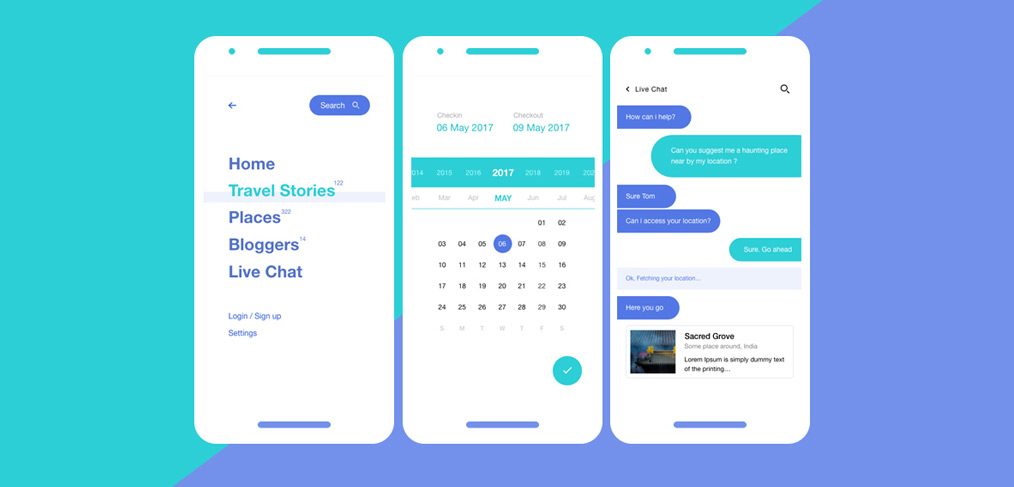
This light travel app UI kit for Adobe XD was shared by Tom Jose on Dribbble. It is a set of 12 mobile screens for a travel app, in white with cool turquoise and blue accents, covering a menu, search, a booking calendar, chat, bloggers and single place pages.
The original Google Drive download no longer works, so we keep this page as a design reference. Below is what the screens show, what happened to the file and where to find similar travel kits you can still download.
What the light travel app UI kit looks like
The cover puts three white phone screens on a diagonal turquoise and periwinkle background. The first is a menu with a small search pill and large blue links for Home, Travel Stories, Places, Bloggers and Live Chat, with Login / Sign up and Settings in small type below. The second is a booking calendar with check-in and check-out dates and a teal confirm button. The third is a live chat with blue and teal message bubbles and a place card for Sacred Grove. The cover also shows pale grey labels, which are worth checking for contrast.
The original post listed the full set like this, and we could not check it against the file:
- Account: sign in and login pages.
- Navigation: the menu and a search page, with a search calendar.
- Content: chat, bloggers, articles and a single place page.
- Booking: a booking page and a booking calendar.
Is the travel app UI kit still available?
We could not confirm a working download. The Google Drive link that this page used to point to now returns a “file not found” page, and the link to the designer’s Dribbble profile no longer loads, so the username has probably changed. Third-party roundups still point to the same dead Drive link.
The kit also has its own Dribbble shot, “Travel App UI Kit (Adobe XD)” by Tom Jose. Dribbble blocks automated checks, so we cannot say whether that page still carries the file. Open it to find out, and credit the designer if you use the file. It was originally shared as free, and we know of no other terms.
Working with an old XD file
Adobe XD is in maintenance mode. Adobe still fixes bugs and security issues, but it is not adding new features. If XD is installed on your machine, an existing copy of the file opens as normal.
To bring the screens into Figma, the Convertify plugin can import an .xd file into a new Figma page, with its layers, text and images. Check the plugin page for current pricing. Alternatively, export the screens from XD as SVG, drag them into Figma and rebuild the text styles.
What to borrow from this design
Three ideas carry over to any travel or tourism app. A full-screen menu with big type keeps navigation to one tap. A date-range calendar that shows check-in and check-out side by side makes a booking easy to follow. Live chat as a main menu item puts support where travellers look first. If you design something similar, add the screens a real booking needs, such as price, payment and confirmation, and test the small grey text and tap sizes. Our fundamental rules of mobile app design are a useful checklist.
Free travel kits you can download
Browse all our free Adobe XD kits, or try these related files:
- Sky Travel UI kit for Adobe XD, for hotels, flights and activities
- Windsail free travel UI kit for Adobe XD, for trip planning
- Navigo transportation XD UI kit, for journeys and routes
- Ticketing app concept UI kit for Adobe XD, for tickets and bookings
Need a travel app designed for a client?
Inkyy is a white label design and development team for agencies. Our in-house designers create mobile apps and booking websites for travel brands that you present under your own brand. See our design services or book a 15-minute call.


