



Pawtastic: Free Pet Website Template for Adobe XD
 3 min read
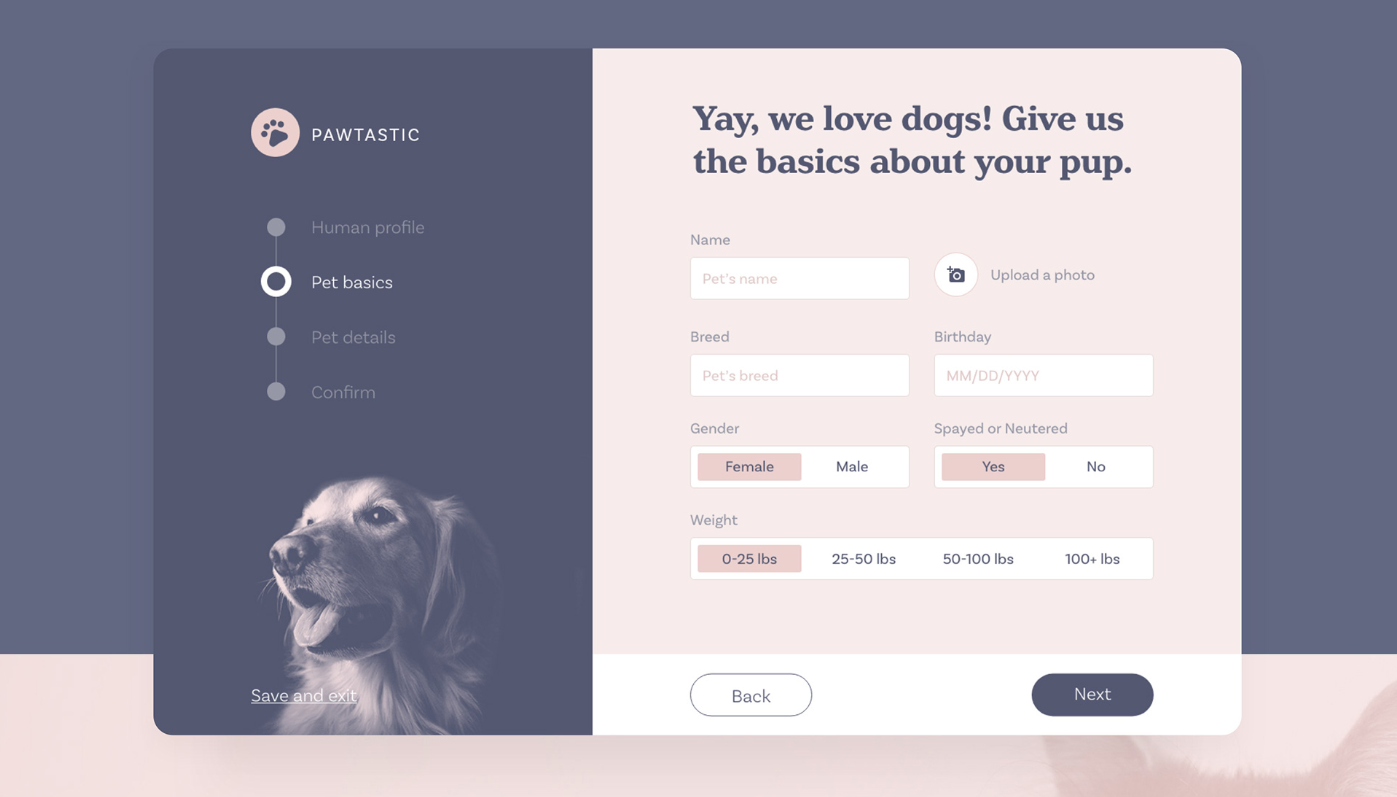
Pawtastic is a free pet website template and UI kit for Adobe XD, designed by UX designer Meagan Fisher and released through Adobe’s series of free XD kits. It is built around a dog care service, with marketing pages, a customer dashboard and a multi-step booking flow.
Below is what the kit includes, how to get it, and how to open it now that Adobe XD is no longer being developed.
What the Pawtastic kit looks like
The palette is a muted slate navy with a soft blush pink, set off by white form fields. Headlines use a warm, chunky serif and the interface text a clean sans serif, which gives the kit a friendly but grown-up tone. The preview shows one screen of the booking flow:
- Progress sidebar: the Pawtastic paw logo, four steps (Human profile, Pet basics, Pet details, Confirm) with the current one highlighted, a tinted photo of a dog, and a Save and exit link.
- Form: the headline “Yay, we love dogs! Give us the basics about your pup.” above fields for name, breed and birthday, plus an Upload a photo button.
- Choice controls: segmented toggles for gender, spayed or neutered, and four weight ranges, with the selected option filled in pink.
- Footer: an outlined Back button and a solid Next button.
According to the creators, the full kit goes well beyond this screen. It combines informational one-page layouts, a dashboard and the booking process, with UI elements for account settings, image grids, profile cards and tiered navigation. As a bonus, it includes 15 wireframes to start a project from.
File details
- Format: Adobe XD.
- Platform: desktop website and web app screens.
- Designer: Meagan Fisher, for Adobe.
- Licence: free for commercial and personal use.
- Content: the brand, text and photos are sample content to replace with your own.
The Behance project page has the full set of preview images and a Download UI Kit button, which fetches the ZIP straight from Adobe’s own download server.
Opening it in Adobe XD or Figma
Adobe XD is in maintenance mode. Adobe still fixes bugs and security issues, but it is not adding new features. If XD is installed on your machine, the file opens as normal.
To bring the screens into Figma, the Convertify plugin can import an .xd file into a new Figma page, with its layers, text and images. Check the plugin page for current pricing. Alternatively, export the artboards from XD as SVG, drag them into Figma and rebuild the text styles. Set up the input field, the segmented toggle and the two button styles as components first, because the booking steps reuse them on every screen.
Who it suits
Pawtastic fits a dog walking or pet sitting service, a grooming salon, a boarding kennel or a vet practice that takes bookings online. The step-by-step form is the strongest part: it asks a few questions per screen and always shows where you are, which keeps long sign-ups manageable. The weights are shown in pounds, so switch them to kilograms for a UK or European audience. Also check the light grey placeholder text and pink selected states for contrast before you hand the design over.
If you are planning the shop side of a pet brand, read our features every successful e-commerce website has.
More free XD kits for pet and booking sites
Browse all our free Adobe XD kits, or try these related files:
- Doglife free UI kit for Adobe XD, another dog-themed kit
- Property booking free Adobe XD template, for more booking layouts
- Free dashboard UI kit for XD, for the account side of a web app
- Wires free Adobe XD wireframe kits, for early layout work
Need a booking website designed for a client?
Inkyy is a white label design and development team for agencies. Our in-house designers create service websites and booking flows that you present under your own brand. See our design services or book a 15-minute call.


