



Gamify: Game Store App UI Kit for Adobe XD
 3 min read
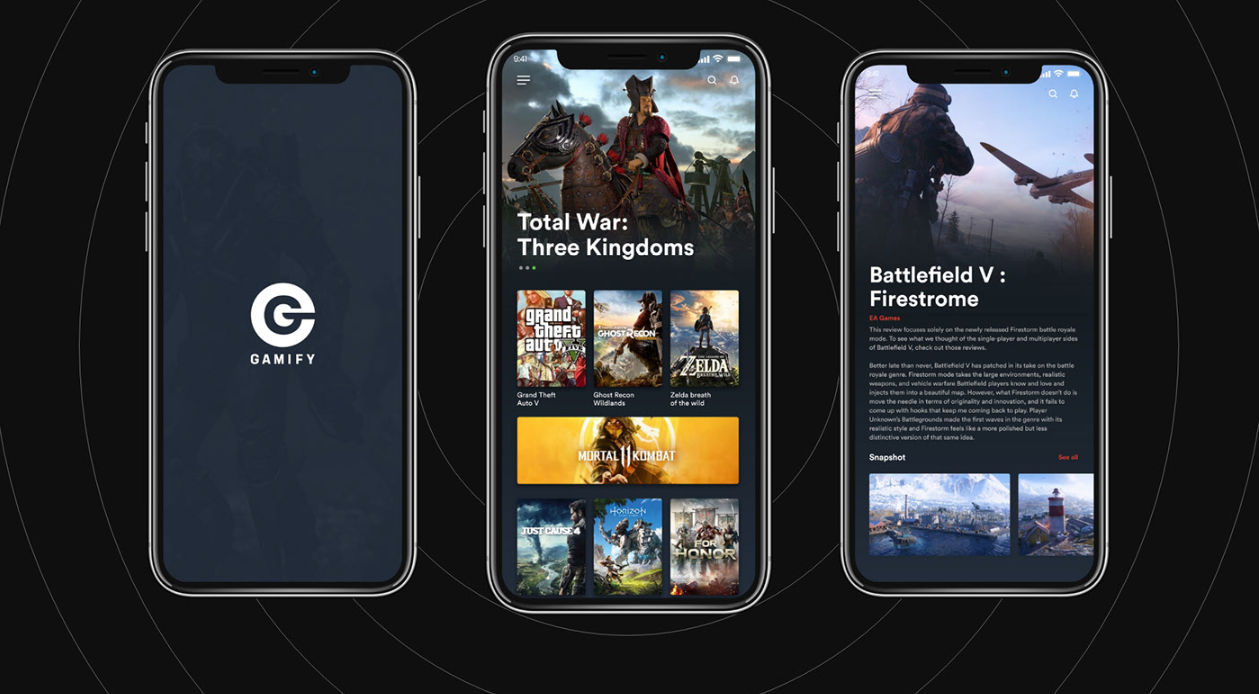
Gamify is a game store app UI kit for Adobe XD, designed by Dilan Gunasekara. It is a dark mobile concept of 15 screens for iPhone X where players browse new releases, open a game page and read a review, with every element drawn as editable vectors.
The free download is no longer available, so we keep this page as a design reference. Below is what the screens show, what happened to the file, and where to find similar free kits that you can still download.
What the Gamify screens look like
The app uses a deep navy background, white type and full-bleed game artwork, with small red accents for the publisher name and “See all” links. Three of the 15 screens appear in the preview:
- Splash: a round white G logo and the GAMIFY wordmark over a faded, dark background image.
- Home: a menu, search and notification icons, a large featured game slider, a three-column grid of game covers with titles, and a wide banner for one highlighted release.
- Game detail: a full-width key art header, the game title, the publisher in red, a long review text and a “Snapshot” row of screenshots.
Is the game store app UI kit still available?
No. The designer shared the .xd file on Dropbox, and that link now returns an error page instead of the file. We could not find a current download from Dilan Gunasekara anywhere else. The Gamify project is still on his Behance profile, so you can view the screens and credit him there.
If you already have the file, note that no licence terms were stated when it was shared. The game titles, logos and artwork in the screens belong to their publishers, so treat them as placeholders and replace them before you show the design to a client.
Working with an old XD file
Adobe XD is in maintenance mode. Adobe still fixes bugs and security issues, but it is not adding new features. If XD is installed on your machine, an existing copy of the file opens as normal.
To move it into Figma, the Convertify plugin can import an .xd file into a new Figma page, with its layers, text and images. Check the plugin page for current pricing. Alternatively, export the screens from XD as SVG, drag them into Figma and rebuild the text styles.
What to borrow from this design
The layout is a useful reference for a game shop, a game review app or a streaming catalogue. Dark backgrounds suit content where the artwork is the main attraction, and the mix of a big featured slider, a dense cover grid and one wide banner gives the home screen a clear rhythm. The detail page shows how a hero image, a short label and long text can sit together. If you design something similar, add prices, platforms and a clear buy or wishlist button, which a store needs and the preview does not show. Also check the small grey text on navy for contrast.
Free mobile kits you can download
Browse all our free Adobe XD kits, or try these related files:
- Playband free XD mobile UI kit, another free mobile kit
- XD music app free UI kit, for media browsing screens
- Ticketing app concept UI kit, for events and purchases
- What makes a bad mobile app design, and what to avoid
Need a mobile app designed for a client?
Inkyy is a white label design and development team for agencies. Our in-house designers create mobile apps and online stores that you present under your own brand. See our design services or book a 15-minute call.


