



Free UI Elements Kit for Adobe XD: Light and Dark Cards
 3 min read
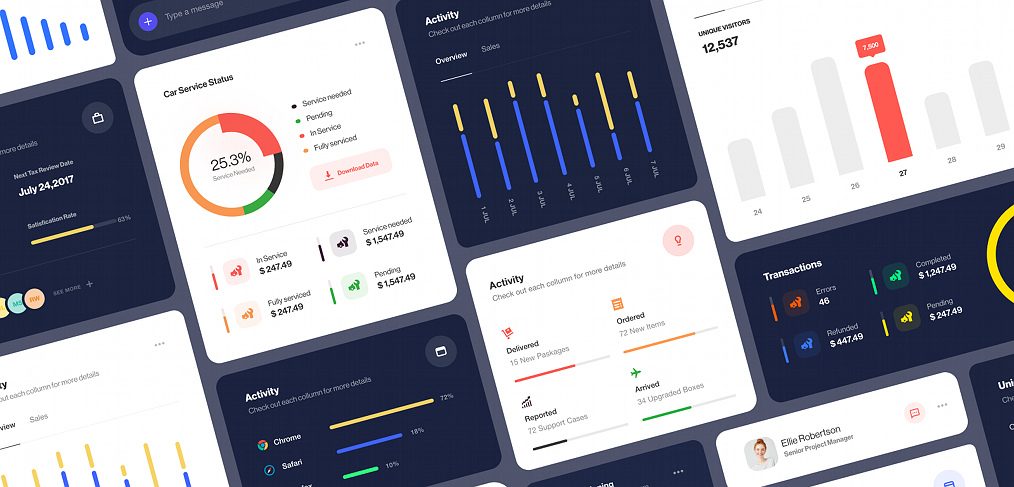
This UI elements kit for Adobe XD is a collection of dashboard components in light and dark versions, shared by Nicholas Ergemla (ergemla on Dribbble). It is built around activity, sales and visitor numbers, with charts and graphs in two variants and a set of chat and conversation elements.
The button below opens the Dribbble shot, where the designer shares the source file. Below is what the cards contain, how to adapt them and how to open an .xd file now that Adobe XD is no longer being developed.
What is in the UI elements kit
The preview shows cards in two themes, white cards and navy cards with the same layout, on a grey-blue background. Each card is a self-contained component that you can copy into a dashboard. These are the types visible in the preview:
- Donut chart: a “Car Service Status” card with a 25.3% ring, a legend for service needed, pending, in service and fully serviced, a small “Download Data” button and a row of icon stats with dollar values.
- Activity bars: vertical bars for seven days, with Overview and Sales tabs and a “Check out each column for more details” caption, plus horizontal bars for browsers such as Chrome and Safari with percentages.
- Visitors chart: a grey bar chart under “Unique visitors 12,537”, with one bar picked out in red and a tooltip showing 7,500.
- Status lists: small cards that count delivered packages, ordered items, support cases and arrived boxes, each with a progress line, and a transactions card with errors, completed, refunded and pending totals.
- People and messages: a profile row with a photo, name and job title, and a message field with a purple plus button.
The accent colours are blue, yellow, coral red, orange and green on white or navy, so the two themes feel like one family. The sample data is placeholder content. Replace it with your own labels and numbers.
How to use the kit
Treat the cards as building blocks, not a finished product. Pick the components that fit your data, then use XD’s grid and repeat grid to line them up. Keep one chart style per page, and give every chart a clear title and unit. Check colour contrast on the navy cards, as thin yellow and blue lines on a dark background can be hard to read. For complete dashboard screens, see the related kits below.
The post originally described the kit as free. No licence terms were stated, so check with the designer before using it in paid client work. We could not open the Dribbble page from a script, so we have not checked the file ourselves. The person names, job titles and figures in the cards are sample content.
Opening the file in Adobe XD or Figma
Adobe XD is in maintenance mode. Adobe still fixes bugs and security issues, but it is not adding new features. If XD is installed on your machine, the file opens as normal.
To bring the file into Figma, the Convertify plugin can import an .xd file into a new Figma page, with its layers, text and images. Check the plugin page for current pricing. Alternatively, export the artboards you need from XD as SVG, drag them into Figma and rebuild the text styles.
More free UI elements and dashboards
Browse all our free Adobe XD kits, or try these related files:
- Neomorphic UI elements for XD, for soft-shadow buttons and cards
- Free Cards UI kit for Adobe XD, for more card layouts
- Modern and trendy buttons free XD UI kit, to pair with the cards
- Free Dashboard UI kit for XD, for full dashboard screens
Need a dashboard or UI kit designed for a client?
Inkyy is a white label design and development team for agencies. Our in-house designers create dashboards, web apps and design systems that you present under your own brand. See our design services or book a 15-minute call.


