



Free Profile Dashboard UI Kit for Adobe XD
 3 min read
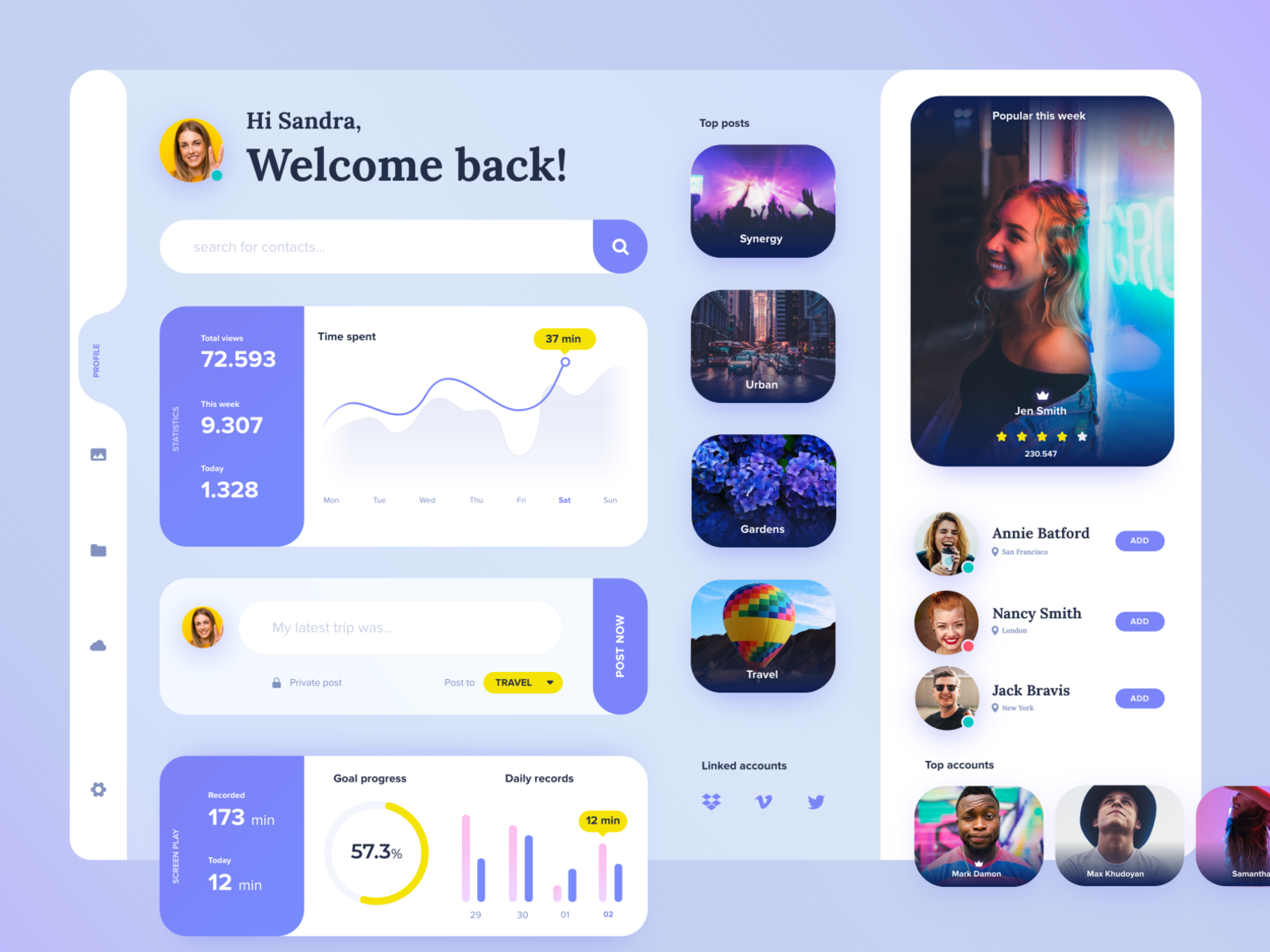
This profile dashboard UI kit for Adobe XD was designed by Zhenya Karapetyan, who shared it on Dribbble as a gift to other designers. It is a social profile screen with statistics, charts, a post box and contact cards, all built from soft, rounded shapes.
Below you will find what the dashboard shows, what the Dribbble download contains, and how to open the file now that Adobe XD is no longer being developed.
What the profile dashboard looks like
The screen sits on a pale blue to lilac background. White and light-blue cards have large corner radii and soft shadows, and one periwinkle purple is used for buttons, stat panels and charts. Yellow marks the key values. The sections in the preview are:
- Welcome and search: a greeting (“Hi Sandra, Welcome back!”) with an avatar, a “search for contacts” field with a round purple button, and a slim left sidebar of icons.
- Statistics: a purple panel with total views, this week and today, next to a smooth “Time spent” line chart with a yellow tooltip.
- Post box: a text field with a Post now button, a privacy note and a “Post to” dropdown.
- Progress: a goal progress ring at 57.3 percent and a paired bar chart of daily records.
- Top posts and popular: four photo tiles (Synergy, Urban, Gardens, Travel) and a large “Popular this week” card with a name and a five star rating.
- Contacts: three people with locations and Add buttons, a Linked accounts row with Dropbox, Vimeo and Twitter icons, and a Top accounts row.
What is in the download
- File: one Adobe XD file, “Free_dashboard_xd_file_zhenya_karapetyan_groupping.xd”, listed on Dribbble at 40 MB.
- Where: the file is attached to the designer’s Dribbble shot. Use the Download button next to the file name on that page.
- Content: the designer says the kit can be customised for your own needs. The names, numbers and photos are sample content, so replace them.
- Price: free. The designer presents it as a gift, and no licence terms are stated, so check with the designer before using it in paid client work.
Opening the file in Adobe XD or Figma
Adobe XD is in maintenance mode. Adobe still fixes bugs and security issues, but it is not adding new features. If XD is installed on your machine, the file opens as normal.
To move it into Figma, the Convertify plugin can import an .xd file into a new Figma page, with its layers, text and images. Check the plugin page for current pricing. Alternatively, export the artboards from XD as SVG, drag them into Figma and rebuild the text styles.
Who this dashboard suits
Use it as a base for a social network, a creator or community profile, a streaming or media account page, or the user area of a web app. The stat cards and charts are easy to reuse for other numbers. Before you ship, add empty, loading and error states, and make sure the white-on-purple small text and the light grey labels are readable. Rounded cards with heavy shadows can also be hard to build in code, so agree the radii and shadows with your developers early.
More free dashboard and UI kits for XD
Browse all our free Adobe XD kits, or try these related files:
- Free dashboard UI kit for XD, another dashboard layout
- Project management app dashboard XD UI kit, for team work
- Free Adobe XD dashboard template, an admin style page
- Personal finance free XD UI kit, charts and cards
Need a dashboard designed for a client?
Inkyy is a white label design and development team for agencies. Our in-house designers create dashboards, web apps and mobile apps that you present under your own brand. See our design services or book a 15-minute call.


