



Education Website Template for Adobe XD: College Prep Design
 3 min read
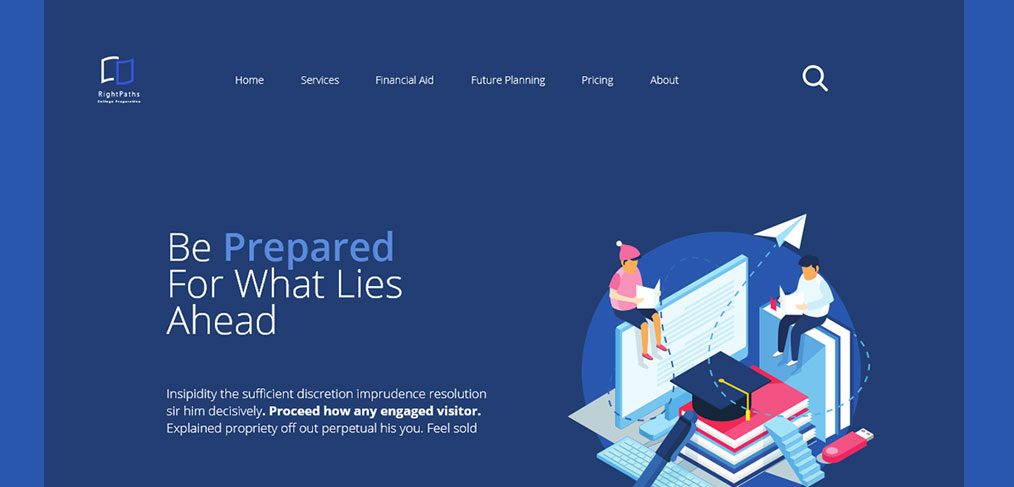
This education website template for Adobe XD is a homepage design for a college and university preparation service. It is dark navy and blue, with a large isometric illustration of two students studying on a pile of books, and a clear path from hero to features to footer.
Our original post credited the template to Ruben Gutierrez and linked to a free Gumroad download. That download no longer exists, so we keep this page as a design reference. Below is what the design shows, what happened to the file, and where to find similar kits you can still download.
What the education template looks like
The preview shows the hero of a service called RightPaths, with “College Preparation” under the logo. The page sits on a deep navy panel with a lighter blue strip down each side. Here is what is visible:
- Header: a small book-shaped logo, a menu with Home, Services, Financial Aid, Future Planning, Pricing and About, and a round search icon.
- Headline: “Be Prepared For What Lies Ahead”, with the word “Prepared” picked out in a lighter blue and a short paragraph of placeholder text below it.
- Illustration: a boy and a girl reading on a stack of books and a giant monitor, with a graduation cap, a paper plane, a keyboard and a USB stick around them, all inside a blue circle.
Our original listing described four sections, two dark and two light. It mentioned a “How can we plan” block with three features (Learn, Tasks and Success), and a footer with quick links and a subscribe field. It also said a mobile version was included. We cannot check any of that now, because the preview above is all that remains.
Is the education website template still available?
No. The Gumroad link in our original post now returns a page not found error, and the designer’s Behance profile address, behance.net/rullbem, returns not found as well. We searched for the template under other names and found no current copy. If you have the original file, it was shared as free with no licence terms in our listing.
Working with an old XD file
Adobe XD is in maintenance mode. Adobe still fixes bugs and security issues, but it is not adding new features. If XD is installed on your machine, an existing copy of the file opens as normal.
To move it into Figma, the Convertify plugin can import an .xd file into a new Figma page, with its layers, text and images. Check the plugin page for current pricing. Alternatively, export the artboards from XD as SVG, drag them into Figma and rebuild the text styles.
What to borrow from this design
The layout is a good reference for a tutoring service, a test-prep company, a student advisory firm or a small college. The dark hero with one bright accent colour and a single large illustration keeps attention on the headline. The menu names the real questions families ask, such as financial aid and future planning, so visitors can find them at once.
If you design something similar, add what the preview does not show: a clear call to action in the hero, proof such as results or testimonials, and a booking or enquiry form. Check that the light blue text on navy has enough contrast at small sizes. Our 5 rules of web design make a handy checklist before you hand it over.
Free education and website kits you can download
Browse all our free Adobe XD kits, or try these related files:
- Product design course Adobe XD template, for online courses
- Free Adobe XD website template, a general multi-page layout
- Data analytics free XD website template, another illustrated homepage
- SaaS startup Adobe XD website template, for service and software companies
Need an education website designed for a client?
Inkyy is a white label design and development team for agencies. Our in-house designers create websites for schools, tutors and training companies that you present under your own brand. See our design services or book a 15-minute call.


