



Product Factory: Free Course Website Template for XD
 3 min read
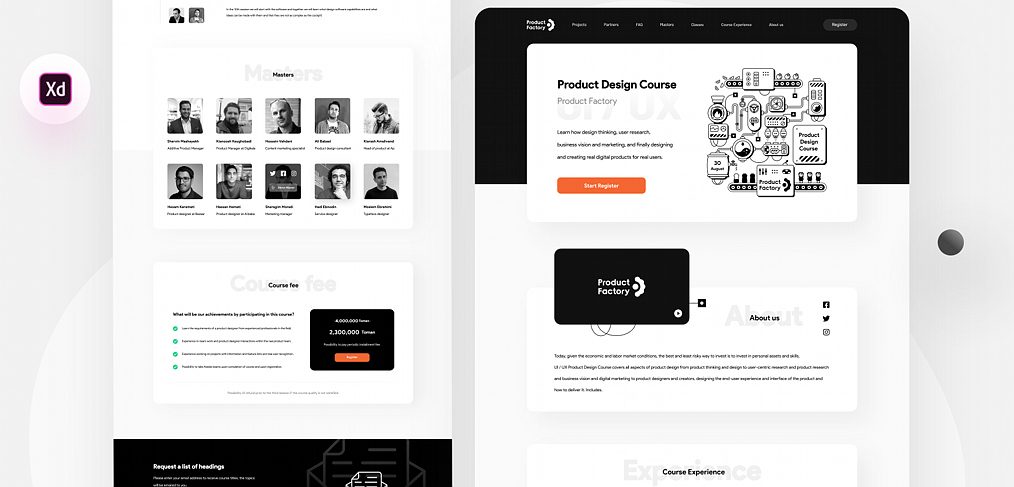
Product Factory is a free course website template for Adobe XD, designed by Afshin T2Y for the creative studio RaDesign. It is a long black and white landing page for a product design course, with ten sections that run from the hero to the course schedule.
Below you will find what the page shows, what the Dribbble download contains, and how to open the file now that Adobe XD is no longer being developed.
What the Product Factory template looks like
The page is mostly white cards on a light grey background, with black for the header, the video card and the price box. The only colour in the preview is an orange register button in the hero. The hero pairs a “Product Design Course” headline with a large black line illustration of a machine with gears, screens and a course card. The designer credits the main illustration to @hesamkeramati. The sections are:
- Hero: a dark navigation bar (Projects, Partners, FAQ, Masters, Classes, Course Experience, About us) with a Register button, short course copy and the Start Register button.
- About us and Experience: a black video card with the Product Factory logo, social icons and a block of text, followed by a course experience section.
- Sessions: the course overview and description, with FAQ and Projects, which includes a project slider.
- Masters: ten teacher cards in two rows of five, each with a photo, a name and a job title. One card shows a hover state with social icons.
- Course fee: a checklist of what students achieve and a black price card with an old price crossed out, a new price in Toman and a note about paying in instalments.
- Subscribe and Schedule: a black panel with an email form and an envelope drawing, and a schedule of when the course starts and ends.
What is in the download
- File: one Adobe XD file named “PF File.xd”, listed on Dribbble at 6 MB.
- Where: the file is attached to the designer’s Dribbble shot. Use the Download button next to the file name on that page.
- Content: the people, names and prices are sample content. Replace the photos, the Toman prices and the course text before you use the page for a client.
- Price: free. The shot is labelled “Free Download File”, and we know of no other licence terms, so check with the designer before using it in paid client work.
Opening the file in Adobe XD or Figma
Adobe XD is in maintenance mode. Adobe still fixes bugs and security issues, but it is not adding new features. If XD is installed on your machine, the file opens as normal.
To move it into Figma, the Convertify plugin can import an .xd file into a new Figma page, with its layers, text and images. Check the plugin page for current pricing. Alternatively, export the artboards from XD as SVG, drag them into Figma and rebuild the text styles.
Who this template suits
The layout fits an online course, a bootcamp, a workshop series or a training academy that wants a calm, text-led page. The Masters grid and the course fee card are the most reusable parts. If you adapt it, check that the small grey text on white meets contrast guidelines, and add a clear refund and contact section that the preview does not show. Our guide to landing pages versus product pages helps you decide how much detail the page needs.
More free website templates for XD
Browse all our free Adobe XD kits, or try these related files:
- Educational website Adobe XD template, another page for schools and courses
- Adobe XD landing page kit, blocks to mix and match
- SaaS startup Adobe XD website template, a clean product page
- Creative agency landing page Adobe XD kit, for a studio site
Need a website designed for a client?
Inkyy is a white label design and development team for agencies. Our in-house designers create websites and landing pages for course providers and other brands that you present under your own brand. See our design services or book a 15-minute call.


