



Designer Portfolio Template: Free Adobe XD Download
 3 min read
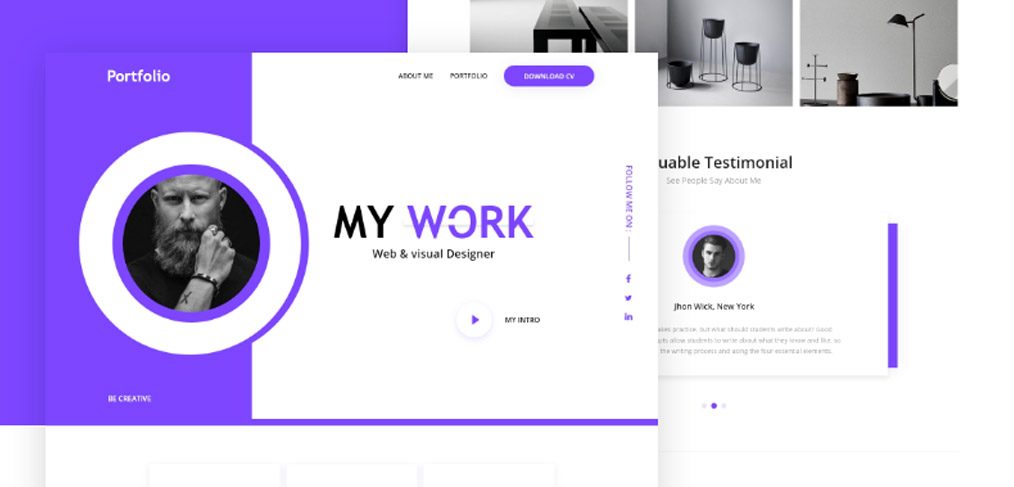
This designer portfolio template for Adobe XD is called “Personal Portfolio template (XD Freebie)” and was shared on Dribbble by Shamin Yassar. It is a one-page site with a purple and white colour scheme, built for web and visual designers but easy to adapt to other jobs.
The download is on the Dribbble shot. Below is what the screens show, what to change before you use the design, and how to open an XD file today.
What the template looks like
The first screen splits in two. The left side is a solid violet panel with a “Portfolio” logo, a large round photo in a white and violet ring and a “Be Creative” line at the bottom. The right side is white. Purple is the only accent colour, which keeps the page calm. The visible parts are:
- Header: a short menu with About Me and Portfolio, and a violet pill button labelled Download CV.
- Hero: a large “My Work” headline with “Web & visual Designer” beneath it, and a round play button with “My Intro” for a video.
- Social links: a vertical “Follow me on” label with three social icons at the right edge.
- Gallery: a row of grey product photos, such as vases and a lamp, which stands in for project thumbnails.
- Testimonial: a card headed “Valuable Testimonial” with a round photo, a name, a short quote and dot pagination.
Our original write-up also described a row of three feature blocks with icons and buttons, a gallery with a purple effect on hover and a Hire Me section with an email field and a purple submit button. These are below the part shown in the preview, so check them in the file.
Where to download it
The file is shared on the Dribbble shot, which is listed on the designer’s profile. Dribbble may ask you to sign in before it shows the attachments. The original post called it a free template, and we know of no other terms, so check the shot before you use it in paid client work.
Opening it in Adobe XD or Figma
Adobe XD is in maintenance mode. Adobe still fixes bugs and security issues, but it is not adding new features. If XD is installed on your machine, the file opens as normal.
To bring the design into Figma, the Convertify plugin can import an .xd file into a new Figma page, with its layers, text and images. Check the plugin page for current pricing. Alternatively, export the artboards from XD as SVG, drag them into Figma and rebuild the text styles.
Making it your own
The template suits a freelance web or graphic designer, an illustrator or a photographer who wants a simple online CV. Three changes help most. First, rewrite the hero. “My Work” reads like a section title, so say your name and what you do for clients instead. Second, replace the portrait, the grey product photos and the sample testimonial with your own photo, projects and real client quotes. Third, check the small text for contrast.
A portfolio sells you through your projects, so give each one a short case study with the problem, your role and the result. Our website design guide for beginners covers the basics of planning a first site.
More free portfolio templates
Browse all our free Adobe XD kits, or try these related files:
- Personal portfolio free Adobe XD file, another personal site layout
- Coder personal portfolio free Adobe XD template, for developers
- Green portfolio website free Adobe XD template, with a fresh colour scheme
- Photographer portfolio website, for image-led work
Need a portfolio website designed for a client?
Inkyy is a white label design and development team for agencies. Our in-house designers create portfolio and business websites that you present under your own brand. See our design services or book a 15-minute call.


