



iSubscribe: Free Subscription App UI Kit for Adobe XD
 3 min read
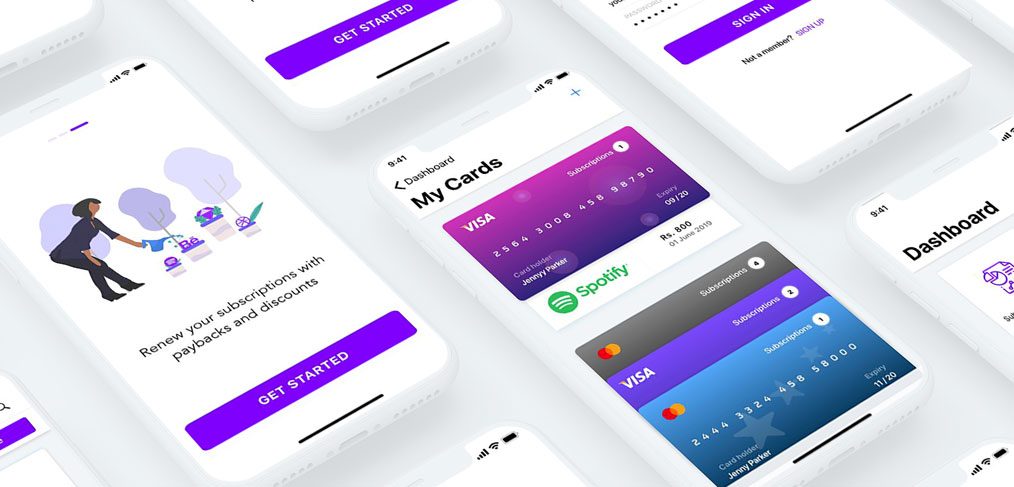
iSubscribe is a subscription app UI kit for Adobe XD by Amruta AP on Dribbble, shared as a freebie. It was made for an app that gathers every subscription, paid, free or trial, in one place, so people can renew them with one tap and see the offers that come with it.
Below is what the screens show, what the kit includes and where to get the file.
What the subscription app UI kit looks like
The cover shows white phone screens at an angle on a pale background, with purple as the main accent. The onboarding screen has a flat illustration of a woman watering plants, the line “Renew your subscriptions with paybacks and discounts” and a purple Get Started button. A My Cards screen stacks bank cards in purple and blue, one of them linked to Spotify, with the amount due and the expiry date on each. Dashboard and sign in screens sit behind them.
The original post listed these screens in the kit:
- Start: log in and sign up.
- Home: a dashboard and subscription lists.
- Payments: add card and add account.
- Manage: renew, subscription categories and a single subscription page.
Where to get the kit
The file is offered on the designer’s Dribbble shot, “Subscription App + Freebie UI Kit”, which is tagged as a freebie and for XD. Dribbble blocks automated checks, so we cannot test the download from here. It was shared as free, and no licence terms were stated. The Spotify logo and the cardholder name on the cover are sample content, so replace them in your own design.
Opening it in Adobe XD or Figma
Adobe XD is in maintenance mode. Adobe still fixes bugs and security issues, but it is not adding new features. If XD is installed on your machine, the file opens as normal.
To bring the screens into Figma, the Convertify plugin can import an .xd file into a new Figma page, with its layers, text and images. Check the plugin page for current pricing. Alternatively, export the screens from XD as SVG, drag them into Figma and rebuild the text styles.
What to borrow from this design
A subscription app has one job, to show people what they pay for and when. The cover handles this with cards that carry the price, the due date and the expiry on one surface. If you design something similar, put the next renewal date and the amount at the top of the dashboard, make cancelling as easy as signing up, and warn people before a free trial turns into a paid plan. Never put real card numbers in a design file. Use test numbers, as the cover does.
More free finance and account kits
Browse all our free Adobe XD kits, or try these related files:
- Personal finance free XD UI kit, for budgets and spending
- Free cards UI kit for Adobe XD, for card components
- 10 login screen templates for Adobe XD, for sign in and sign up
- Telco Lite free mobile app UI kit, for plans and usage
Need an app designed for a client?
Inkyy is a white label design and development team for agencies. Our in-house designers create mobile apps and dashboards for finance and subscription brands that you present under your own brand. See our design services or book a 15-minute call.


