



Hot Burgers: Free Fast Food Website Template for XD
 4 min read
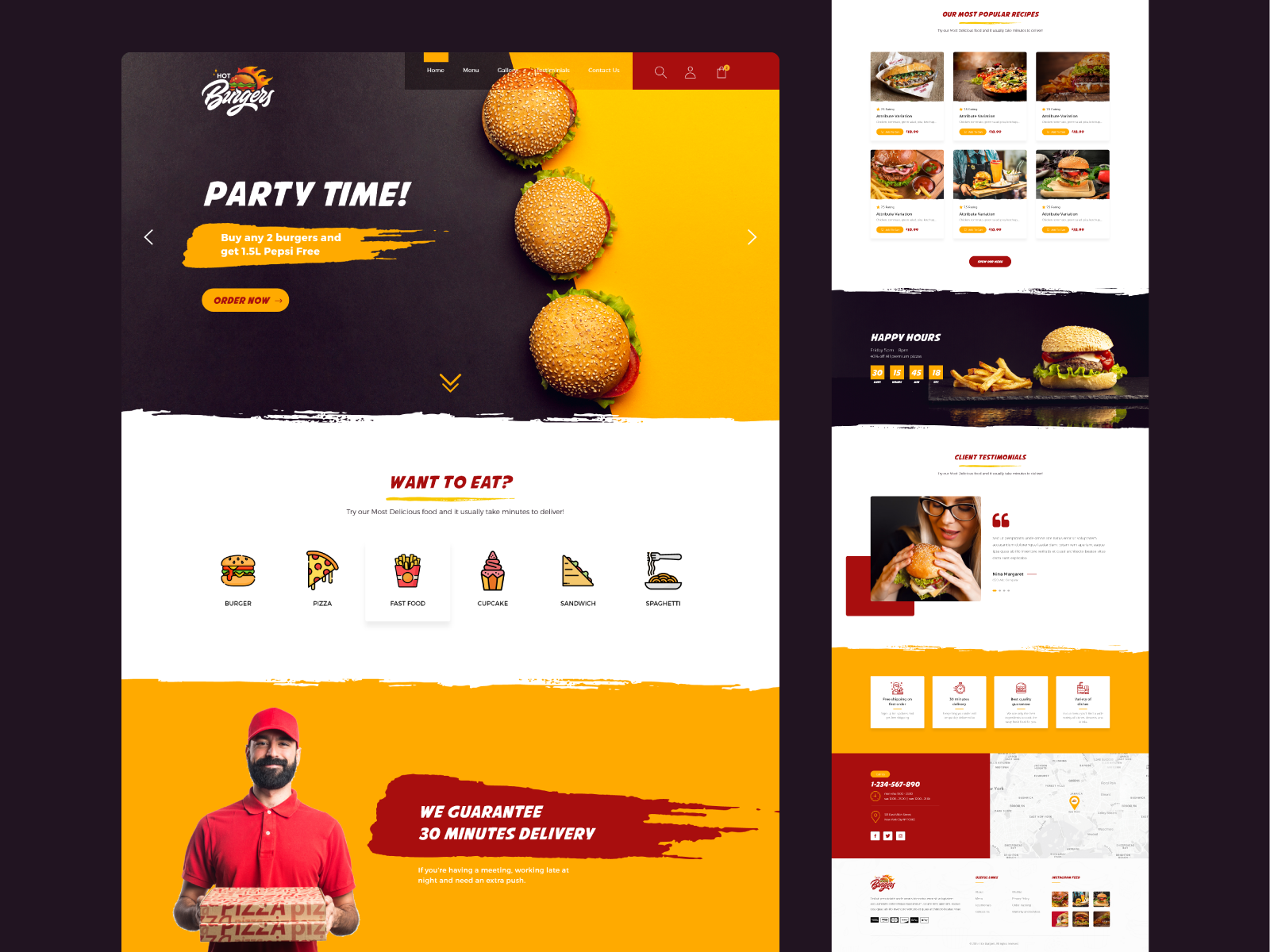
Hot Burgers is a free fast food website template for Adobe XD, designed by the Inkyy team. It is one long homepage for a burger bar, pizza place or takeaway, set in yellow, deep red and near black, with a deals slider, food categories, menu cards, a happy hour countdown and a contact section with a map.
Below you will find what each section looks like, what is inside the download, and how to open the file now that Adobe XD is no longer being developed.
What the template looks like
Bright yellow and a strong red carry the page, with dark charcoal bands for the hero and the happy hour block. Sections are split by torn, brush-stroke edges, and headings use a bold italic comic-style display font that suits a loud, casual food brand. Photos of burgers, pizza and fries do most of the selling. From top to bottom:
- Header and hero: the Hot Burgers script logo with a flame, a menu (Home, Menu, Gallery, Testimonials, Contact Us), search, account and cart icons, and a slider with the headline “Party Time!”, a “Buy any 2 burgers and get 1.5L Pepsi Free” offer on a yellow brush stroke, an Order Now button and three burgers stacked on a yellow and black background.
- Want to Eat?: six food categories with flat colour icons: Burger, Pizza, Fast Food, Cupcake, Sandwich and Spaghetti.
- Delivery promise: a delivery man in a red cap holding pizza boxes next to a “We Guarantee 30 Minutes Delivery” banner.
- Our Most Popular Recipes: six product cards with a photo, rating, short description, price and Add to Cart button, plus a Show Our Menu button.
- Happy Hours: a dark band with a Friday 5pm to 8pm pizza offer, a days, hours, minutes and seconds countdown, and a burger with fries.
- Client Testimonials: a photo of a woman eating a burger, a quote and slider dots.
- Features, contact and footer: four cards for free shipping on the first order, 30 minutes delivery, best quality and variety of dishes; a red block with phone, opening hours and address beside a map; and a footer with links, payment icons and an Instagram feed.
What is in the download
- File: a 7z archive of about 42 MB that contains one file, Food.xd (43 MB). You need a tool that opens .7z files, such as 7-Zip on Windows or The Unarchiver or Keka on a Mac.
- Artboard: a single desktop artboard, 1920 x 8517 px. There is no mobile or tablet version.
- Fonts: Montserrat for most text, with a little Poppins and Source Sans Pro, all free on Google Fonts. The headings use Avengeance Mightiest Avenger by The Fontry, which is free for personal use. A commercial version is sold separately, so buy it or swap the font before a client site goes live.
- Images: the food, delivery and testimonial photos are embedded in the file, which is why it is large. Treat them as sample images and use your client’s own photography.
- Content: the testimonial is lorem ipsum, every menu card shows the same “Attribute Variation” name and $10.99 price, and the phone number, address and copyright line are placeholders.
- Price: free.
Opening the file in Adobe XD or Figma
Adobe XD is in maintenance mode. Adobe still fixes bugs and security issues, but it is not adding new features. If you already have XD installed, unpack the archive and the file opens as normal.
If your team works in Figma, the Convertify plugin can import an .xd file into a new Figma page, including layers, text and images. Check the plugin page for its current pricing. Install Montserrat and your chosen heading font first so the text comes across correctly. Another route is to export the artboard from XD as SVG and drag it into Figma, then rebuild the text styles and spacing by hand.
Who this fast food website template suits
Hot Burgers fits a burger joint, a pizza takeaway, a food truck or a small delivery kitchen. The page leads with offers and delivery speed, which is what hungry visitors look for first. To make it ready for a real site, give each menu card its real dish name and price, link Order Now to the ordering system the restaurant actually uses, and design a mobile version, as most food orders happen on a phone. Check the small white text on yellow for contrast, and fix the “Testiminials” spelling in the menu layer. For more ideas, see these restaurant website examples.
More free restaurant and food resources
Browse all our free Adobe XD kits, or try these related posts:
- Restaurant website design Adobe XD UI kit, for a sit-down restaurant
- Food booking XD landing page template, for table and order bookings
- Restaurant finder app XD mobile UI kit, for a matching app
- Restaurant logo design ideas, for brand ideas to go with the site
Need a restaurant website designed for a client?
Inkyy is a white label design and development team for agencies. Our in-house designers create restaurant, takeaway and hospitality websites that you present under your own brand. See our design services or book a 15-minute call.


