


Free Chatbot UI Kit for Adobe XD by Kasper Christensen
 4 min read

This free chatbot UI kit for Adobe XD covers the side of a chatbot that most kits skip: the dashboard where a support team trains the bot, reviews questions it could not answer and steps into live conversations. It was designed by Kasper Christensen and shared as a freebie on Dribbble. We host a copy of the file here on Inkyy.
Below you will find what each of the three screens shows, what is inside the download, and a short guide to the chatbot UI patterns worth adding when you build on it.
What the three screens show
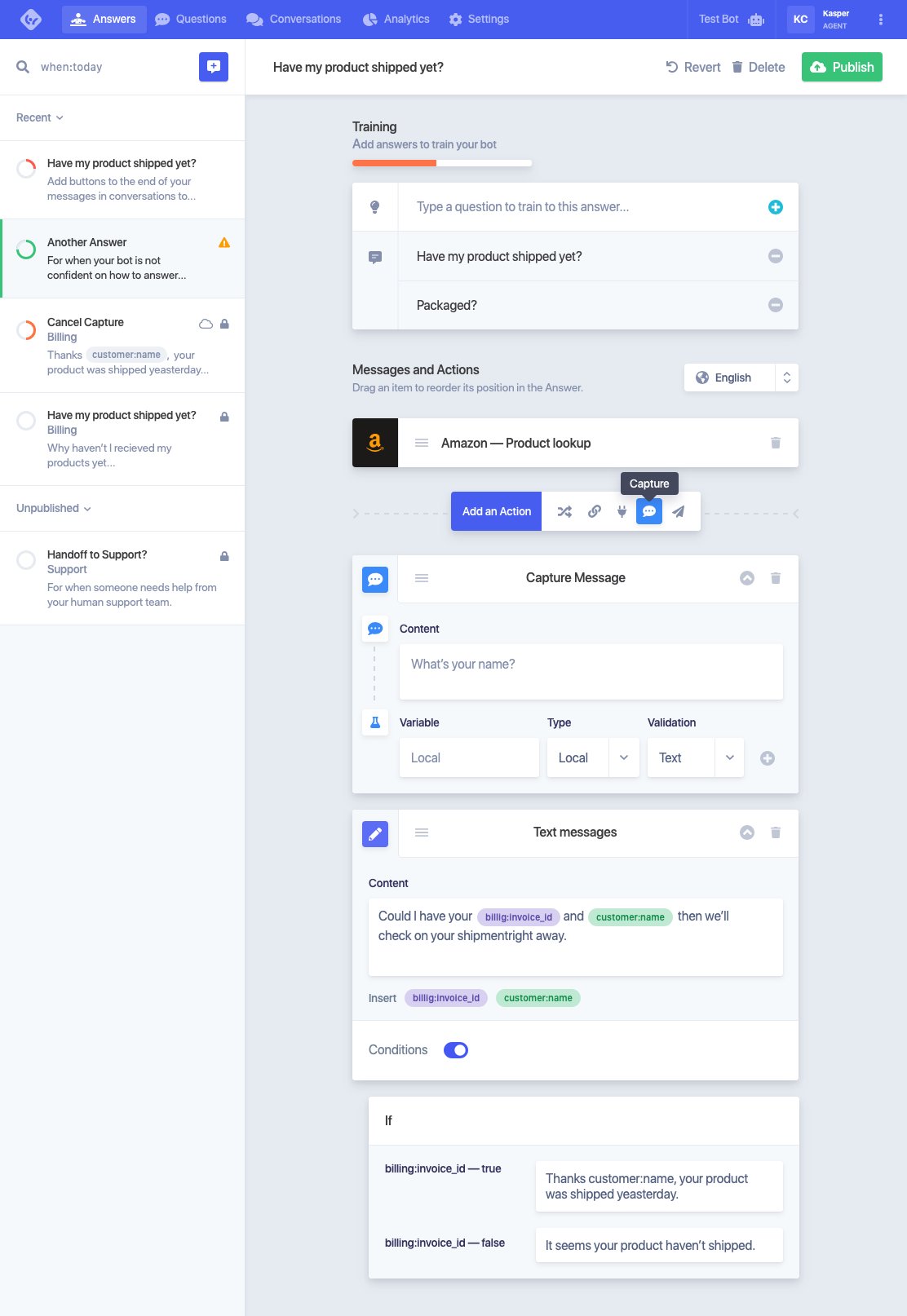
The kit is clean and light, with pale grey backgrounds, white cards, soft shadows and a bright blue top menu with Answers, Questions, Conversations, Analytics and Settings, plus a Test Bot button. Small coloured rings, warning icons and red or orange labels show which answers and questions need attention.
- Answers: the bot builder. A sidebar lists Recent and Unpublished answers, including a fallback for when the bot is not confident and a “Handoff to Support?” answer for when someone needs a human. The main panel holds training phrases, an action toolbar, a Capture Message block that asks for the customer’s name, a text message with variable chips such as customer:name and billing:invoice_id, and If conditions with a true and a false reply. Revert, Delete and Publish sit at the top.
- Questions: a review queue for questions the bot handled badly. Each card shows the question, a time stamp, a Not Helpful or Not Understood label, a View conversation link and a Train button that links it to an answer.
- Conversations: a list of chats with answer counts and Handoff to Agent tags on the left, and the full transcript on the right, starting with a “Hello John!” greeting. Mark as done, Revert, Delete and Handoff to Support controls let an agent close or take over a chat.
What is in the download
- File: a 7z archive of about 400 KB that contains one file, chat-bot-ui-kit.xd. You need a tool that opens .7z files, such as 7-Zip on Windows or The Unarchiver or Keka on a Mac.
- Artboards: three tablet-width screens, Answers (1112 x 1614 px), Questions (1112 x 834 px) and Conversations (1112 x 1013 px), plus a small credit card. A simple click-through prototype links the three screens.
- Fonts: mostly Apple’s SF Pro Display, with a few SF Compact and SF Pro Text layers, all available from Apple’s font page. One small label uses Open Sans.
- Graphics: everything is vector, with letter avatars instead of photos, so the file is tiny and easy to restyle.
- Content: sample shipping and billing questions. Fix a few typos, such as “yeasterday” and “recieved”, before you show it to a client.
- Price: free.
Chatbot UI patterns to add
This kit designs the admin side. If you also design the chat window that customers see, these patterns make the biggest difference:
- Quick replies: show two to four tappable suggestions under a bot message, such as “Track my order” or “Talk to a person”. They save typing and steer people towards questions the bot can answer. Keep the labels short and let people type freely as well.
- Typing state: a short typing indicator before each bot reply tells people their message arrived. Keep it brief, as a long fake delay only slows the chat down.
- Handoff to a human: make the route to a real person easy to find, not a last resort. Tell the user when an agent has joined, roughly how long the wait is, and pass the whole transcript to the agent so nobody has to repeat themselves. The Conversations screen in this kit is a good model for that agent view.
- Accessibility: announce new messages to screen readers with a live region, make every button and quick reply reachable with the keyboard, keep focus in the input after sending, and check that bubble colours meet contrast guidelines. Never rely on colour alone to show who is speaking.
Opening the file in Adobe XD or Figma
Adobe XD is in maintenance mode. Adobe still fixes bugs and security issues, but it is not adding new features. If you already have XD installed, unpack the archive and the file opens as normal. If your team works in Figma, the Convertify plugin can import an .xd file into a new Figma page. Check the plugin page for its current pricing, and install SF Pro first so the text comes across correctly.
More free dashboard and app kits
Browse all our free Adobe XD kits, or try these related files:
- Free dashboard UI kit for XD, for the analytics screens this kit leaves out
- Mailbox template for Adobe XD, another inbox-style layout
- CRM website XD template, for customer support software
- UI elements collection for Adobe XD, for extra buttons and form fields
Need a chatbot or SaaS interface designed for a client?
Inkyy is a white label design and development team for agencies. Our in-house designers create dashboards, web apps and chat interfaces that you present under your own brand. See our design services or book a 15-minute call.


