



Foody: Free Restaurant Website Template for Adobe XD
 3 min read

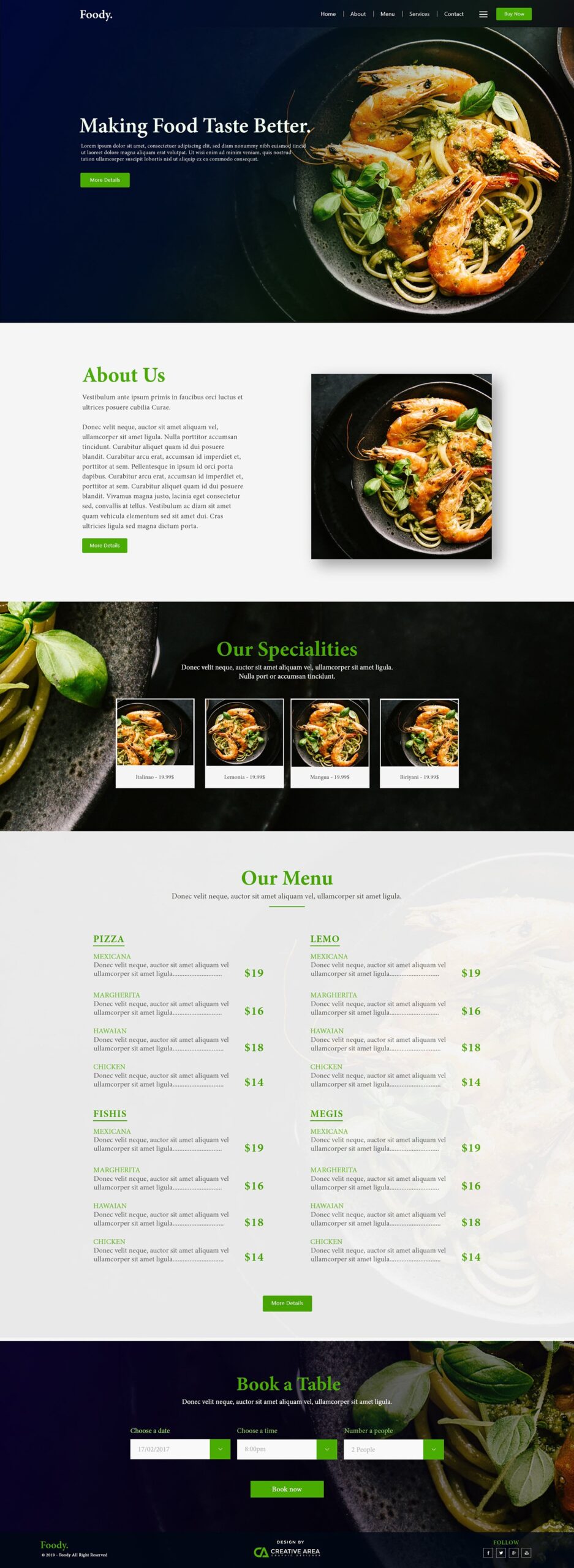
Foody is a free restaurant website template for Adobe XD, designed by Tanvir Hasan. It is a single long homepage for a restaurant or food business, with a dark navy and green look, large food photos and sections for the menu and table bookings.
Below is what each section looks like, where to download the file, and how to use it now that Adobe XD is no longer being developed.
What the Foody template looks like
The page alternates dark photo bands with light grey sections. Headings are set in a classic serif, and a bright green is used for headings, prices and buttons. One shrimp and pasta photo carries most of the design, so you will want your own food photography before showing it to a client. From top to bottom, the page has:
- Header and hero: the Foody. wordmark, a menu (Home, About, Menu, Services, Contact), a green Buy Now button, and the headline “Making Food Taste Better.” over a dark photo.
- About Us: two paragraphs of text, a More Details button and a square food photo with a soft shadow.
- Our Specialities: a dark band with four dish cards, each with a photo, a name and a price.
- Our Menu: four categories in two columns, each with four dishes, a short description and a price in green.
- Book a Table: date, time and number of people dropdowns with a Book now button.
- Footer: the logo and copyright line, a “Design by Creative Area” mark and social icons.
File details
- Format: one Adobe XD file, Foody.xd, about 14 MB. The designer used Adobe XD and Adobe Illustrator.
- Layout: a single desktop homepage. There is no mobile version, so you will need to design the small-screen layout yourself.
- Content: all copy is placeholder text. Dish names and categories are dummy words, and the same photo is repeated across the speciality cards.
- Designer: Tanvir Hasan. His old Dribbble profile is no longer online.
- Price: free to download from Google Drive. No licence is stated with the download, so check with the designer before using it in paid client work.
Opening it in Adobe XD or Figma
Adobe XD is in maintenance mode. Adobe still fixes bugs and security issues, but it is not adding new features. If XD is installed on your machine, the file opens as normal.
To bring the page into Figma, the Convertify plugin can import an .xd file into a new Figma page, with its layers, text and images. Check the plugin page for current pricing. Alternatively, export the artboard from XD as SVG, drag it into Figma and rebuild the text styles. For a restaurant site, rebuild the menu rows and dish cards as components, because those are the parts the client will keep changing.
Who it suits
Foody fits a restaurant, bistro or seafood place that wants a dark, moody homepage with the menu and a booking form on one page. It works well as a pitch concept or a first round for a client review. Before you build it, check the small grey and green text on dark photos for contrast, and plan where online ordering, opening hours and a map will go, since the file does not include them. If the restaurant also needs a new mark, our restaurant logo ideas are a good place to start.
More free restaurant templates
Browse all our free Adobe XD kits, or try these related files:
- Food booking XD landing page template, for ordering and reservations
- Fast food restaurant Adobe XD template, for a brighter, casual brand
- Restaurant finder app mobile UI kit, for the app side of a food project
- Top 10 restaurant website examples, for live sites to learn from
Need a restaurant website designed for a client?
Inkyy is a white label design and development team for agencies. Our in-house designers create restaurant and hospitality websites that you present under your own brand. See our design services or book a 15-minute call.


