



Air Music: Free Adobe XD Music Website Template
 3 min read
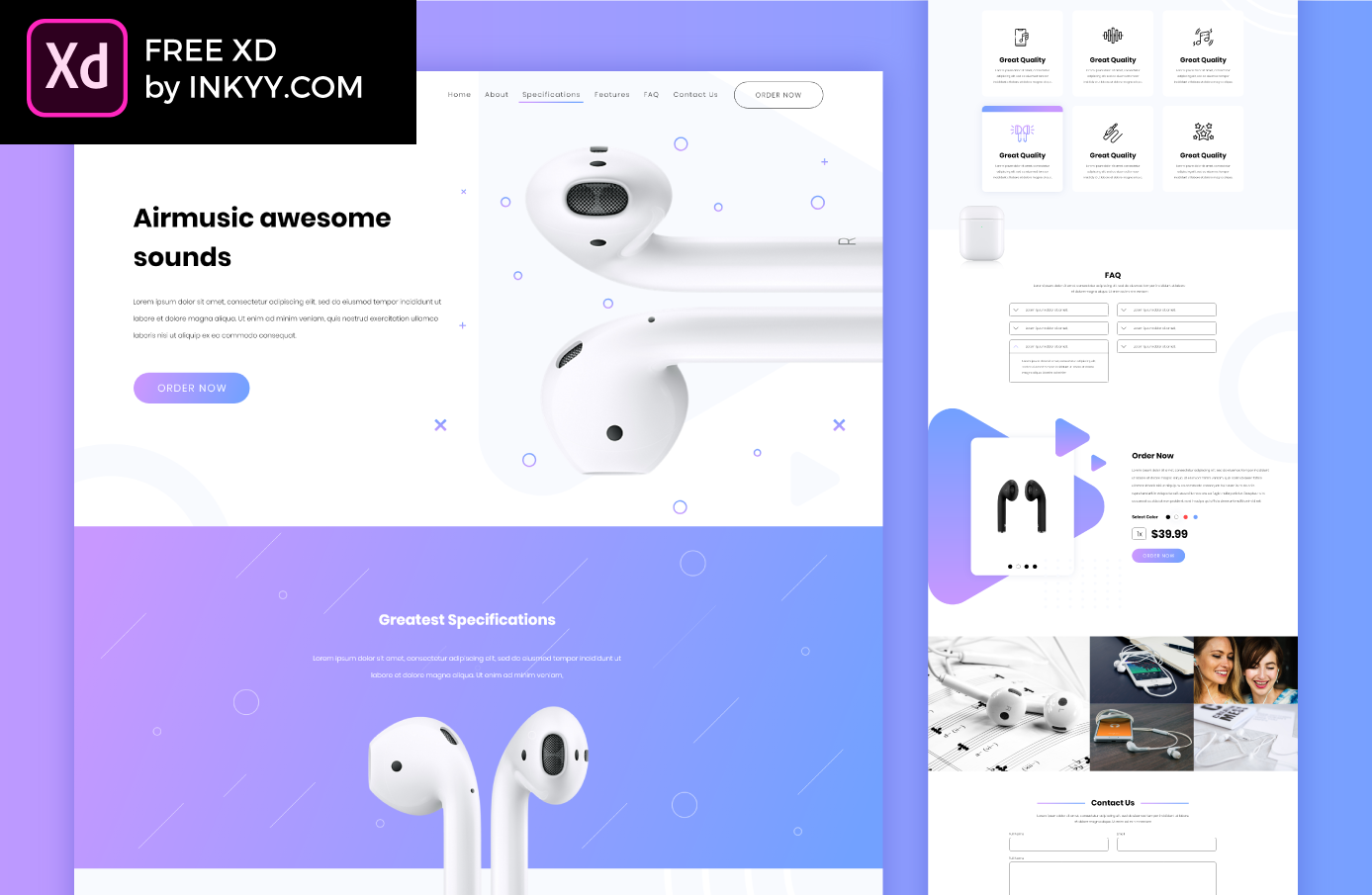
Air Music is a free music website template for Adobe XD, designed by the Inkyy team. It is a one-page shop for a single audio product, here a pair of white wireless earbuds, with everything from the hero to the order box and contact form on one long artboard.
Below you will find what each section looks like, what is inside the ZIP, the licence, and how to open the file now that Adobe XD is no longer being developed.
What the Air Music template looks like
The layout is mostly white with a soft lilac-to-blue gradient used for buttons, one full-width band and a few decorative shapes. Large cut-out product photos do most of the work, and small circles, crosses and play-button triangles float around them. Type is set in Poppins, light for body text and bold for headings. The page runs from top to bottom like this:
- Header and hero: the airmusic wordmark, a menu (Home, About, Specifications, Features, FAQ, Contact Us), an outlined Order Now button, the headline “Airmusic awesome sounds” and a close-up of the earbuds.
- Specifications: a full-width gradient band with a short intro and a large product shot.
- Features: six white cards with line icons, one of them shown in a highlighted hover state.
- FAQ: six accordion rows in two columns, one of them open.
- Order box: a product card with a slider, colour dots, a quantity box, a $39.99 price and an Order Now button.
- Photo grid: five lifestyle photos of earphones and people listening to music.
- Contact and footer: a name, email and message form, then a small footer with Twitter, Facebook and LinkedIn icons.

What is in the download
- File: one ZIP of about 4.5 MB with the .xd file, a full-size PNG preview and an Info.txt with the font details.
- Artboard: a single desktop artboard, 1920 x 7573 px. There is no mobile or tablet version.
- Fonts: Poppins, which is free on Google Fonts. One text layer also uses Nexa Bold, so XD will flag it as missing unless you have Nexa installed.
- Assets: five colour swatches saved in the document, and the product and lifestyle photos embedded in the file. All copy is placeholder text.
- Licence: free for commercial use.
Opening the file in Adobe XD or Figma
Adobe XD is in maintenance mode. Adobe still fixes bugs and security issues, but it is not adding new features. If you already have XD installed, the file opens as normal.
If your team works in Figma, the Convertify plugin can import an .xd file into a new Figma page, including layers, text and images. Check the plugin page for its current pricing. Install Poppins first so the text comes across correctly. Another route is to export the artboard from XD as SVG and drag it into Figma, then rebuild the text styles and spacing by hand. Without either tool, the full-size preview above is detailed enough to rebuild the layout from scratch.
Who this template suits
Air Music fits a brand that sells one hero product: headphones, a speaker, a small gadget or a music accessory. It works as a launch page, a pre-order page or a pitch concept for a client. Swap the photos for your own product shots, because the earbuds in the file look like a well-known brand’s product. For a full shop with categories and a cart, start from a proper e-commerce kit instead.
More free templates
Browse all our free Adobe XD kits, or try these related files:
- XD music app free UI kit, for the mobile side of a music project
- E-commerce free UI kit for Adobe XD, for a shop with more than one product
- CO2 Web nature website template, another free XD file from Inkyy
- Landing page vs product page, on which one converts better
Need a product website designed for a client?
Inkyy is a white label design and development team for agencies. Our in-house designers create landing pages and websites that you present under your own brand. See our design services or book a 15-minute call.


