



Free Personal Finance App UI Kit for Adobe XD
 3 min read
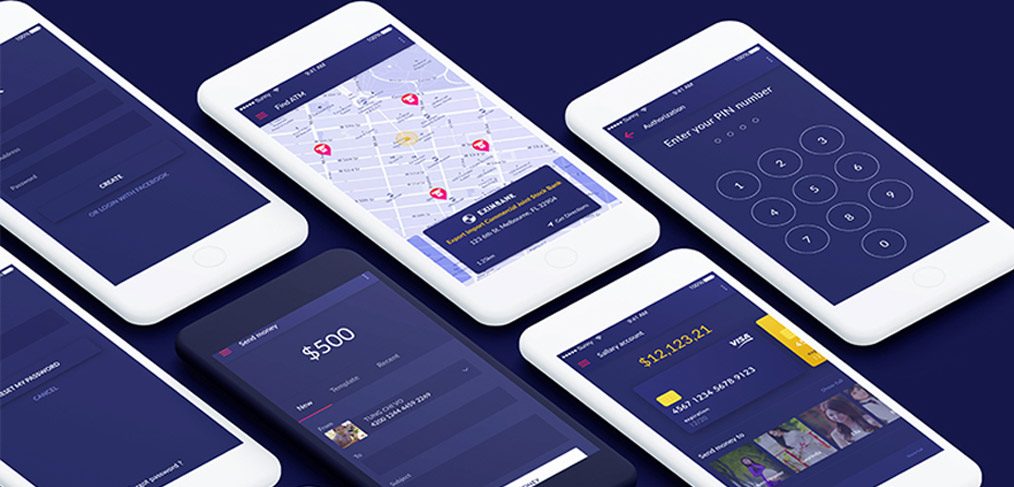
This personal finance app UI kit for Adobe XD is a free mobile design by Tung Chi Vo. It is a concept for an app where people see their accounts, find a nearby ATM, send money to friends and read statistics about their spending.
The designer’s Gumroad page calls this version 2.1 and says it has more than 60 screens. Below you will find what the screens show, how to get the file and what to check before you use a finance design with a client.
What the personal finance screens look like
The preview shows six white iPhones at an isometric angle on a dark indigo background. The app itself uses deep navy and indigo screens with white type, a yellow accent for amounts and pink map pins. The visible screens are:
- Sign in: account creation and an “or login with Facebook” option, plus a reset password screen with a Cancel button.
- Find ATM: a light map with pink pins and a navy card for the selected branch, with its address and a Get Directions link.
- PIN: an “Enter your PIN number” screen with four dots and a round number pad.
- Send money: a darker screen with a large $500 amount, New, Template and Recent tabs, and fields for the sender and receiver.
- Salary account: a balance in yellow, a bank card with a Visa logo and a row of contact photos under “Send money to”.
The bank name, card number, balances and photos are sample content. Replace them before showing the design to a client.
Download the file
The kit is on the designer’s Gumroad page, listed as “Persional finance v2.1”. The page is live and the price is $0. You enter your email address to get the file. The designer says it is a freebie for everyone and that you can enter an amount above $0 if you want to say thanks. The version 2 files cover iPhone 6 and 7, iPhone X and Samsung Galaxy S8 layouts. We know of no other licence terms. The page also links to the full project on Behance, which we could not open because it blocks automated checks.
Opening it in Adobe XD or Figma
Adobe XD is in maintenance mode. Adobe still fixes bugs and security issues, but it is not adding new features. If XD is installed on your machine, the file opens as normal.
To bring the screens into Figma, the Convertify plugin can import an .xd file into a new Figma page, with its layers, text and images. Check the plugin page for current pricing. Alternatively, export the artboards you need from XD as SVG, drag them into Figma and rebuild the text styles.
Who it suits and what to check
The kit fits a budgeting app, a digital wallet, a small bank or a student money app. It is a concept, so treat it as a starting point rather than a finished product. Before you build on it:
- Test contrast. Thin light type on dark navy is hard to read for many people, especially on amounts and card numbers.
- Design the error states. Declined payments, a wrong PIN and no connection need clear messages in plain words.
- Show the cost. Fees and limits belong on the send money screen, before the user confirms.
- Plan for security. Add screens for biometric sign in, lost cards and session timeouts.
- Check regulation. A real finance product has legal and accessibility requirements that a UI kit does not cover.
Our fundamental rules of mobile app design cover the basics before you extend it.
More free finance and mobile kits
Browse all our free Adobe XD kits, or try these related files:
- Audit finance mobile app Adobe XD template, another finance concept
- Cooin crypto free UI kit for Adobe XD, for wallets and coins
- Vault free security UI kit, for lock and PIN screens
- Payment method icons XD freebie, for card and payment logos
Need a finance app designed for a client?
Inkyy is a white label design and development team for agencies. Our in-house designers create mobile apps and websites for finance and fintech brands that you present under your own brand. See our design services or book a 15-minute call.


