This personal portfolio website template is a free Adobe XD file by Ismail Hossain. It is a one-page site for a designer or developer who also offers photography and video, with services, skills, a filterable portfolio and client reviews.
Below is what the preview shows, where to download the XD file, and how to use it now that Adobe XD is no longer being developed.
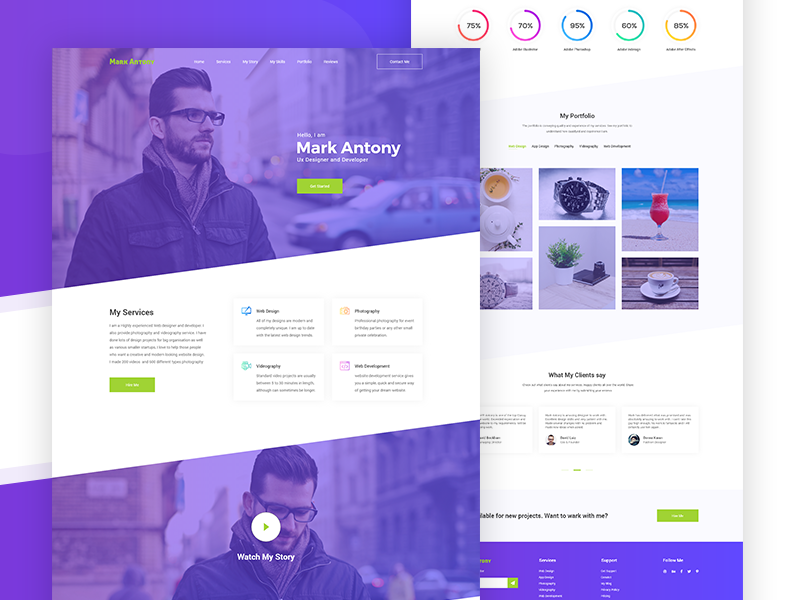
What the portfolio template looks like
The design pairs a purple to violet gradient with small lime green buttons. Photo sections get a purple overlay so text stays readable, and sections are split by slanted edges instead of straight lines. Content sits in white cards with soft shadows. The placeholder owner is “Mark Antony, UX Designer and Developer”. The preview shows these parts:
- Hero: a menu (Home, Services, My Story, My Skills, Portfolio, Reviews), a Contact Me button, a portrait photo under a purple overlay and a “Get Started” button.
- My Services: a short bio next to four cards for web design, photography, videography and web development.
- Watch My Story: a full-width photo with a play button for an intro video.
- Skills: five circular progress meters with percentages.
- My Portfolio: filter tabs (web design, app design, photography, videography, web development) above a grid of six images.
- What My Clients Say: three testimonial cards with photos and slider dots.
- Call to action and footer: “Available for new projects. Want to work with me?”, then a purple footer with a newsletter field, link columns and social icons.
File details and licence
- Format: Adobe XD, a desktop layout.
- Designer: Ismail Hossain, who shares the file as a free download from his Dribbble shot.
- Licence: our original listing did not state licence terms. Check the shot description, or ask the designer, before using it in paid work.
- Content: the photos, name and copy are placeholders to replace with your own.
Opening it in Adobe XD or Figma
Adobe XD is in maintenance mode. Adobe still fixes bugs and security issues, but it is not adding new features. If XD is installed on your machine, the file opens as normal.
To bring the layout into Figma, the Convertify plugin can import an .xd file into a new Figma page, with its layers, text and images. Check the plugin page for current pricing, and install the fonts used in the file first. Alternatively, export the artboard from XD as SVG, drag it into Figma and rebuild the text styles. A one-page portfolio like this is also quick to rebuild from scratch using the preview as a guide.
Who it suits
The template fits a freelancer who sells more than one service, such as a designer who also shoots photos or edits video. The filter tabs make it easy to keep different kinds of work apart. If you only do one thing, cut the extra services and filters so the page stays focused. The skill percentages are a common portfolio pattern, but they tell clients very little. Consider replacing them with a list of tools or with short case studies, which do more to win work.
More free portfolio templates
Browse all our free Adobe XD kits, or try these portfolio files:
- Portfolio website free Adobe XD template
- Green portfolio website free Adobe XD template
- Coder personal portfolio template, for developers
- Creative agency landing page kit, if you present yourself as a studio
Need a portfolio website designed for a client?
Inkyy is a white label design and development team for agencies. Our in-house designers create portfolio sites and landing pages that you present under your own brand. See our design services or book a 15-minute call.
 Book a Meeting